Key Takeaways
- Start with account research briefs if reps prep calls by hand, form enrichment if inbound leads arrive half empty, or a TAM build if nobody trusts your account list.
- Claygent, Clay’s AI research agent, runs on every plan, including Free, so most research jobs cost credits rather than a plan upgrade.
- Anything that reads or writes HubSpot or Salesforce, or syncs an ad audience, needs Clay’s Growth plan, which starts at $495 a month on monthly billing.
- Clay’s own customer stories report 4 hours a week saved per recruiter at Grow Therapy and over 200 hours a month across AlertMedia’s sales org. Each figure measures a different job at a different scale, so time your own manual task before you automate it.
Clay use cases are jobs your team does by hand today that Clay can take over. The 15 below fall into five groups: sales research and call prep, marketing and ads, RevOps and CRM data, partnerships and recruiting, and market mapping. We chose each one because Clay documents it in its own templates or Clay University, and because it replaces a task someone does by hand.
Some save reps research time directly, others fix the records and lists they work from, and a few serve marketing, partnership and recruiting teams. Each entry names the manual task, the Clay feature that does it, a setup detail and the plan it needs.
We’re Frontal, the go-to-market partner for B2B tech companies, and we work as an extension of your team. As a Clay Elite Studio Partner, our team sets up jobs like these inside client workspaces. We checked every Clay feature, plan and price here against clay.com and Clay University on November 19, 2026.
What Does Clay Do?
Clay is a data and automation tool for go-to-market teams. You load a list of companies or people into a Clay table, and each column fills in one answer, from a data provider, from AI or from another app. Clay calls the AI part Claygent, “Clay’s AI agent with access to web research,” and lists it as included on all four plans.
So what does Clay do for a sales team? It does the lookups a person would do in browser tabs. It finds the company and the right people, reads their website, checks your CRM and writes the result there or to Slack. A rep who did that by hand before a call now gets the answer in a column.
Building and running these tables takes its own skills, from writing prompts to mapping CRM fields, which is the work of GTM engineering.
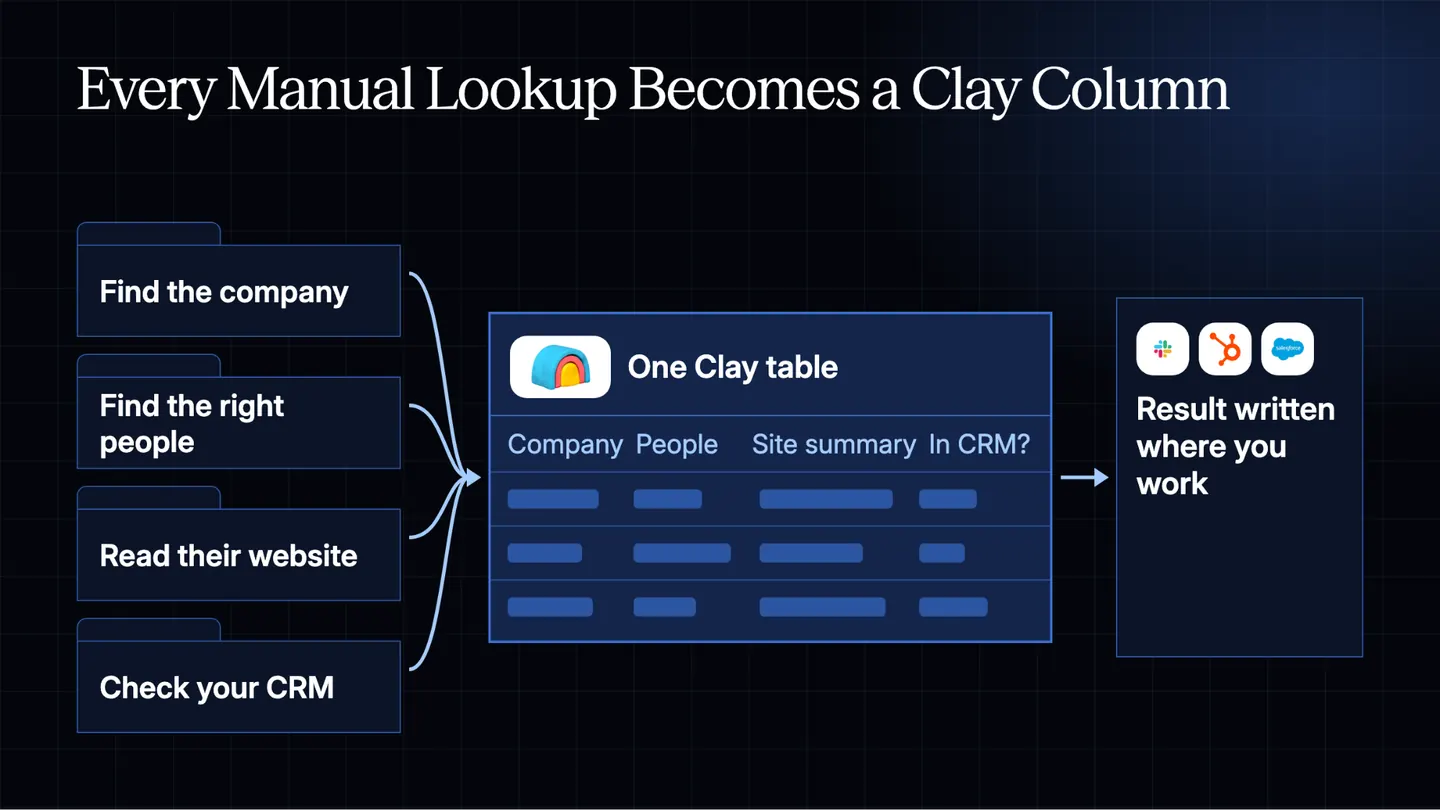
Each lookup a rep does in a browser tab becomes a column in one table.
Clay names its own use cases on its site. Its menu groups them into data foundations, pipeline generation and rep productivity, with pages for account research, rep assist, TAM sourcing and territory planning. The list below follows those pages, grouped by the team that does the work today.
The 15 Clay Use Cases at a Glance
Use this table to find the two or three jobs that cost your team the most time. The plan column shows the lowest Clay plan for the core job, and each entry’s Plan line names any step that needs more, such as a CRM write-back.
| # | Use case | Manual job it replaces | Main Clay feature | Lowest plan for the core job |
|---|---|---|---|---|
| 1 | Account research briefs | Googling a company before a call | Claygent | Free |
| 2 | Pre-meeting notes | Prepping each meeting on the calendar | Webhook trigger, Claygent | Growth |
| 3 | Buying committee mapping | Searching LinkedIn for each stakeholder | Find People | Free |
| 4 | Research-based first lines | Writing a custom opener per prospect | Use AI | Free |
| 5 | Form fill enrichment | Looking up each inbound lead | Webhook, enrichment | Growth |
| 6 | Ad exclusion lists | Exporting and uploading customer CSVs | Clay Ads, Audiences | Growth |
| 7 | Newsletter subscriber enrichment | Guessing subscribers’ companies | Enrichment, Use AI | Free |
| 8 | CRM field normalization | Fixing company names and industries by hand | Normalize, formulas | Growth to write back |
| 9 | Lead routing | Assigning owners from a spreadsheet | Round robin action | Growth to write back |
| 10 | Lead-to-account matching | Checking the CRM for an existing account | CRM lookups | Growth |
| 11 | Partner prospecting | Checking sites for partner programs | Claygent | Free |
| 12 | Candidate sourcing | Searching profiles one by one | Find People | Free |
| 13 | TAM builds | Stitching lists from several databases | Find Companies | Free |
| 14 | Competitor customer lists | Reading competitors’ logo walls | Claygent | Free |
| 15 | Local business lists | Copying listings from Google Maps | Google Maps source | Free |
The Free plan caps a table at 200 rows, so “Free” here means you can test the job, not run it at volume. Launch, at $185 a month on monthly billing, raises that to 50,000 rows per table. Launch and Growth cost about 10% less billed annually.
Clay for Sales: Research and Call Prep
Clay for sales starts with research, because research takes hours a rep could spend with buyers. McKinsey estimated in 2020 that about a third of sales and sales operations tasks could be automated with the technology of the time. The same sales automation analysis found that high-performing reps spend 20 to 25 percent more time with customers. The four jobs below move research from the rep to a Clay table.
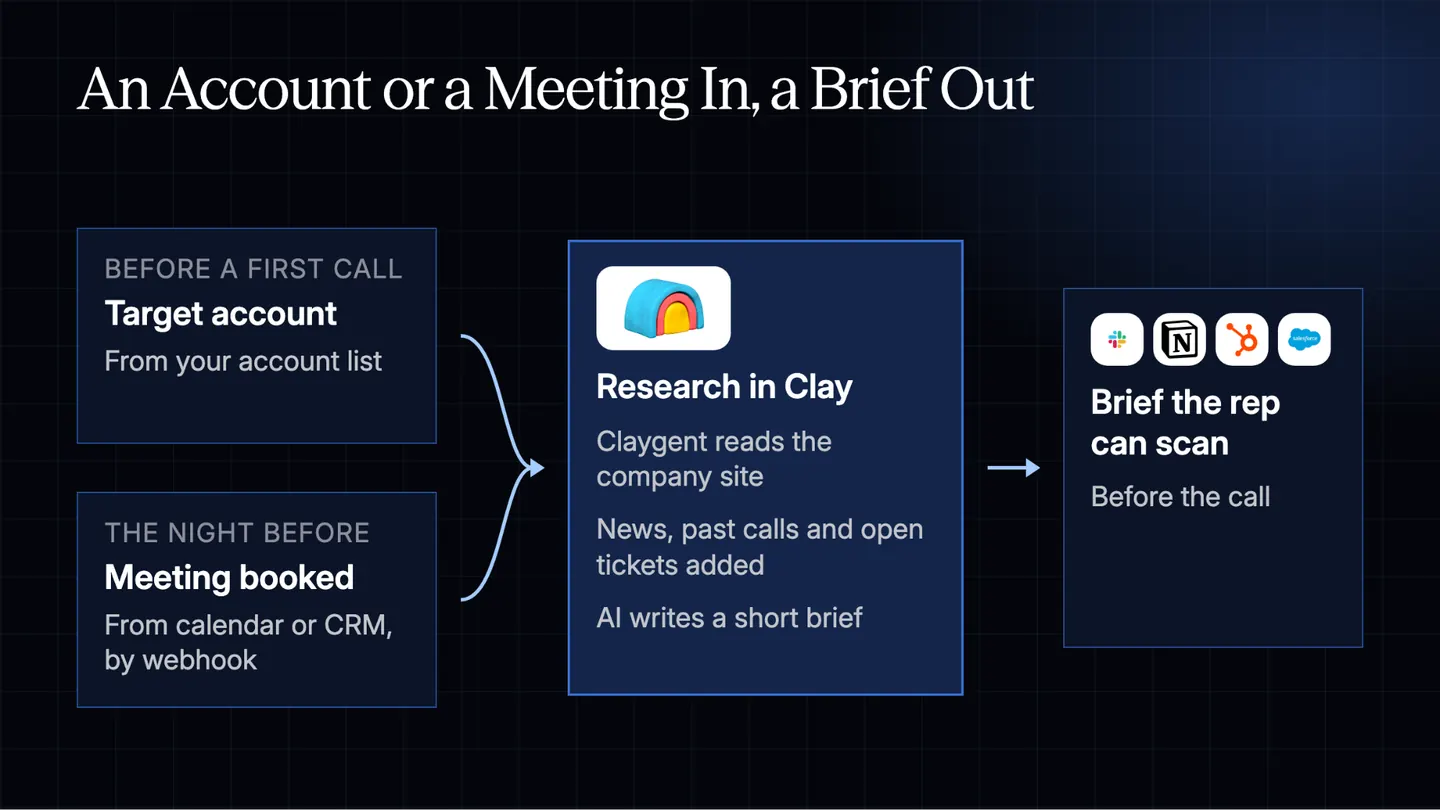
Both research jobs end in a brief the rep reads before the call.
1. Account Research Briefs
Prepping a first call by hand means five tabs: the company site, LinkedIn, a funding database, the news and the CRM. This use case turns those tabs into one brief.
Best for: Account executives who prep target accounts by hand before every first call.
The manual job: Reading a prospect’s website and news to find what they sell, how big they are and what changed recently.
How Clay does it: Clay’s account research page says to “use Claygent and AI copywriting to summarize detailed research into formatted briefs reps can scan before meetings.” A Claygent column reads the company site and answers a prompt, such as Clay’s own example: “Summarize this company’s product offering from their website.”
Setup detail: Write the prompt so it returns one field per question, such as product, headcount and latest funding. A second AI column then turns those fields into a five-line brief. Send the brief to Slack or a Google Doc. In Clay’s Vanta story, Said Lail says Clay gives reps “detailed, actionable research in minutes, not hours.”
Plan: Claygent runs on Free. Clay’s Google Docs version of this job uses an HTTP API step, and writing the brief into HubSpot or Salesforce uses a CRM integration, so both need Growth.
2. Pre-Meeting Notes
Account research covers a target list. Pre-meeting notes cover the calendar: every meeting booked for tomorrow, with the people attending and what happened last time.
Best for: Reps whose calendars fill with external meetings and leave no time to prep each one.
The manual job: Opening the CRM, the last call recording and LinkedIn for each attendee the night before.
How Clay does it: On Clay’s rep assist page, “Clay automatically pulls in meeting data from calendar or CRM via webhook” when a meeting is scheduled. It then gathers past call summaries, recent news and open support tickets, and sends the brief “via Slack, Google Doc, Notion, or added to CRM.”
Setup detail: Clay’s Notion template for this job needs Zapier (Pro), Notion and Slack, and posts a Slack message every morning. Start with external meetings only, or the table fills up with internal standups. We publish the same job built without Clay, using Exa and Claude for the research, if you’d rather compare.
Plan: The webhook trigger and the CRM write-back both need Growth.
3. Buying Committee Mapping
One contact per account is a single point of failure. If your champion goes quiet or leaves, the deal can stall with them.
Best for: Teams selling deals that need sign-off from several functions.
The manual job: Searching LinkedIn for every VP, director and head of function at an account, then finding their emails.
How Clay does it: The Find People source searches by job title, company, location and experience. Its “Find People at These Companies” action takes an existing table of accounts and returns the people who match your titles. Clay’s own example asks for “senior leaders (VPs, Directors, Heads) in revenue, marketing, go-to-market, and sales.”
Setup detail: Set the title match to “is similar to” for broad roles and “is exactly” for one specific title. Then cap the results at three to five people per account. Once you have the contacts, reach them in a set order, as our multi-threading play does for inbound leads.
Plan: Find People has no plan gate on Clay’s pricing table. New-hire signals, which flag a persona who joins mid-deal, start on Launch.
4. Research-Based First Lines
An opener that could go to any company reads like a mass email. A first line built from the prospect’s own website shows the message was written for them.
Best for: SDRs who write custom openers and send fewer emails because of it.
The manual job: Reading a prospect’s site, case studies or LinkedIn posts to write one sentence per email.
How Clay does it: Clay’s Use AI feature lists “drafting personalized messages using company and individual data” as a core job. One Clay template finds the case studies a prospect publishes, then uses AI to write outbound messages around the customers named in them.
Setup detail: Give the AI column the research fields as inputs and ask for one sentence under 25 words, with a rule to return “none” when the research is thin. In Clay’s Merge story, Clay tagged each account with a suggested use case, and “SDRs got 10+ hours back every week.”
Plan: Use AI and Claygent run on every plan. Sending from Clay or a connected sequencer starts on Launch.
Clay for Marketing: Forms, Ads and Lists
Marketing teams use Clay to fill in what a form or an export leaves out. The jobs below sit between a marketing tool and the CRM, where somebody used to fix records in a spreadsheet. Ad syncs need Clay’s Growth plan and a segment set up in Audiences, and LinkedIn then takes about 48 hours to process each list.
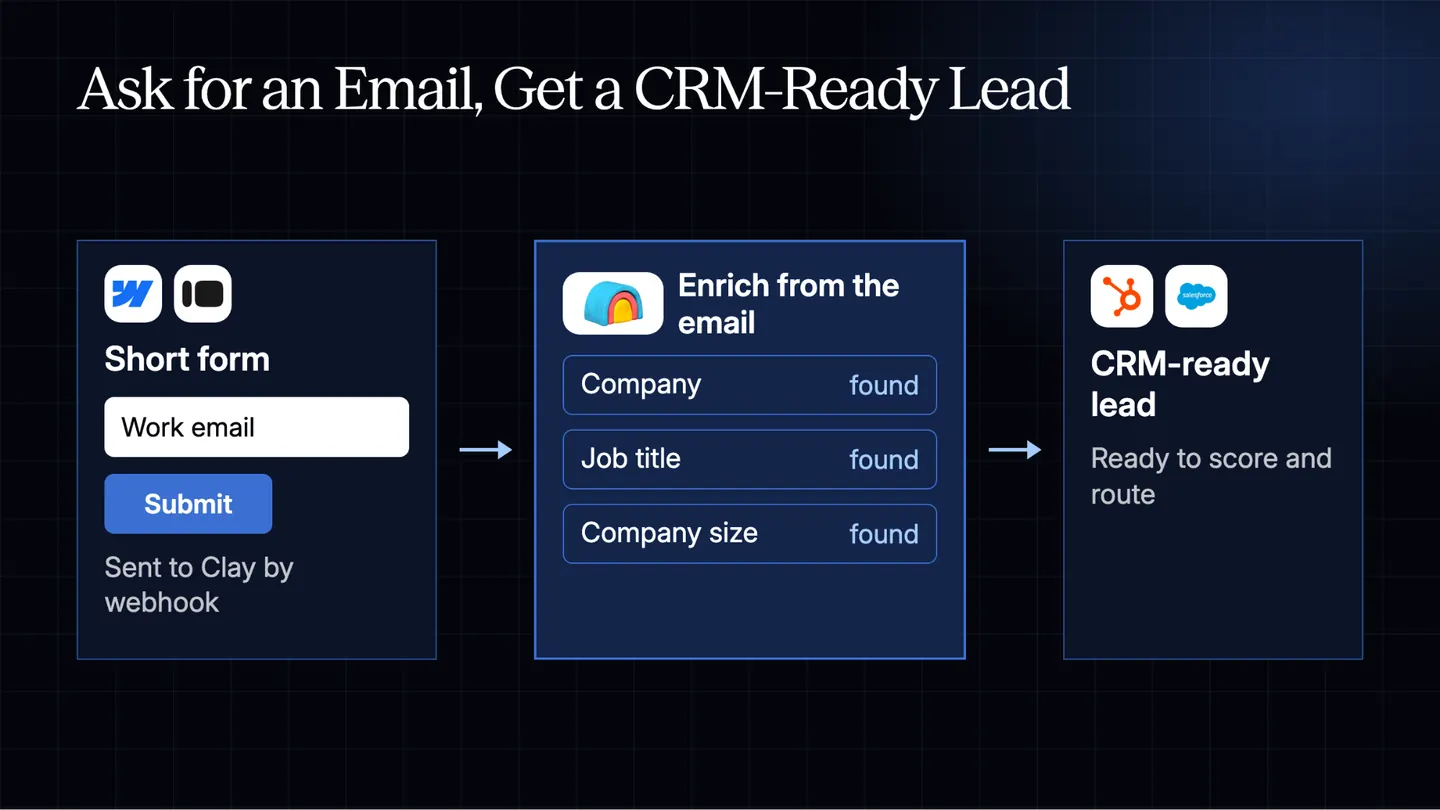
Enrichment lets the form ask for less while the CRM still gets a full record.
5. Form Fill Enrichment
A longer form can cost you sign-ups, and a shorter one leaves your sales team lookups to do. Enrichment lets you ask for less and still route well.
Best for: Marketing ops teams whose demo or content forms ask for a long list of fields and still miss the job title.
The manual job: Looking up each new lead’s company, title and size before scoring or routing it.
How Clay does it: Clay’s inbound Claybook says Clay “turns form fills into fully enriched, CRM-ready leads with zero delay,” from Webflow, Typeform or a webhook. In Clay’s AlertMedia story, “27% of inbound leads arrived without a title at all,” and Clay now “finds and validates a title so the lead scores and routes correctly.”
Setup detail: Send submissions in through a webhook source, then enrich from the work email. A webhook source holds up to 50,000 submissions, even after you delete rows, so plan a new source before you hit it. Routing is a separate job: our inbound form routing recipe checks HubSpot for an existing account and sends each qualified lead to an owner.
Plan: Clay’s pricing table puts webhook automation on Growth and shows no plan gate for the Typeform source. Pulling forms from HubSpot or writing leads back also needs Growth.
6. Ad Exclusion Lists
Paying to show an acquisition ad to a current customer wastes budget on people who already bought. Clay’s own documentation calls an exclusion list “usually the fastest first win.”
Best for: Teams running LinkedIn or Meta ads aimed at a list of target accounts.
The manual job: Exporting customers and open deals from the CRM, cleaning the CSV and uploading it to each ad platform.
How Clay does it: Clay Ads syncs a segment to LinkedIn and Meta. Clay suggests using it to “create exclusion lists so you stop paying to advertise to existing customers, employees, or open opportunities.” An always-on sync refreshes every 3 days, and a company sync every 7.
Setup detail: Plan for platform delays. LinkedIn “takes about 48 hours to finish processing,” and Meta rejects a list under 300 people. Prospect audiences use the same Clay ads sync with a different segment.
Plan: Growth or Enterprise, and syncing from a segment also needs Audiences set up.
7. Newsletter Subscriber Enrichment
A newsletter list is usually a column of emails. Sponsors, and your own sales team, want to know which companies those emails belong to.
Best for: Marketing teams that sell sponsorships or want to know which accounts read their content.
The manual job: Exporting subscribers and guessing the companies behind personal and work emails.
How Clay does it: In a Clay Claybook, the newsletter Exit Five used a table that enriches subscribers “with information their sponsors kept asking for.” The fields include company emails, company names, job titles, employee count, industry and revenue. A Use AI column can then label each subscriber by persona or vertical.
Setup detail: Import the list as a CSV and start with the rows that have a work domain, because the domain already names the company. Group the results by industry and company size, then hand sales the subscribers at target accounts.
Plan: Clay’s pricing table lists CSV import and enrichment without a plan gate, so this runs on any plan.
Clay Automation for RevOps and CRM Data
RevOps teams use Clay to keep CRM records clean enough for every other job to trust. Bad records are common. In a 2017 Harvard Business Review study, 75 executives checked 100 recent records from their own departments, and on average 47% of new records had at least one critical error. The study covered all kinds of business data, not CRMs alone.
In a CRM, errors like these break routing and reports, which is why some teams pay for CRM data cleansing services before they automate anything. On a new inbound lead, the three jobs below fit together: clean its fields, check it against existing accounts, and send only a lead with no account into the rotation.
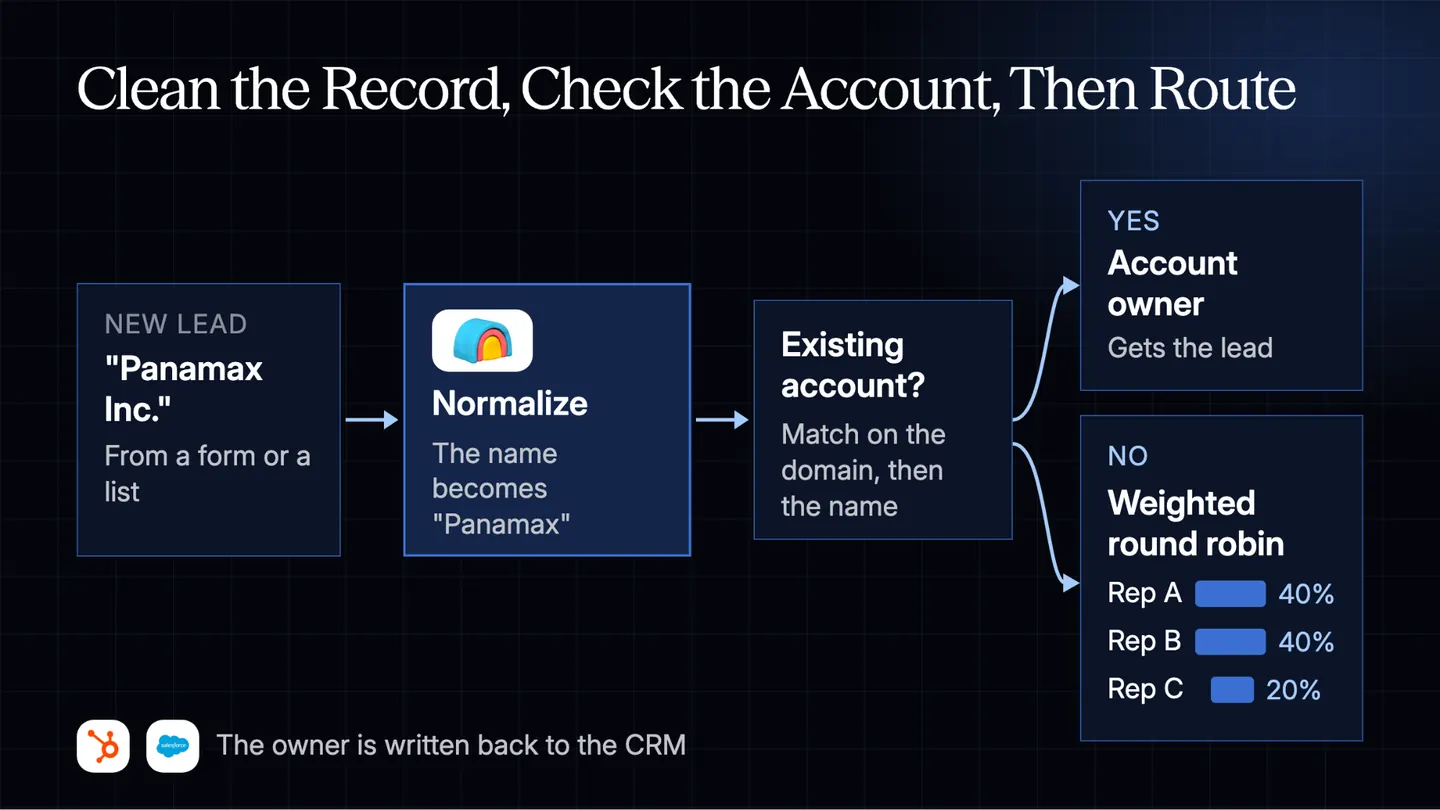
A lead from an existing account skips the rotation.
8. CRM Field Normalization
“Panamax Inc.” and “Panamax” look like two companies to a CRM. Normalization makes them one, so reports and routing rules work.
Best for: RevOps teams whose industry, company name and revenue fields hold a dozen formats each.
The manual job: Fixing company names, phone formats and industry labels row by row in a spreadsheet.
How Clay does it: Clay’s Normalize options and Formatters clean data “without using any credits,” with actions such as “Normalize Company Name” and “Normalize Phone Number.” For fields with no built-in normalizer, such as job titles or a custom industry list, a Use AI column maps each value to your own categories.
Setup detail: Run normalization on a copy of the CRM export before you write anything back, and map AI labels to the picklist values your CRM already uses. This is the formatting half of CRM upkeep. Filling blanks without overwriting values someone set on purpose is the job of our CRM hygiene play.
Plan: The normalizers are free on every plan. Syncing cleaned fields back to the CRM needs Growth.
9. Lead Routing
Leads that wait in a general queue go cold. Routing gives every lead an owner the moment it lands.
Best for: Teams that assign inbound leads or new accounts by territory, segment or rotation.
The manual job: Checking a spreadsheet of territories and rep capacity, then assigning owners by hand.
How Clay does it: Clay University recommends “a rep table as your live source of truth” and the “Distribute Leads Round Robin (Weighted)” action. With weights of 2, 2 and 1, three reps get 40%, 40% and 20% of new leads.
Setup detail: Keep the rep table as its own Clay table, so a sales manager can change weights without touching the routing logic. Clay itself says that if routing “starts to get very complex or niche,” a dedicated tool such as Default may fit better. Our RevOps team builds routing inside HubSpot or Salesforce when that’s the better home.
Plan: The pricing table doesn’t gate the round robin action. Pushing owners into the CRM needs Growth.
10. Lead-to-Account Matching
A new lead from a company you already sell to belongs to that account’s owner, not to whoever is next in the rotation. Matching makes that check automatic.
Best for: Teams with an existing customer base in Salesforce or HubSpot and a steady flow of inbound leads.
The manual job: Searching the CRM for the lead’s company before assigning it, and merging duplicates later.
How Clay does it: Clay matches Salesforce leads to accounts with a plain record lookup, a lookup plus formulas, or a lookup through SOQL. It then converts the lead with its “Convert lead” action. In Clay’s AlertMedia story, “15% of inbound leads are matched to existing accounts in Salesforce and routed directly to the assigned rep.”
Setup detail: Match on the company domain first and the company name second, because names vary more than domains. When the match writes fields back, use the same no-overwrite rules as Clay data enrichment, so a value set on purpose stays.
Plan: CRM lookups are part of Clay’s CRM integrations, which need Growth.
Clay for Partnerships and Recruiting
Clay’s search and research tools don’t care whether the person you’re looking for is a buyer, a partner or a hire. The two jobs below use the same features as sales prospecting for teams outside sales.
11. Partner Prospecting
Partner teams prospect too. Finding companies that run a partner program is research a Clay table does well.
Best for: Partnership managers building agency, affiliate or integration partner lists.
The manual job: Visiting each candidate’s website to check for a partner page, then writing a pitch per company.
How Clay does it: Clay’s partner Claybook uses “Claygent, Clay’s AI research agent, to find out if they have an affiliate partner program,” then drafts a pitch email with an AI model.
Setup detail: Ask Claygent a yes or no question with a source URL, so a person can check each answer before the pitch goes out.
Keragon, a healthcare automation company, shows what partner outreach with Clay in the stack can produce. Frontal built Keragon’s partnerships team a stack of Clay, Smartlead and lemlist, and the outreach opened 2 new partner conversations a day for six straight months. The Keragon case study also reports “100+ hours each month” recovered on that partnership outreach.
Plan: Claygent runs on Free. Sending from Clay starts on Launch.
12. Candidate Sourcing
Recruiters and sales leaders hiring SDRs face the same problem as an SDR: a long list of profiles and no fast way to rank them.
Best for: Recruiting teams, and sales leaders hiring reps from known companies.
The manual job: Searching profiles one by one and judging each candidate’s track record by eye.
How Clay does it: Clay describes Find People as “ideal for building targeted sales prospect lists, identifying potential hires, and conducting market research.” Clay’s own hiring template finds people “from a list of target companies” and calculates how often each candidate has been promoted for their time in the role.
Setup detail: Turn on the “Include past experience” toggle to find people who used to work at your target companies as well as current staff. In Clay’s Grow Therapy story, pre-call vetting “saves each recruiter 4 hours of preparation per week.”
Plan: Clay’s pricing table puts Find People on every plan without a gate, so a sourcing test can start on Free.
Market Mapping and TAM in Clay
Market mapping builds the account lists the other jobs work from, and buying a list from one database rarely covers the whole market. The three jobs below start from different places, and each ends in an outbound list your reps can work.
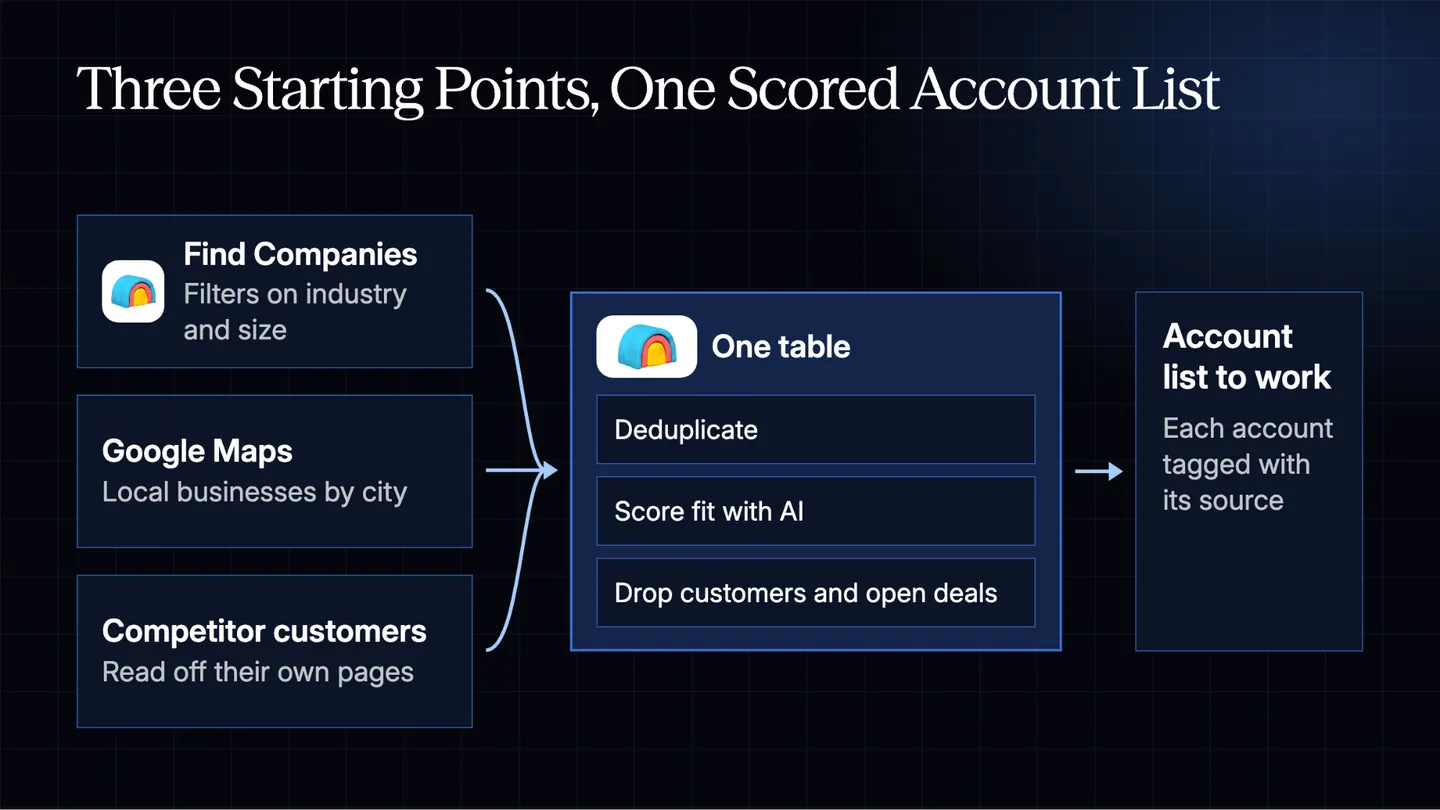
Each list starts somewhere different and ends as one scored table.
13. TAM Builds
Your total addressable market is every company that fits your ideal customer. Parts of that list often sit in different tools, with no single complete copy.
Best for: Teams planning territories or a new segment who don’t trust their current account list.
The manual job: Exporting lists from several databases, then merging and deduplicating them in a spreadsheet.
How Clay does it: The Find Companies source “lets you build targeted lists of companies using filters like industry, size, location, and keywords.” When you save the results to a new table, Clay lets you turn on auto-dedupe. Its TAM page says you can search “company, people, and job data in a single query,” so one search stands in for the separate exports. On the same page, Mistral says two weeks with Clay gave it a starter TAM of 25,000 accounts, adding, “Normally this would have taken 2 months.”
Setup detail: Write your filters from closed-won deals, not from a persona document. Then score each account with an AI column that checks one fit question on its website. Exclude current customers and open deals before anyone works the list.
Plan: Search runs on every plan. “Exclude companies/people from search” starts on Launch.
14. Competitor Customer Lists
A company that bought from your competitor has already paid to fix the problem you solve. Their logos are often public, on the competitor’s own site.
Best for: Teams with a clear competitor and a displacement story to tell.
The manual job: Reading competitors’ customer pages and case studies and copying logos into a sheet.
How Clay does it: Clay’s template generates “a list of your competitors’ top customers by just inputting their company URL,” using Claygent “to find their customer page and extract customers automatically.”
Setup detail: Run it on three to five competitors, then deduplicate and enrich the results in one table. Tag each account with the competitor it came from and the page that named it. A logo wall can be out of date, so write the opener about the problem that competitor solves, not about a switch the account may not be making.
Plan: Claygent runs on every plan, including Free.
15. Local Business Lists
Dentists, contractors and law firms rarely show up well in B2B databases. Clay says as much, noting that many local businesses “aren’t well represented on LinkedIn or traditional B2B databases.”
Best for: Teams selling to local service businesses, retail or professional practices.
The manual job: Copying names, sites and phone numbers from Google Maps into a spreadsheet, one listing at a time.
How Clay does it: Clay integrates Google Maps as a source. Its template “couples Google Maps with Claygent to find local business owners and their contact information,” and falls back to Claygent when the email waterfall finds nothing.
Setup detail: Search by category and city, then use Claygent to find the owner’s name on each business website. Score each business on fit before outreach, which is the step a local business TAM build adds after the scrape.
Plan: Clay’s pricing table shows no plan gate for the Google Maps source.
How Much Time Clay Saves, by Clay’s Own Customers
Clay’s customer stories report savings per person, per team and per project. Each recruiter at Grow Therapy saves 4 hours of preparation a week, and AlertMedia’s qualification work saves its sales org over 200 hours a month. These are figures Clay publishes about its own customers, so treat them as Clay’s reported results.
| Customer (Clay’s story) | Job | Reported saving | Matching use case |
|---|---|---|---|
| Grow Therapy | Pre-call vetting of providers | 4 hours of preparation per recruiter per week | 12 |
| Merge | Researching each account’s angle | 10+ hours back per SDR every week | 4 |
| A-LIGN | Account data uploads | Roughly 46 hours weekly | No direct match |
| AlertMedia | Lead qualification | Over 200 hours a month for the sales org | 5, 9, 10 |
| Mistral | Starter TAM of 25,000 accounts | Two weeks instead of two months | 13 |
The units differ, so read the table as five examples rather than a ranking. What they share is a task repeated many times. Grow Therapy’s 4 hours came from cutting vetting from 15 minutes per provider to about 5, across a full calendar of calls.
AlertMedia’s job touched every inbound lead. Pick a first use case your team repeats that often. The same test applies to any sales workflow automation tool, not only Clay.
The Keragon figure from our own case study, “100+ hours each month,” came from partnership outreach, not a sales team.
Which Clay Use Case to Start With
Start with the job you can measure. Before you build, write down how long the manual task takes per week and who does it. After two weeks in Clay, check the same number, and count the hours someone spent building and fixing the table. If you can’t name the task’s owner, the use case isn’t ready.
Your plan narrows the choice. On Free or Launch, start with research jobs: account briefs, buying committee mapping, first lines, competitor customers or local business lists. They run on Claygent, Find People and the Google Maps source, and you export the results.
On Growth, start with a job that writes to your CRM, such as form enrichment or lead-to-account matching, because those save time on every new record. Each plan also bundles a set number of Clay credits, so a research job at volume can push you up a plan anyway.
For the first month, have someone read a sample of every AI column before its output reaches a prospect, a partner or the CRM. Check with your security team before you send candidate data, call notes or form submissions to an AI model. Test each new column on a few rows before you run it on the whole list.
Put Your First Clay Use Case to Work
Pick one job from this list, give it one owner, and time the manual version this week. That number tells you whether Clay saved hours or only moved them.
Want a research, enrichment or routing job built for you instead? Our GTM engineering service sets it up in your own Clay workspace, then hands it to your team or keeps running it with them. Most clients start with one service. Have the manual-task time you measured ready for the call.
Frequently Asked Questions
What are the best Clay use cases in 2026?
The best Clay use cases in 2026 are account research briefs, pre-meeting notes, buying committee mapping, form fill enrichment, lead-to-account matching and TAM builds. Each one swaps a manual lookup or cleanup for a Clay column. Pick the one that takes your team the most time today.
What does Clay do?
Clay puts companies or people in a table where each column fetches an answer from data providers, AI models and other apps. Go-to-market teams use it to research accounts, find contacts, clean CRM records and build lists, then send the results to a CRM, Slack or a sequencer.
Is Clay only for sales teams?
No. Clay for sales covers research and call prep, but marketing teams use it to enrich forms and sync ad audiences. RevOps teams use it to clean and route CRM records. Partnership and recruiting teams use the same search and research features to find partners and candidates.
Which Clay use cases work on the free plan?
Most research jobs work on Clay’s Free plan, because Claygent and Find People have no plan gate on its pricing table. Pre-meeting notes are the exception, because they start from a calendar webhook. Free tables stop at 200 rows, which suits testing. CRM integrations, webhook automation and ad audience syncs need Growth, which starts at $495 a month billed monthly.
How much time does Clay automation save?
The saving depends on the task Clay replaces. At Grow Therapy, Clay’s customer story reports 4 hours of preparation saved per recruiter each week. At AlertMedia, it reports over 200 hours a month of qualification work saved for the sales org. Time the manual task before you build, so you can measure your own saving.
Does Frontal build Clay use cases for clients?
Yes. Frontal’s GTM engineering team builds Clay tables, research columns, enrichment and routing in your own Clay workspace, and writes results to HubSpot or Salesforce. Other firms do this work too. Before you pick one of the Clay automation agencies, check that it builds in your own workspace and ask who fixes a column when a data provider changes.