Key Takeaways
- Start with the website visitor play if you already get traffic, with the job change play if you have past customers, and with CRM cleanup if your records are a mess.
- A typical Clay play has five parts: a trigger, enrichment, a scoring decision, an action, and a record of the result, usually in your CRM.
- Job change signals and scheduled runs start on Clay’s Launch plan, while CRM sync, web intent and ad audiences need Growth.
- Keep a human review queue before anything sends on its own, at least until the scoring rule has proven itself.
The 15 Clay plays below are workflows built in Clay, the data enrichment and automation tool for go-to-market teams at clay.com. They fall into five groups: inbound leads, buying signals, list building, CRM upkeep, and pipeline revival with ads. We picked each one because it starts from a trigger many B2B teams already have. Each entry gives the trigger, tools, steps and result.
We’re Frontal, the go-to-market partner for B2B tech companies, working as an extension of your team. We’re also a Clay Elite Studio Partner, and we build Clay workflows like these in our clients’ own Clay workspaces. Every Clay feature name and plan below comes from clay.com and Clay University, read on November 16, 2026.
What Is a Clay Play?
A Clay play is a repeatable workflow that fires when something happens and ends with an action a person or a tool takes. Clay uses the word itself. Its blog has an “Outbound Plays” category, and a Clay University lesson says “Signal-based plays” let Clay watch every contact “and routes them the moment something changes.”
Most plays on this list are built from the same five parts, though some fold two of them into one step or leave one out.
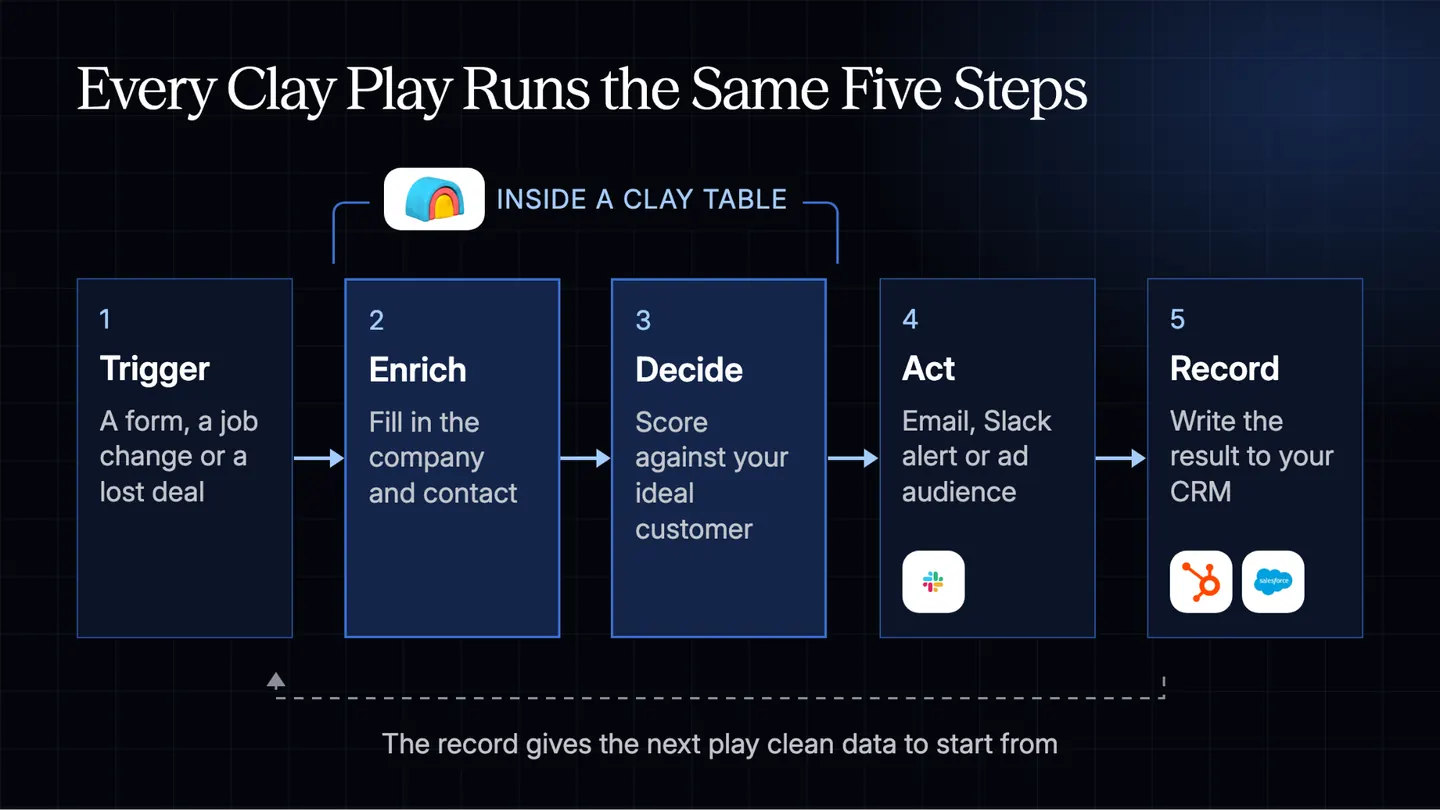
A typical play runs these five steps, whatever starts it.
The trigger is the event: a form fill, a job change, a funding round or a lost deal. Enrichment fills in the company and the contact. The decision scores the row against your ideal customer and picks a path.
The action sends an email, alerts a rep in Slack or pushes an ad audience. The record keeps the result, usually in HubSpot or Salesforce, so the next play starts from clean data. Teams that run this kind of GTM engineering work treat each play as a small product with an owner.
The 15 Clay Plays at a Glance
Use this table to shortlist two or three plays that match a trigger you already have. Each play is built from the steps in our free plays library, where every recipe lists its tools and numbered steps.
| # | Play | Trigger | Main tools beside Clay | What you get |
|---|---|---|---|---|
| 1 | Website visitor follow-up | A known company visits your site | RB2B, HubSpot, Slack | Tiered visitors routed to reps |
| 2 | Inbound form routing | A demo form is submitted | Tally, HubSpot, Slack | Qualified leads with owners |
| 3 | Product sign-up outreach | A new product sign-up | Findymail, HubSpot, lemlist | Scored sign-ups in tiered outreach |
| 4 | Job change tracking | A buyer starts a new role | Champify, LinkedIn, Apollo | Outreach to new leaders |
| 5 | Hiring signal outreach | A company posts a relevant job | TheirStack, PredictLeads | The hiring manager in a sequence |
| 6 | Funding round outreach | A company raises money | Crunchbase, PredictLeads, Exa | The buying committee mapped |
| 7 | Tech stack displacement | A company adds or drops a tool | BuiltWith, TheirStack | The tool owner in a sequence |
| 8 | Founder network mining | A one-time export of connections | LinkedIn, BetterContact | A scored list of warm contacts |
| 9 | Competitor post engagers | Someone engages a competitor’s post | Apify, Prospeo, lemlist | Qualified engagers by topic |
| 10 | Event attendee outreach | A webinar or event list | Luma, Zoom, Instantly | Two sequences, attended and no-show |
| 11 | CRM cleanup and refresh | A dirty or stale CRM | HubSpot, Salesforce, Findymail | Filled blanks and caught job changes |
| 12 | Account tiering | Closed deals from the last 12 to 24 months | HubSpot, Findymail | Tier and segment on every account |
| 13 | Reply triage | A prospect replies to an email | Instantly, ChatGPT, Slack | A Slack alert a rep acts on |
| 14 | Closed-lost revival | A lost deal with a dated change | HubSpot, Salesforce, Claude | Revived deals with history attached |
| 15 | Ad audiences from Clay | A scored target account list | LinkedIn, Meta, HubSpot | Matched ad audiences |
Start with an inbound play if you already get forms, sign-ups or site traffic, because those triggers are already in your stack. The signal plays need a data source, from Clay or a tool such as TheirStack, and the later groups pay off once your CRM records are clean enough to trust.
Inbound Clay Plays: Answer Hand-Raisers Fast
Inbound plays work on people who already showed interest, so speed matters. A 2011 Harvard Business Review study audited how fast 2,241 US companies answered a web lead. Firms that tried to reach a lead within an hour were nearly seven times as likely to qualify it as firms that waited an hour longer. The same study found that 23% of the companies never responded at all.
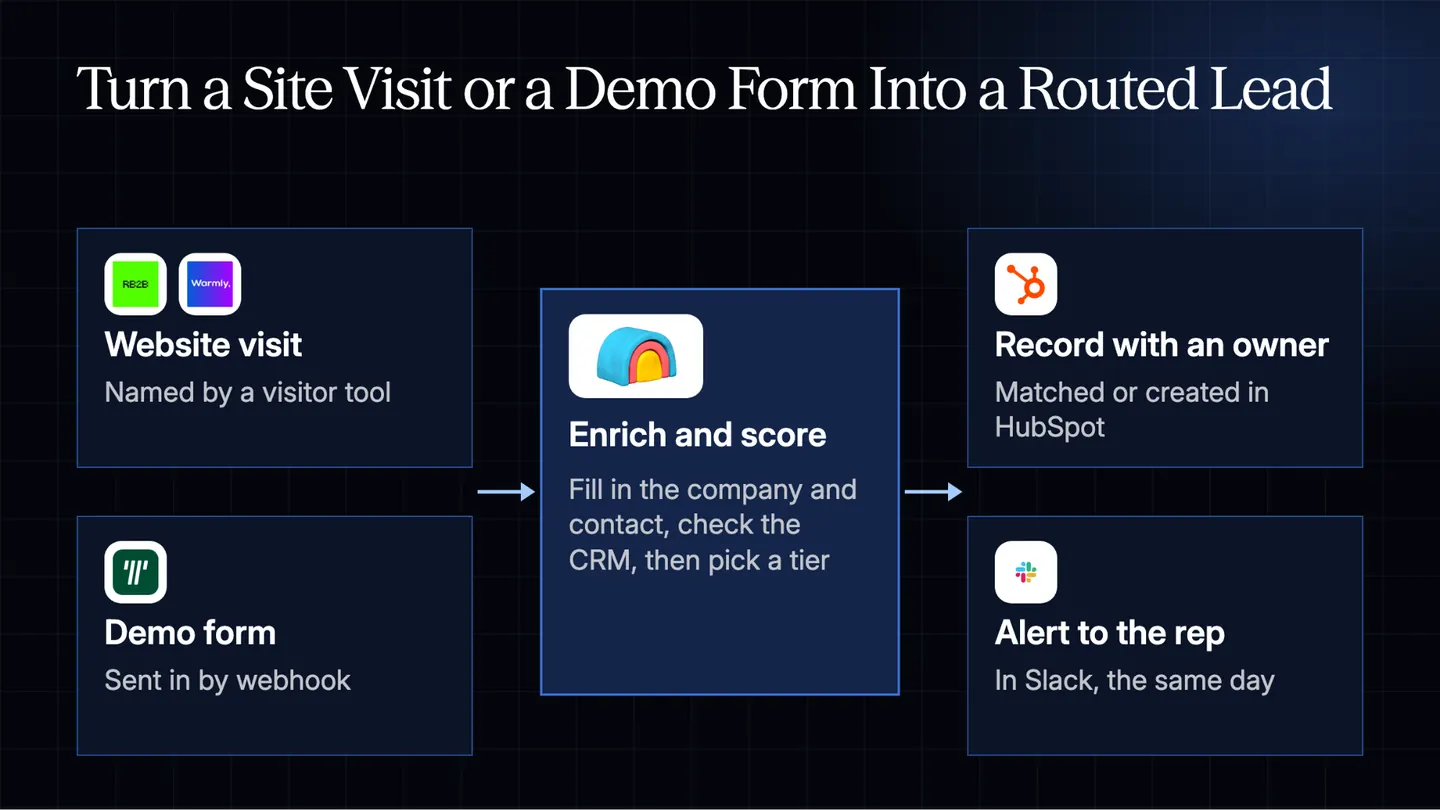
Inbound plays turn a visit or a form into a lead with an owner.
Each play below takes the hand-raise, enriches it in Clay and gets it to the right person while the interest is fresh. That handoff is a simple case of sales workflow automation: software moves the lead to its owner, so nobody copies data by hand.
1. Website Visitor Follow-Up
Most visitors leave without filling in a form. This play names the companies behind those visits and gets the best fits to a rep the same day.
Best for: Teams with steady site traffic and a low form fill rate.
Trigger: A visitor tool such as RB2B or Warmly identifies a person or company on your site.
Tools: Clay, RB2B, Warmly, Findymail, HubSpot, Slack, Instantly.
Steps: Send each visitor into a Clay table, then enrich the company and the contact. Score the visit on fit and on the pages viewed, and route by tier: a Slack alert for tier 1, a sequence for tier 2. Routing by tier is the last step of the website visitor play, after detection, enrichment and scoring.
What you get: A short daily list of named, scored visitors instead of anonymous page views. Clay’s own web intent signal does the first step natively, but it sits on the Growth plan.
2. Inbound Form Routing
A demo form tells you little about the person who filled it in. This play fills the gaps and checks your CRM before anyone writes back.
Best for: Teams whose demo requests sit in a queue while someone looks them up.
Trigger: A form submission, sent into Clay through a webhook.
Tools: Clay, Tally, HubSpot, Slack, Instantly, lemlist.
Steps: Capture the form with a webhook and enrich the domain, LinkedIn profile, title and firmographics. Look up the company in HubSpot by domain and the contact by email. Existing accounts go to their owner after a persona check. New companies get an ICP check with Clay’s AI before a record is created.
What you get: Every qualified demo request lands with an owner and a complete record. Clay lists webhook automation and HTTP API integrations on Growth and above.
3. Product Sign-Up Outreach
Free sign-ups arrive with an email and little else. This play works out who signed up and routes the ones worth a sales conversation.
Best for: Product-led teams with a free plan or trial.
Trigger: A new sign-up posts to a Clay webhook with the email, name and username.
Tools: Clay, Findymail, HubSpot, lemlist, Instantly, Slack.
Steps: Find the LinkedIn profile, title and company with Findymail and Clay’s AI. Classify the email as work or personal in its own column. Score fit with Clay formulas on seniority, company size, industry and location, then sync to HubSpot and split the contacts into three tiers.
What you get: Tier 1 goes to LinkedIn through lemlist with a Slack alert, while tiers 2 and 3 enter Instantly sequences.
Buying-Signal Plays: Reach Accounts When Something Changes
Signal plays watch for a change that opens a budget or a new decision maker. People change jobs often, so a watch list kept by hand goes stale fast. The Bureau of Labor Statistics reported median tenure with a current employer of 4.1 years in January 2026. That month, 20.6% of wage and salary workers had been in their job a year or less.
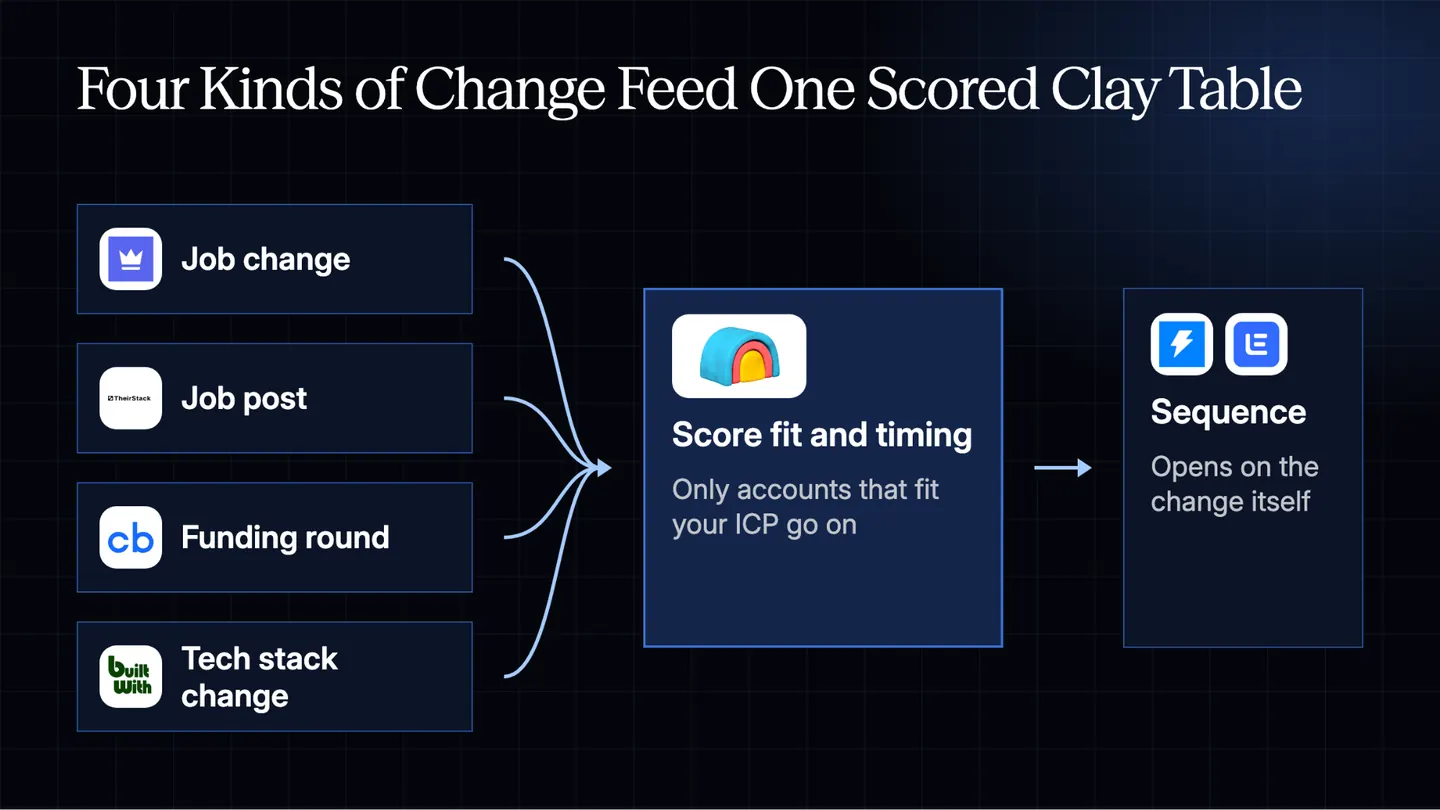
Four kinds of change feed one scored Clay table.
Clay sells some of these signals natively. Its Signals include “Job change”, “New hires”, “Promotions”, “Job postings”, “News & fundraising” and “Web intent”, and you can bring others in from tools such as TheirStack or BuiltWith. Our roundup of B2B intent data providers compares the outside sources.
4. Job Change Tracking
A new leader is often free to review the vendors the last one chose. This play catches those moves and filters out the ones that don’t matter.
Best for: Teams with past customers and champions worth following.
Trigger: A tracked contact starts a new role, or a target company hires a new leader.
Tools: Clay, Champify, LinkedIn, Apollo, Instantly, lemlist.
Steps: Define which titles count before you turn anything on, because most job change alerts are noise. Route each qualifying move into Clay, check that the new company fits, then score fit and timing together, in the order the job change play lays out.
What you get: Outreach that opens on the move itself. In Clay, each job change check uses 1 action plus 0.2 data credits.
5. Hiring Signal Outreach
A job post for a function can point to a gap at the company. The role hints at what they’re about to work on.
Best for: Products that replace or support a specific team.
Trigger: A new job post for a role you watch, from TheirStack or PredictLeads.
Tools: Clay, TheirStack, PredictLeads, Findymail, Apollo, Instantly, lemlist.
Steps: Keep one record per company per hiring event. Match the company to your ICP first, since a job post only counts at a company that fits anyway. Weight the score by how directly the role maps to your product, then find the hiring manager rather than HR.
What you get: A sequence whose opener names the open role.
6. Funding Round Outreach
A new round often brings new hires and new tools. Not every round means budget for you, though, so this play scores before it sends.
Best for: Teams selling to fast-growing companies.
Trigger: A weekly sweep of funding sources such as Crunchbase and PredictLeads.
Tools: Clay, Crunchbase, PredictLeads, Exa, Apollo, Findymail, Instantly.
Steps: Track only the rounds that matter to you and resolve each company to a domain, because announcements name companies, not websites. Score fit, then map the buying committee, since new funding often brings new hires and new authority.
What you get: A short congratulations sequence to the mapped buying committee. Clay’s own News & Fundraising signal costs 1 action plus 6 data credits per result.
7. Tech Stack Displacement
Much of what a company runs, and what it just stopped running, shows up in public data. This play turns those changes into two different conversations.
Best for: Teams that replace a known competitor or complement a common tool.
Trigger: BuiltWith or TheirStack reports a tool added or removed.
Tools: Clay, BuiltWith, TheirStack, Apollo, Findymail, Instantly.
Steps: Split added from removed and never let them share a sequence. Rank removals above additions, then find the person who owns the tool rather than the CEO.
What you get: A displacement sequence that opens on the tool they use or just dropped.
List-Building Plays: Build Lists You Can’t Buy
For Clay lead generation, a standard outbound list comes from a database anyone can buy, so your competitors often work the same names. These plays build lists from sources no database sells, such as your founder’s network or the people engaging with a competitor’s posts.
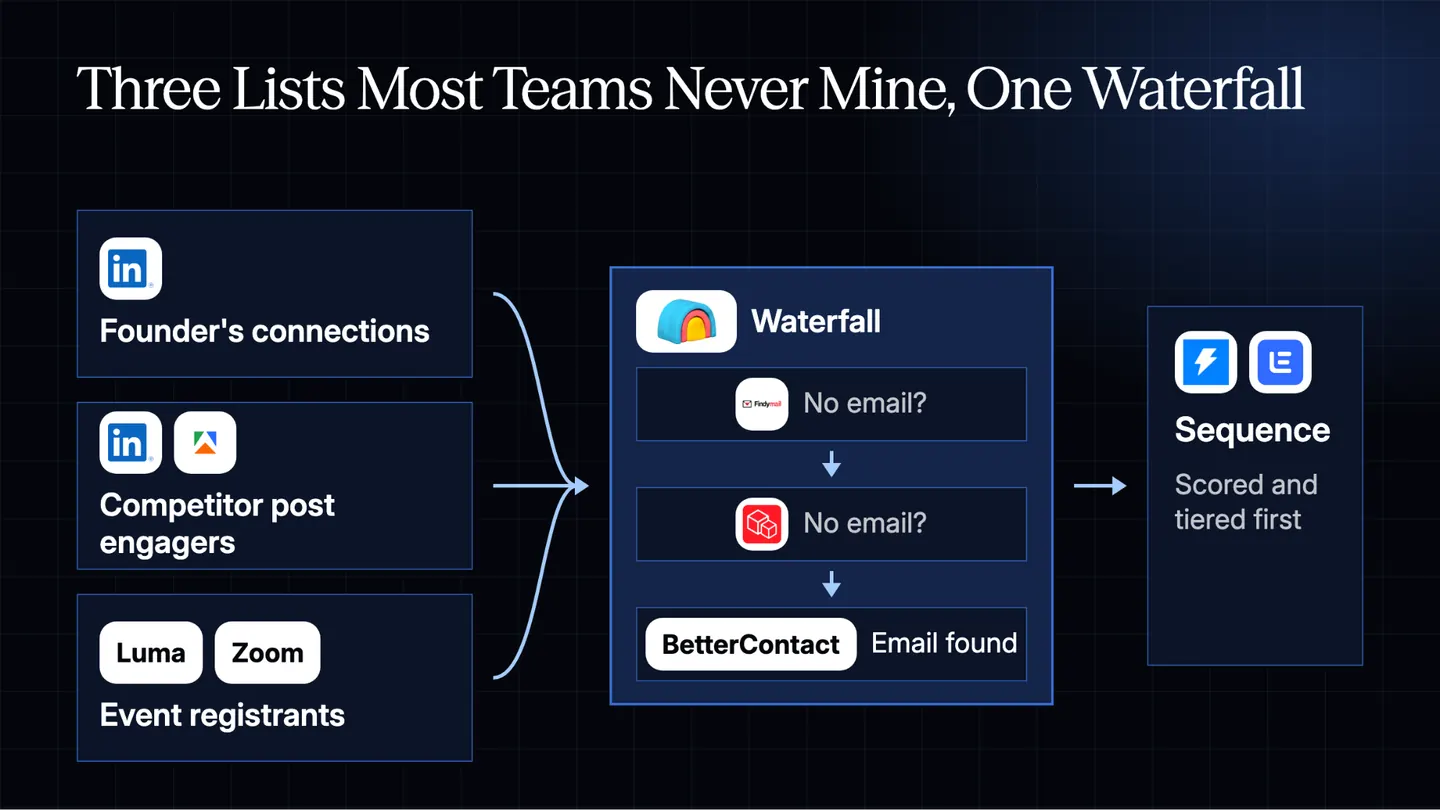
Three list sources feed one email waterfall and one sequence.
Each of these plays runs contacts through a waterfall, Clay’s way of trying several data providers in order until one returns a valid email. Clay includes multi-provider waterfalls on every plan, Free included.
8. Founder Network Mining
The founder’s LinkedIn network is warm data you already have. This play ranks it by fit, not by who the founder remembers.
Best for: Early sales teams where the founder still sells.
Trigger: A one-time export of the founder’s connections.
Tools: Clay, LinkedIn, BetterContact, Findymail, Instantly, lemlist.
Steps: Upload one row per connection and keep how long they’ve been connected. Enrich the companies to find the ones you can sell to, then confirm each person is still there. Score against your ICP and route by tier, the last of six steps in the founder connections play.
What you get: A scored list of warm contacts. Because the play runs once, the top tier deserves hand-written messages.
9. Competitor Post Engagers
A competitor’s posts pull in people thinking about the problem right now. Many engagers are peers, fans and the competitor’s own staff, so qualification decides who gets a message.
Best for: Categories with an active competitor voice on LinkedIn.
Trigger: A daily scrape of new posts from the competitor voices you pick, with Apify.
Tools: Clay, LinkedIn, Apify, Prospeo, Findymail, lemlist, Instantly.
Steps: Scrape each post once inside a fixed window, so nobody is counted twice. Enrich the person and the company, then qualify in three gates to drop peers, fans and staff. Pitch the switch on the post’s own topic.
What you get: Prospects who already told you what they care about.
10. Event Attendee Outreach
Every registration for an event you run is a hand-raise, including the people who never showed up. A conference list you get as a sponsor is colder, so score it before anyone writes. The main split is between people who attended and people who didn’t.
Best for: Teams that run or sponsor webinars and events.
Trigger: Registrations from Luma or Zoom, or an event’s attendee list.
Tools: Clay, Luma, Zoom, Findymail, Apollo, HubSpot, Instantly, lemlist.
Steps: Route registrants into Clay and enrich them, because registration forms give you almost nothing. Split attended from no-show and run two sequences with the same offer and a different opening. Log attendance to the CRM as a signal worth keeping.
What you get: Follow-up that matches what each person actually did.
Chamelio shows what one event list can do. In Frontal’s work with Chamelio, a legal AI company, the conference play booked a meeting for every fourth message, and about 60 people asked to meet at one event. A broad campaign in the same window got 3 positive replies from 1,000 leads. The work ran in their own Clay, CRM and inboxes over 10 months.
Alex Zilberman, CEO and co-founder of Chamelio, put the reason simply: it works “when you have interesting specific intent signals and interesting original ideas you can share. People really resonate with that.”
CRM Upkeep Plays: Keep the Data Every Play Depends On
Most Clay plays write to your CRM, so bad records make them all worse. These three keep the CRM clean, tiered and fast to act on.
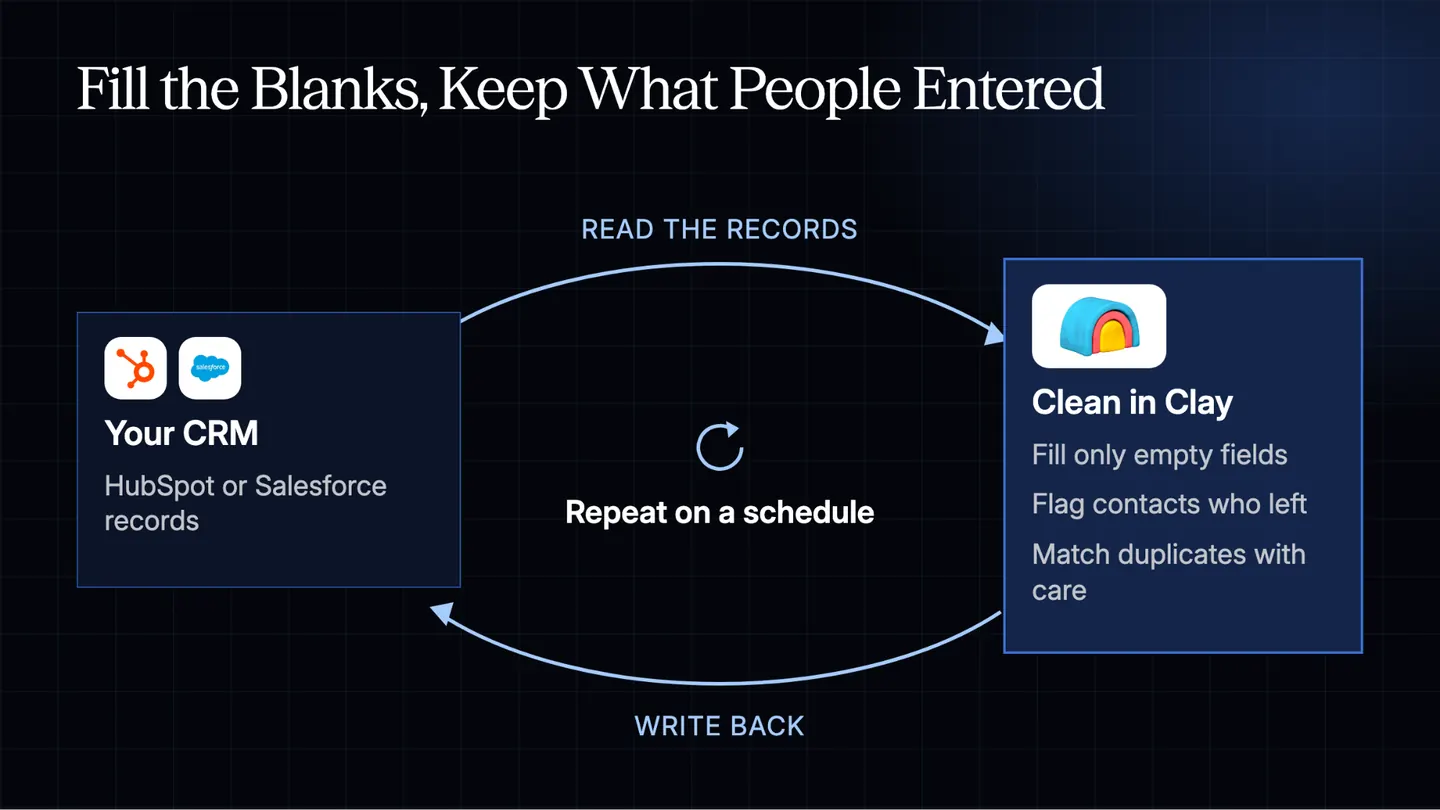
Fill the blanks, never overwrite what a person entered, then repeat.
Clay’s Growth plan adds CRM auto-sync and enrichment. On Growth, a scheduled source can also re-pull HubSpot or Salesforce records on a recurring basis.
11. CRM Cleanup and Refresh
Messy CRMs break in the same handful of ways. This play gives each one its own rule and its own fix.
Best for: Teams whose reps no longer trust the CRM.
Trigger: A read-only audit of HubSpot or Salesforce.
Tools: Clay, HubSpot, Salesforce, Prospeo, Findymail.
Steps: Audit without writing anything, then find the dirty sets: duplicates, blanks and contacts who left. Match duplicates carefully, since many look-alikes are different people. Back up and get a person’s sign-off before any write, then fill blanks with a waterfall that leaves alone what someone entered on purpose. That waterfall is the core of Clay data enrichment, where each provider is tried in order until one returns a value.
What you get: Filled blanks and flagged contacts who left, with the play kept running so new gaps get caught.
12. Account Tiering
Reps waste time when every account looks equal. This play tiers accounts on what your won deals have in common.
Best for: Teams with at least a year of closed deals in HubSpot.
Trigger: An export of the deals you won and lost in the last 12 to 24 months.
Tools: Clay, HubSpot, Findymail, ChatGPT.
Steps: Define segments by company size, industry and business model. Build a Clay data model with name, domain and LinkedIn URL, then enrich the missing firmographic and technographic data. Sync new Account Tier and Segment properties to HubSpot. The account tiering play adds the workflows on top.
What you get: A tier and a segment on each account in the export, so you can track conversion rate, deal size and sales cycle by tier.
13. Reply Triage
Replies pile up fast once outbound runs at volume. This play reads every reply and sends the ones it marks as interested to a rep.
Best for: Teams sending outbound from Instantly at volume.
Trigger: A reply event from Instantly, posted to Clay.
Tools: Clay, Instantly, ChatGPT, BetterContact, HubSpot, Slack.
Steps: Normalize every reply into one shape, then let one AI call sort it into one of four paths. Enrich only the interested replies and sync them to HubSpot without creating duplicates.
What you get: A Slack message a rep can act on, with the record already filled in.
Pipeline Revival and Ad Plays: Reuse What You Already Have
Your CRM already holds lost deals and scored accounts. These last two plays turn them back into conversations and ad audiences, without buying a new list.
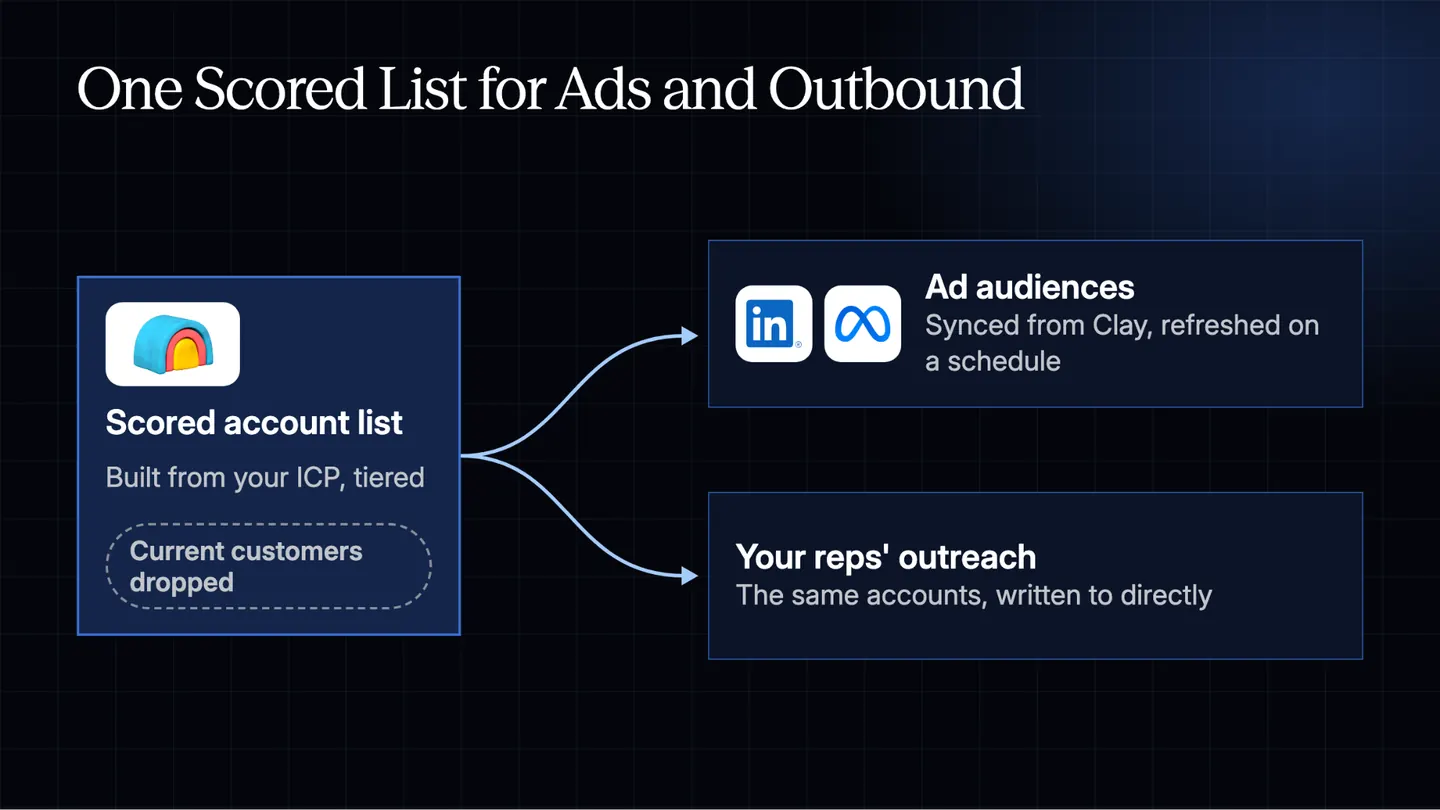
One scored list feeds outbound and ads at the same time.
14. Closed-Lost Revival
A lost account has already met your team, and if reps logged a loss reason, the CRM already holds it. This play comes back only when there’s a real, dated reason.
Best for: Teams with a year or more of lost deals.
Trigger: A closed-lost deal past the waiting window you set, with a change since the loss.
Tools: Clay, HubSpot, Salesforce, Claude, Prospeo, Findymail, Instantly.
Steps: Wait before reaching back, because a week after a no just reopens the same argument. Check what changed and which contacts are still there, then re-score the account. The opener names what changed and is never a check-in. The full recipe has seven closed-lost revival steps, from pulling the deals to reopening them.
What you get: A short list of lost deals worth reopening, with their history attached.
15. Ad Audiences From Clay
Ads and outbound work better on the same account list. This play sends your scored Clay list to ad platforms as audiences.
Best for: Teams running account-based campaigns on LinkedIn or Meta.
Trigger: A scored target account list in Clay.
Tools: Clay, LinkedIn, Meta, HubSpot.
Steps: Build the list from your ICP, score and tier the accounts, then push the audience to the ad platform. Refresh it on a schedule and drop current customers. The sync runs through Clay ads, which sends audiences to LinkedIn, Meta, Google and other platforms.
What you get: Matched audiences that warm the same accounts your reps are writing to. Clay’s pricing page lists “Push audiences to ad platforms” for LinkedIn and Meta on Growth and Enterprise.
What Each Clay Plan Lets You Run
Clay’s Launch plan starts at $185 per month and Growth at $495 per month on monthly billing, per its pricing page on November 16, 2026. That gap decides which plays you can run without workarounds. Each plan bundles a set number of actions and data credits, and your usage decides when you move up.
| Clay feature (Clay’s wording) | Free | Launch | Growth and Enterprise | Plays that use it |
|---|---|---|---|---|
| Run multi-provider waterfalls | Yes | Yes | Yes | 8 to 11 |
| Job change signals | No | Yes | Yes | 4 |
| Company news signals | No | Yes | Yes | 6 |
| Schedule recurring enrichment runs | No | Yes | Yes | 11, 15 |
| Web intent signals | No | No | Yes | 1, as a native option |
| Automate any signal via webhooks, HTTP API integrations | No | No | Yes | 2, 3, 13 |
| CRM integrations (HubSpot, Salesforce) | No | No | Yes | 1 to 3, 10 to 15 |
| Push audiences to ad platforms | No | No | Yes | 15 |
Most of the plays here write to a CRM, which puts them on Growth. A Launch team can still run the signal and list-building plays and export the results to its CRM by hand.
How to Pick Your First Clay Play
Pick the play whose trigger you already have, then the one your team can act on. If you get site traffic and few form fills, start with play 1. With past customers to follow, start with play 4. With a year of lost deals, try play 14. If reps complain about the CRM, run play 11 first, because most of the other plays write to it.
Keep a person in the loop for the first month. One practitioner on Reddit’s r/GrowthHacking wrote that “fully auto enroll usually backfires unless the signal is extremely high confidence,” and that a “human review queue” before the sequence worked better. That’s one person’s experience, so treat it as a starting rule rather than a law.
Clay’s conditional runs help you enforce that rule. The “Only run if” setting stops an enrichment or a CRM upload unless a condition holds, such as a valid email. A row that fails the condition is skipped, so it never gets enriched or written to the CRM.
Before you turn on visitor identification, scraping or ad uploads, check them against the privacy rules in the markets you sell to.
Get Your First Clay Play Live This Week
Choose one play, give it one owner, and run it by hand for two weeks before you automate the send. Write down the trigger, the score that sends a row to a person, and the field it writes back. If you can’t write those three down, the play isn’t ready to automate.
If you’d rather have a team build it in your own Clay workspace, our GTM engineering service does exactly that. We run it with your team or hand it over. Most clients start with one service.
Frequently Asked Questions
What are the best Clay plays in 2026?
The best Clay plays in 2026 are website visitor follow-up, inbound form routing, job change tracking, funding round outreach, CRM cleanup and closed-lost revival. Each starts from a trigger you likely already have. The right first one depends on that trigger: site traffic, past customers or a messy CRM.
What are Clay plays?
Clay plays are repeatable workflows in Clay, the go-to-market data tool, that start from a trigger and end in an action. The trigger might be a demo request, a new leader at a target account or a closed-lost deal with a fresh reason to call. Clay enriches the row, scores it and then sends an email, alerts a rep or updates your CRM.
Do Clay workflows need the Growth plan?
Any Clay workflow that syncs to HubSpot or Salesforce, automates signals through webhooks, calls HTTP APIs, tracks web intent or pushes ad audiences needs Growth or Enterprise. Waterfalls and Claygent work on every plan, and job change and company news signals start on Launch.
Can you do Clay lead generation without a CRM?
Yes, but you lose the record that makes plays improve over time. Launch includes signals, waterfalls and sequencing, so you can find and reach leads and export them. The write-back step needs a CRM integration, which starts on Growth.
How do Clay outbound plays avoid spamming people?
Good Clay outbound plays score every row before anything sends and keep a human review step until the scoring is proven. Conditional runs stop actions on rows that don’t meet your rules. Signals with a dated reason, such as a new role or a lost deal with a change, also give each email a real opener.
Does Frontal build Clay plays for clients?
Yes. Frontal’s GTM engineering team builds the tables, waterfall enrichment, signal tracking and workflows in your own Clay workspace. We write the results into HubSpot or Salesforce and run them with your team. Other firms build Clay workflows too, so compare at least two Clay automation agencies before you choose.