Key Takeaways
- Clay Ads turns a filtered list of contacts or accounts into an ad audience on LinkedIn, Meta, Google, Bing, Reddit or Vibe.co. An always-on sync keeps it current. It’s on Clay’s Growth and Enterprise plans only.
- Match rates depend on the identifiers you send. Clay’s docs put work emails alone at a typical 60 to 70% on LinkedIn and 10 to 20% on Meta. Adding hashed personal emails typically lifts those to 90 to 95% and 50 to 70%+.
- Only LinkedIn accepts account audiences. Google and Bing take first-party data only and drop any contact whose sole source is Clay’s database.
- Build the exclusion list first: current customers, open opportunities, employees and closed-lost deals. Clay’s docs say it’s “usually the fastest first win” because it cuts wasted spend without a new campaign.
Clay Ads is the part of Clay that sends a list to your ad platforms. You build a segment of the people or companies you want to reach, and Clay adds the identifiers the platform needs. The audience then refreshes itself as records qualify or drop out.
Clay handles the sync. The choices that waste or save ad budget are yours: choosing who belongs on the list, raising the match rate and keeping customers out.
Frontal, the go-to-market partner for B2B tech companies, wrote this guide. We build audiences and run paid media for clients as an extension of their team, and we hold Clay Elite Studio Partner status.
We checked every Clay detail below against Clay’s own site and docs on November 16, 2026.
What Clay Ads Does and Where Its Job Ends
Clay’s help center says Clay Ads “takes a filtered segment of contacts or accounts from your Clay Audiences.” It adds “up to three hashed personal emails so ad platforms can match it,” then pushes the list out “as a targetable audience that keeps itself current.” Clay Audiences holds the list, and Ads matches it and sends it out.
Clay builds and maintains the audience, and the campaign itself is always built on the platform side. Clay’s course is blunt about the limits: Clay doesn’t generate ad creative, and you read clicks, cost per lead and return on ad spend in each platform, not in Clay.
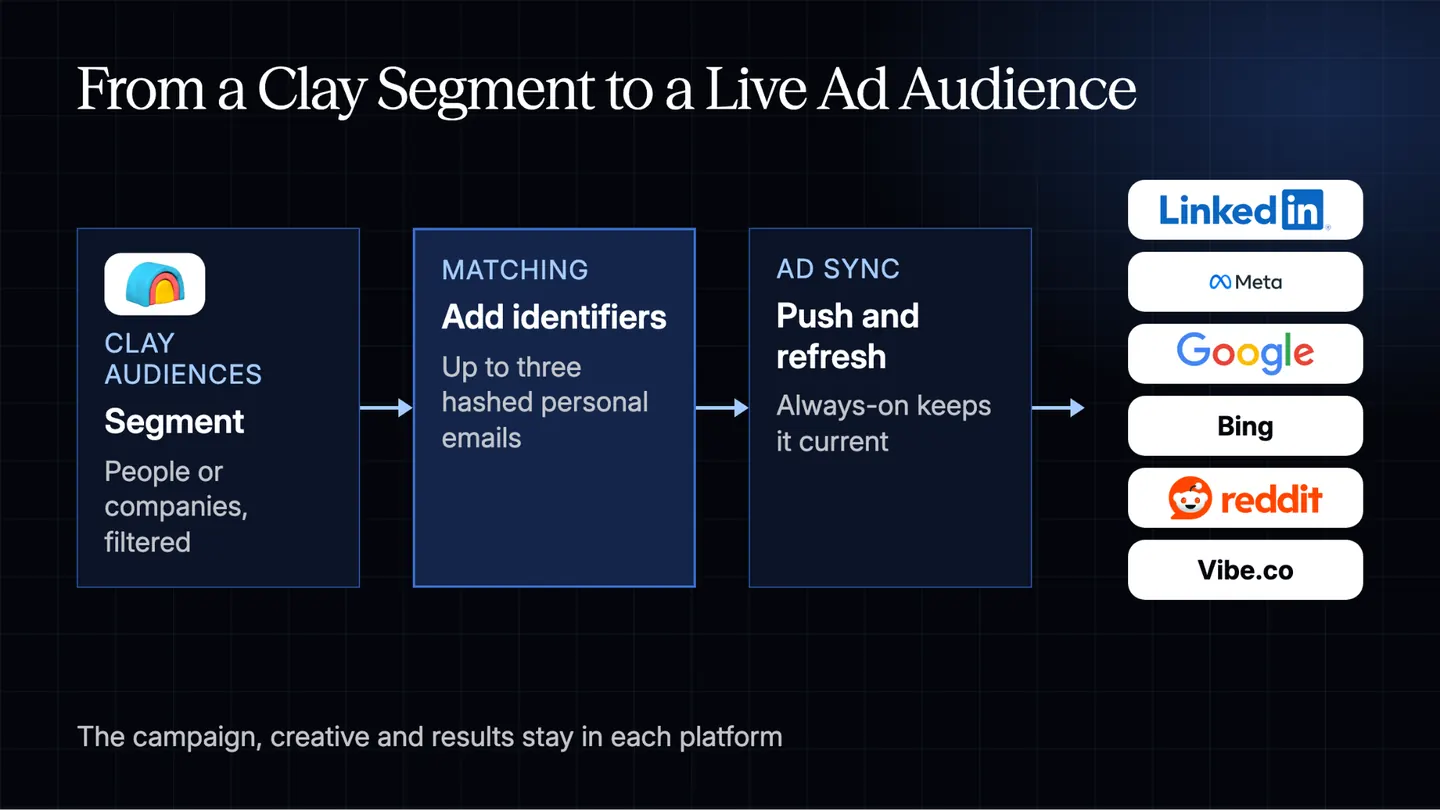
The campaign starts where Clay’s part ends.
A fair objection comes up on Reddit. In an r/gtmengineering thread, one user asked whether this is “basically what your CRM already does,” since a CRM can push contacts to LinkedIn too. That’s one person’s view, and the answer depends on your identifiers. A CRM sync sends the identifiers you already hold. Clay Ads can first add up to three hashed personal emails, the step behind Clay’s higher match-rate ranges.
Access has two conditions. Clay Ads is available on the Growth and Enterprise plans, and syncing from a segment also requires Audiences to be set up in your workspace. Clay’s docs also say the newer sync flow is in open beta and still rolling out, so your screens may differ. Whoever owns the Clay workspace, your own admin or one of the Clay agencies you hire, should confirm both before anyone builds a segment.
Which Ad Platforms You Can Sync To
Clay Ads syncs to six destinations: LinkedIn Ads, Meta Ads, Google Ads, Bing Ads, Reddit Ads and Vibe.co, a connected TV platform. Each one accepts different identifiers and sets its own floor, and Clay’s figures don’t always match the platform’s own help pages. The table puts both side by side for the four platforms we checked.
| Destination | What Clay can send | Clay’s stated minimum | The platform’s own rule, where checked |
|---|---|---|---|
| LinkedIn Ads | Email, name, company, title, country, plus company fields for account audiences | 300 members | LinkedIn: 300 matched members to run, 300,000 records maximum |
| Meta Ads | Email, name, gender, phone, mobile advertiser ID, country, city, state, zip | 1,000 matched contacts | Meta: the list must include at least 1,000 customers |
| Google Ads | Email, phone, name, country, zip | 1,000 matched contacts | Google: 100 active users for lists uploaded or refreshed after February 1, 2024 |
| Bing Ads | Email only | 1,000 members | Microsoft: at least 300 active email users |
| Reddit Ads | Email and mobile advertiser ID | 1,000 matched users | Not checked for this guide |
| Vibe.co | Email and phone | No stated minimum | Not checked for this guide |
Where Clay and the platform disagree, plan for the stricter number. Google is the messiest case. Clay lists 1,000 matched contacts as its minimum, and Google’s help says 100 active users for newer lists. Clay’s “Too small” status only appears once Google reports an audience under 500. With three numbers in play, check the audience status inside Google Ads before you launch.
Account audiences have one home. Clay’s docs say account segments “can only go to LinkedIn Ads, the one destination that accepts account audiences.” Every other destination takes contacts. If your strategy is company-level targeting through LinkedIn Matched Audiences, build a Companies segment. For Meta, Google and the rest, you need the people inside those companies.
LinkedIn also has the tightest cap: 300,000 records, against up to 1,000,000 for the other destinations. Clay’s docs add that a sync to several platforms is capped by the most restrictive one. So whoever runs the campaigns, your own team or one of the LinkedIn ads services we’ve compared, should keep a shared list under 300,000 records.
Build a Segment Worth Paying to Reach
Every ad dollar lands on the list you build, so the segment is where targeting really happens. In Clay Audiences, you click People or Companies and filter with CRM fields, Clay enrichment data and signals together. That’s what separates a Clay ABM audience from a platform’s interest targeting: you choose the accounts yourself.
Inferred segments are often wrong. A peer-reviewed study in Marketing Science tested more than 90 audience segments from 19 data brokers, using field studies run in Australia in 2016 and published in 2019. Neumann, Tucker and Whitfield found gender accuracy averaged 42.3%, below the roughly 50% you’d get by guessing. A list built from your CRM and your own fit rules avoids that guesswork.
Size the contact list to the whole buying group. Forrester’s State of Business Buying 2026 release says “the typical buying decision now includes 13 internal stakeholders and nine external influencers.” A contact segment that holds only your main contact at each account misses most of the people who sign off.
Tiering keeps spend where it counts. Frontal’s ABM and ads play starts with an ICP model, builds the total addressable market, then researches and scores accounts in Clay. Its first tier carries the note “Focus ad spend here.” You can mirror that with one segment per tier, because each segment can feed only one ad sync.
Keep the first run small. Clay’s docs suggest 5,000 to 10,000 records, enough to check that enrichment behaves and match rates look sane before you commit credits to a large list.
Fill the Identifiers Ad Platforms Match On
For contact audiences, ad platforms match people mostly on identifiers such as email addresses and phone numbers, not on job titles. LinkedIn account audiences are the exception, matching on company fields.
Work emails match reasonably on LinkedIn and poorly on Meta. Clay’s docs call work emails the stronger identifier on LinkedIn and personal emails the stronger one everywhere else. They give the typical gap: work emails alone match 60 to 70% on LinkedIn and only 10 to 20% on Meta.
Clay’s matching step, which Clay calls Enhanced matching, closes part of that gap. It finds up to three hashed personal emails per contact, working from each contact’s LinkedIn profile URL or work email. Clay’s docs say those two fields “set your ceiling,” and its course ranks filling LinkedIn URL gaps as the most useful fix before any sync.
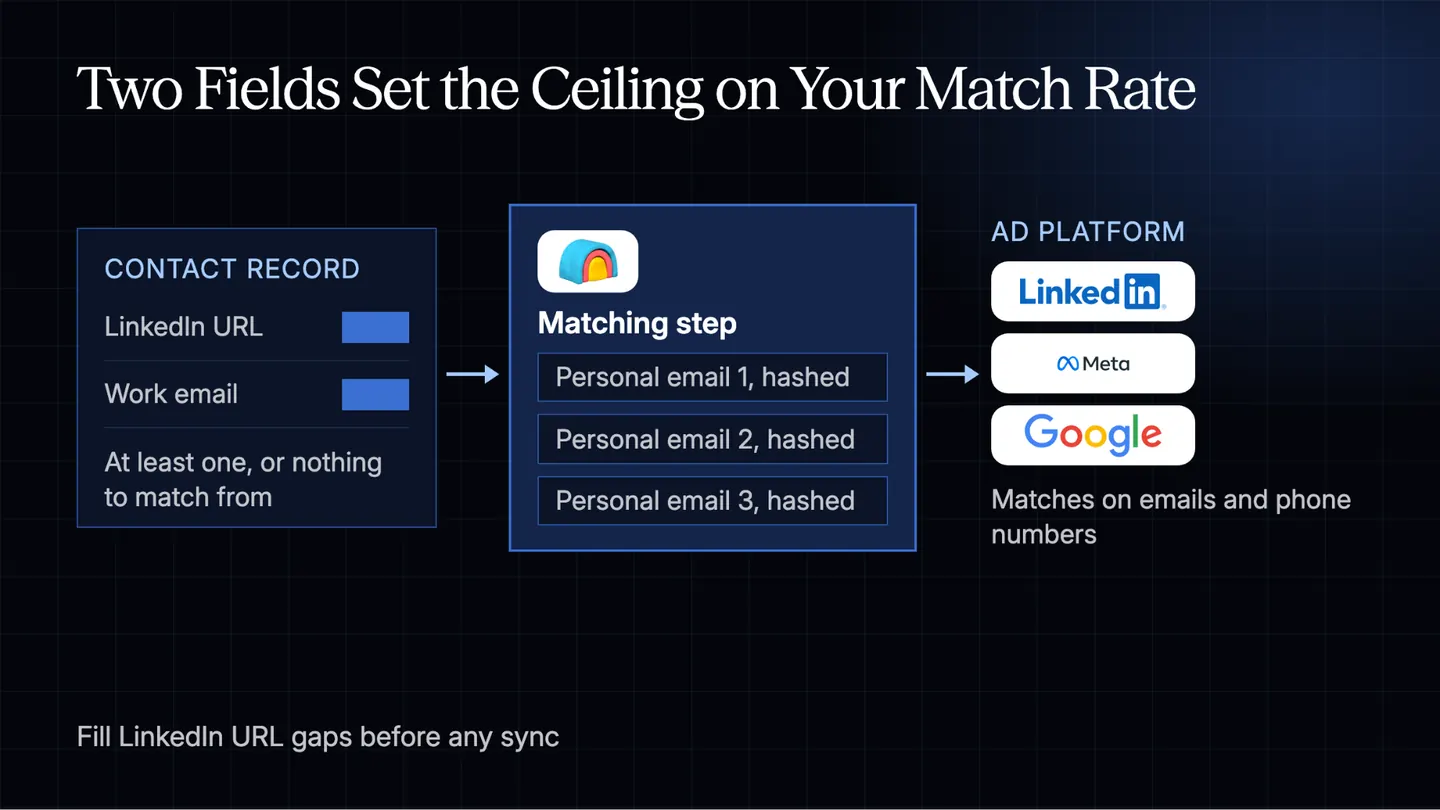
The matching step works only from the fields you give it.
The identifier you send can matter more than the list size. One r/PPC commenter, in a thread on Google match rates, had a B2B list of mostly Google Workspace addresses that matched about 6%. After switching to phone plus name, it “jumped to 40-something percent overnight.” That’s one anecdote, but it fits how consumer platforms match.
Before you sync, check each record against these points:
- A LinkedIn profile URL or a work email on every contact, since the matching step needs at least one.
- Any personal emails you already hold, mapped to the personal email input, because Clay only enriches where that field is empty.
- Phone numbers with a country code, which Meta and Google both require for phone matching.
- Country as a two-letter ISO code, which Clay expects for any mapped country field.
- For company audiences, the LinkedIn company page URL and domain, which Clay says match far more reliably than company name alone.
If your records are missing most of these, fill the gaps before you sync, with a Clay waterfall that queries several lead enrichment services in order.
Step by Step: Create Your First Clay Ad Sync
The sync itself takes six steps once the segment and identifiers are ready. Clay’s ad sync runs on a three-stage path called Setup, Match and Sync, and the steps below follow it. If your records start in Clay tables, fill the gaps there before you build the segment.
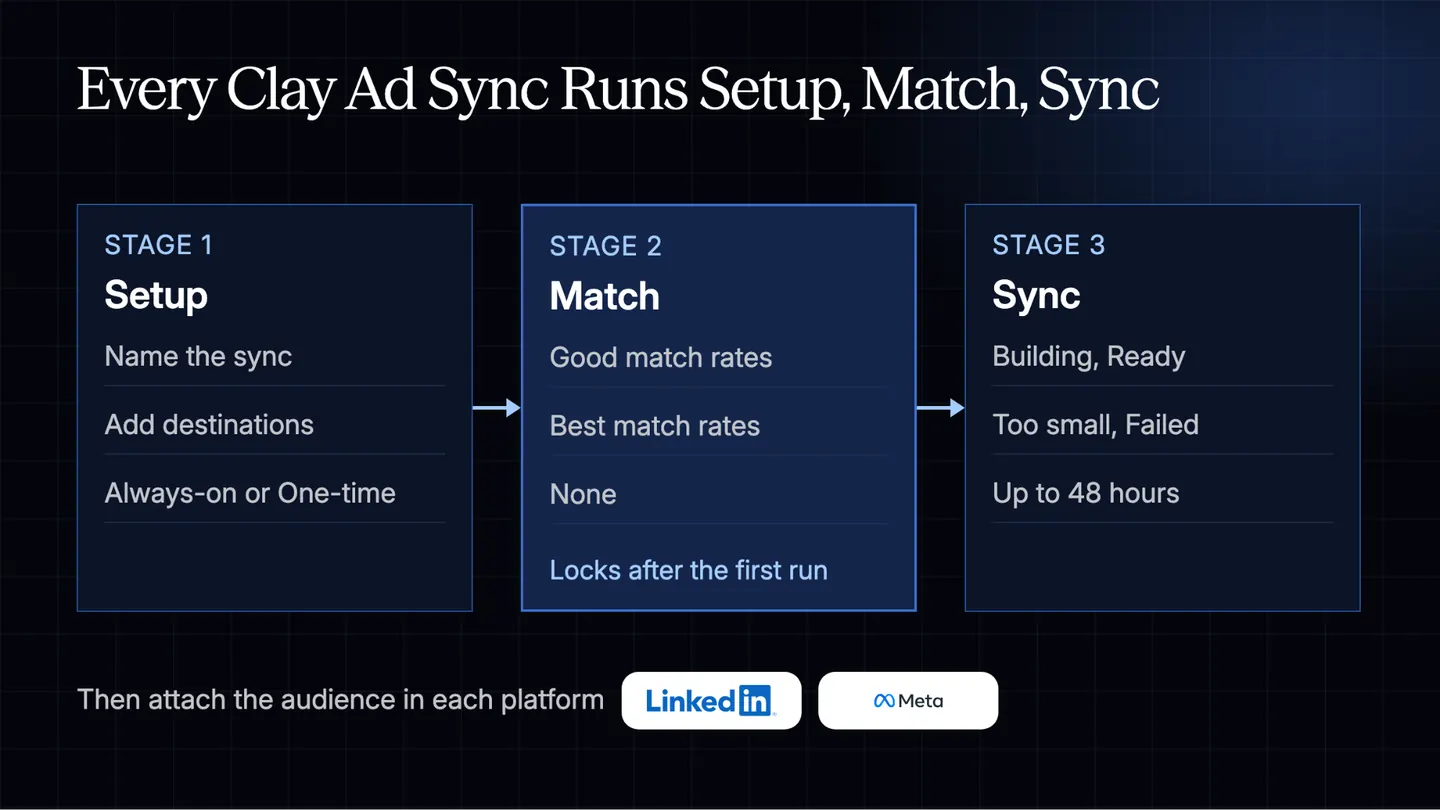
Pick the matching tier with care: Clay locks it after the first enrichment.
1. Save the Segment in Audiences
Open People for a contact sync or Companies for a LinkedIn account sync. Apply your filters, check the record count and save the segment. Clay’s docs block a new ad sync on any segment that still has a legacy one, so start from a clean segment.
2. Connect Your Ad Accounts
Go to Ads in the left sidebar, under Orchestration, and connect each platform. You need a role on the ad account that can manage audiences: Clay’s docs say admin and editor roles both work, and view-only roles can’t create an audience. Connections are shared across the workspace, so a teammate’s existing connection counts.
3. Create the Ad Sync and Set It Up
On the Ads page, click Create ad sync and pick People or Companies to match your segment. In Setup, name the sync, because Clay uses that name for the audiences it creates in each platform. Add your destinations, then pick a schedule: Always-on keeps the audience aligned to the segment, and One-time pushes once with no updates.
4. Choose the Matching Tier
In Match, pick a matching tier. Good match rates is Clay’s cost-effective choice at scale, Best match rates adds premium providers, and None skips enrichment and sends the identifiers you have. Choose carefully, because Clay locks the tier once the first enrichment has run. A confirmation then shows Contacts to enrich and Estimated credits before anything is charged.
5. Enrich, Sync and Wait
Click Enrich and sync. Status cards then show states such as Building, Ready, Too small and Failed, with the audience size, match rate and records sent. Clay’s docs say to allow up to 48 hours before an audience is usable, and LinkedIn’s own help says the same.
6. Attach the Audience in Each Platform
Clay doesn’t launch the campaign. Open each platform’s campaign manager and attach the Clay audience to a campaign, either as targeting or as an exclusion. On LinkedIn, the Clay audience appears among your LinkedIn Matched Audiences in the campaign’s audience settings. On Meta, it sits on the ad set.
What Clay Ads Costs on Each Plan
$495 a month is the Growth price in Clay’s pricing FAQ, and Growth is the cheapest plan with Clay Ads. The pricing cards show $446 a month beside a toggle that saves 10% on annual billing, and the page doesn’t label which basis the cards use.
Growth includes 6,000 Data Credits and 40,000 Actions a month, and Clay’s pricing table lists “Unlimited ad audiences” on Growth and Enterprise. Free and Launch don’t include ad audiences.
Inside the plan, the work draws on two meters. The table shows what each part of the work uses, from Clay’s Ads, matching and Actions docs.
| Part of the work | What it uses | Clay’s rule |
|---|---|---|
| Creating the audience | No Actions | Only the export counts |
| Hashed-email matching | Credits, charged per row | The rate shows on screen; Best costs more than Good |
| A contact with no email found | No credits | Enrichment that comes back empty is refunded |
| A contact already enriched | No new credits | Stored hashes are reused on later syncs |
| The sync | Actions | 1 Action per record exported |
One Clay lesson says syncing “doesn’t consume anything,” while the Ads FAQ and the Actions doc both say 1 Action per record. We follow the two docs. Clay doesn’t publish a per-row credit price for either matching tier, and it says to read the figure off your own workspace.
Clay’s docs don’t say whether a scheduled re-sync counts every record again or only the changes. Clay is rolling out incremental LinkedIn syncs that send only what changed, but not every workspace has them yet.
If every re-sync sends every record, a 5,000-record audience on a 3-day cadence uses about 50,000 Actions in 30 days, more than Growth’s 40,000. Watch your Actions balance after the first two scheduled syncs, then size the list to fit.
Ads shares both meters with every other Clay workflow, and Clay pricing sets a different allowance on each plan, so budget them together.
How to Read a Match Rate in Clay
A match rate is the share of your records the platform could tie to a real user. LinkedIn’s help defines it as the percentage of entries “that successfully matched with either member accounts or Pages” within the past seven days. It shows “<5%” for any list that matched fewer than 300 members.
Clay doesn’t calculate the figure the same way everywhere. Its docs say LinkedIn, Google and Vibe.co report the rate themselves, while Clay calculates it for Meta, Reddit and Bing from audience size divided by records sent. Meta also reports audience sizes as ranges, not exact counts, so treat its number as a rough guide.
Clay’s own benchmarks come as ranges. Its docs say the matching step “typically” takes LinkedIn to 90 to 95% and Meta to 50 to 70%+. Its Reddit testing produced 20 to 50%, and the Clay Ads page claims up to 85% on Google. These are Clay’s figures. None of the platform help pages we checked publishes a comparable benchmark, and Clay’s course says no platform reports which contacts matched.
Judge the rate against your own baseline instead. Split one test list at random into two halves, because each segment feeds only one ad sync and the tier locks after the first run. Sync one with None and the other with a matching tier. With a random split, the gap between them is a fair estimate of what the tier adds.
For a US-heavy list, expect a bigger lift, because Clay’s docs say matching coverage drops outside the US and Canada. A match rate measures reach. Judge the campaign itself on the qualified pipeline your CRM records.
Keep Audiences Current With Always-On Syncs
An ad audience starts going stale once you upload it. People change jobs, accounts become customers and deals close. An Always-on sync handles that by adding and removing members as records qualify or drop out, with no manual work.
Clay’s docs set the cadence: an always-on sync re-syncs every 3 days, or every 7 days for a company sync or when Bing is a destination. Older Clay pages and one customer story say every two days, but the current doc says 3.
The segment’s own refresh sets the real lag. On Growth, Clay’s Audiences FAQ says CRM and data warehouse syncs run daily, and on Enterprise every 15 minutes. A deal that closes this morning reaches the segment at the next CRM sync, then the ad audience at the next ad sync. Each platform then takes up to 48 hours to process it.
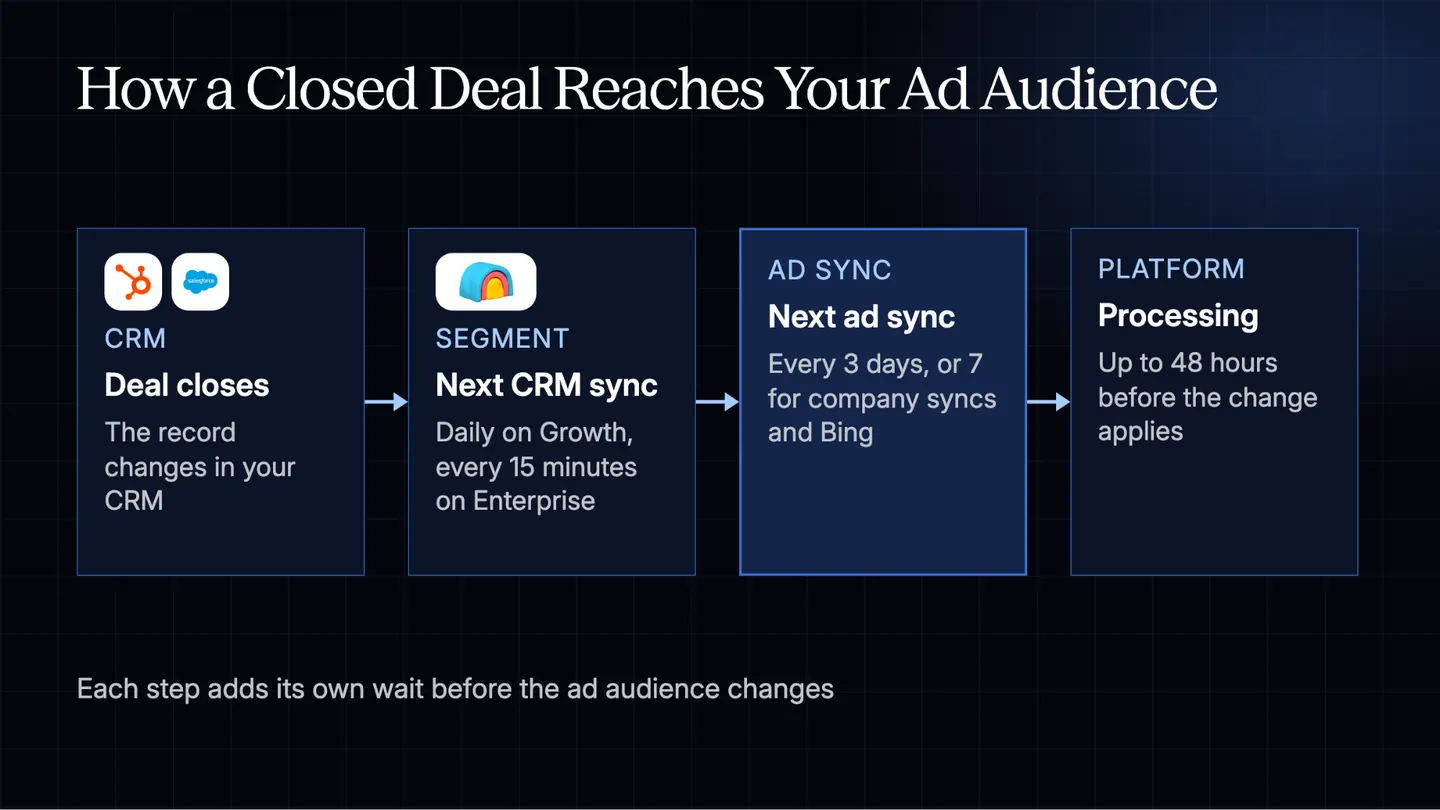
A new customer leaves the audience only after each step has run.
A dropped connection stalls the refresh too. Clay’s docs say Meta’s OAuth tokens expire every 60 days, and each expiry stops your always-on syncs until someone reconnects, which a system user token avoids. Clean source data helps every refresh, and our list of CRM data cleansing services covers teams that fix duplicate and stale records.
Suppress Customers and Open Deals
An exclusion list is an ad audience set up to keep a group from seeing your ads. Clay’s docs call it “usually the fastest first win, because it cuts wasted spend without needing a new campaign.”
Clay suppresses at the contact level. Its course gives the example of three people in an open deal: you can stop those three from seeing an ad without excluding the whole company. Build one always-on exclusion segment from these four groups, which Clay’s course names:
- Current customers, pulled from your CRM’s lifecycle or account status field.
- Open opportunities, filtered by deal stage so a new deal joins the list on its next sync.
- Employees, matched on your own company domain.
- Closed-lost deals, if you’d rather win them back through outbound than through ads.
Attach the exclusion audience in each platform. On LinkedIn, open the campaign, go to audiences, then exclusions, and select the Clay audience. On Meta, exclude it at the ad set. Before you hire one of the retargeting agencies we’ve reviewed, ask how it handles exclusions.
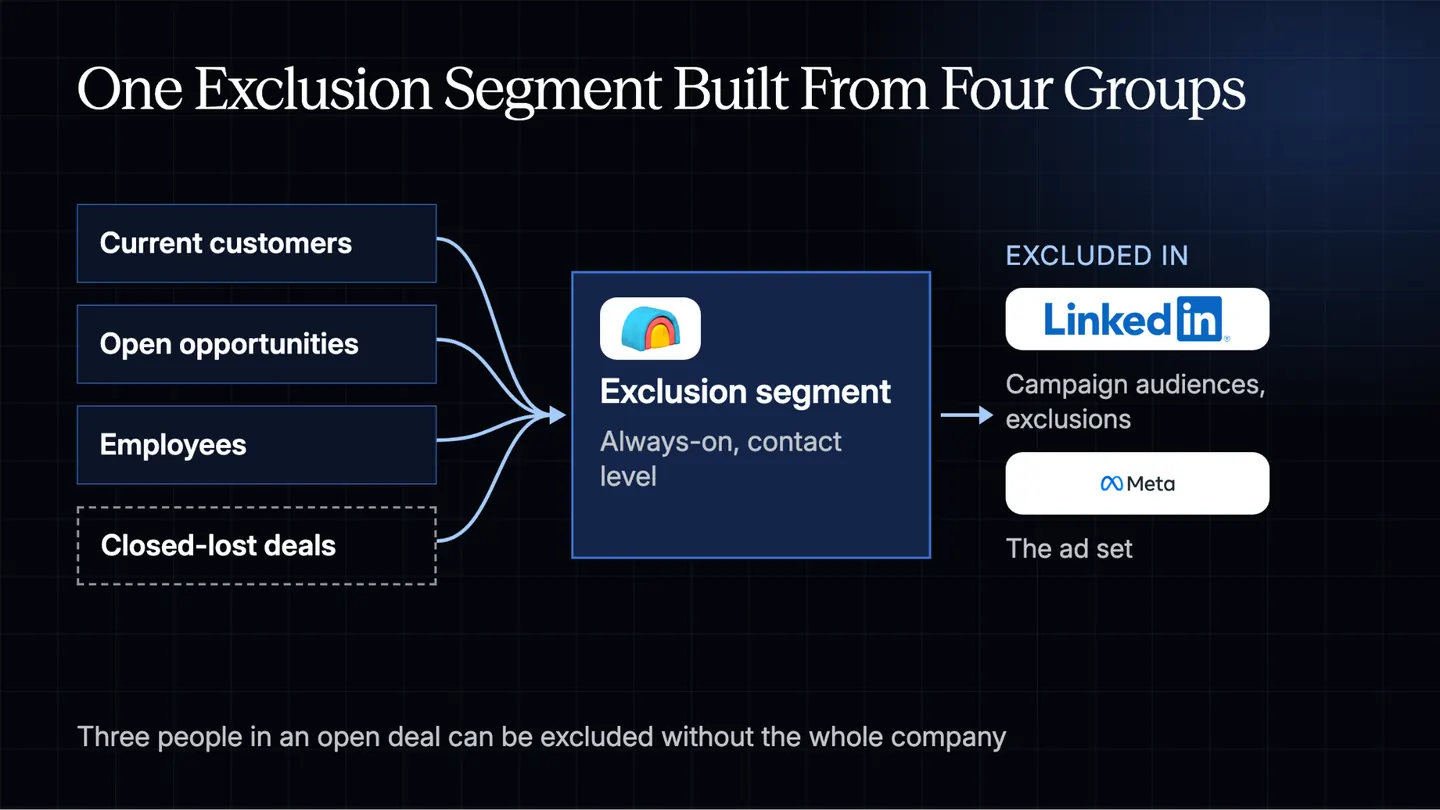
One exclusion segment, attached in each platform.
Check it after launch. Clay’s course warns that “a suppression list that doesn’t sync doesn’t work, and it fails silently,” and says to give it 48 to 72 hours. Its course adds that an up-to-date exclusion list moves CPMs first, then cost per qualified lead.
First-Party Data Rules for Google, Bing and Non-US Audiences
Not every contact can go everywhere. Clay’s docs say Google Ads and Bing Ads accept first-party data only, so contacts sourced solely from Clay’s data marketplace are filtered out of those syncs. Outside the US, Clay-sourced contacts are filtered from every destination, so only your first-party data goes out.
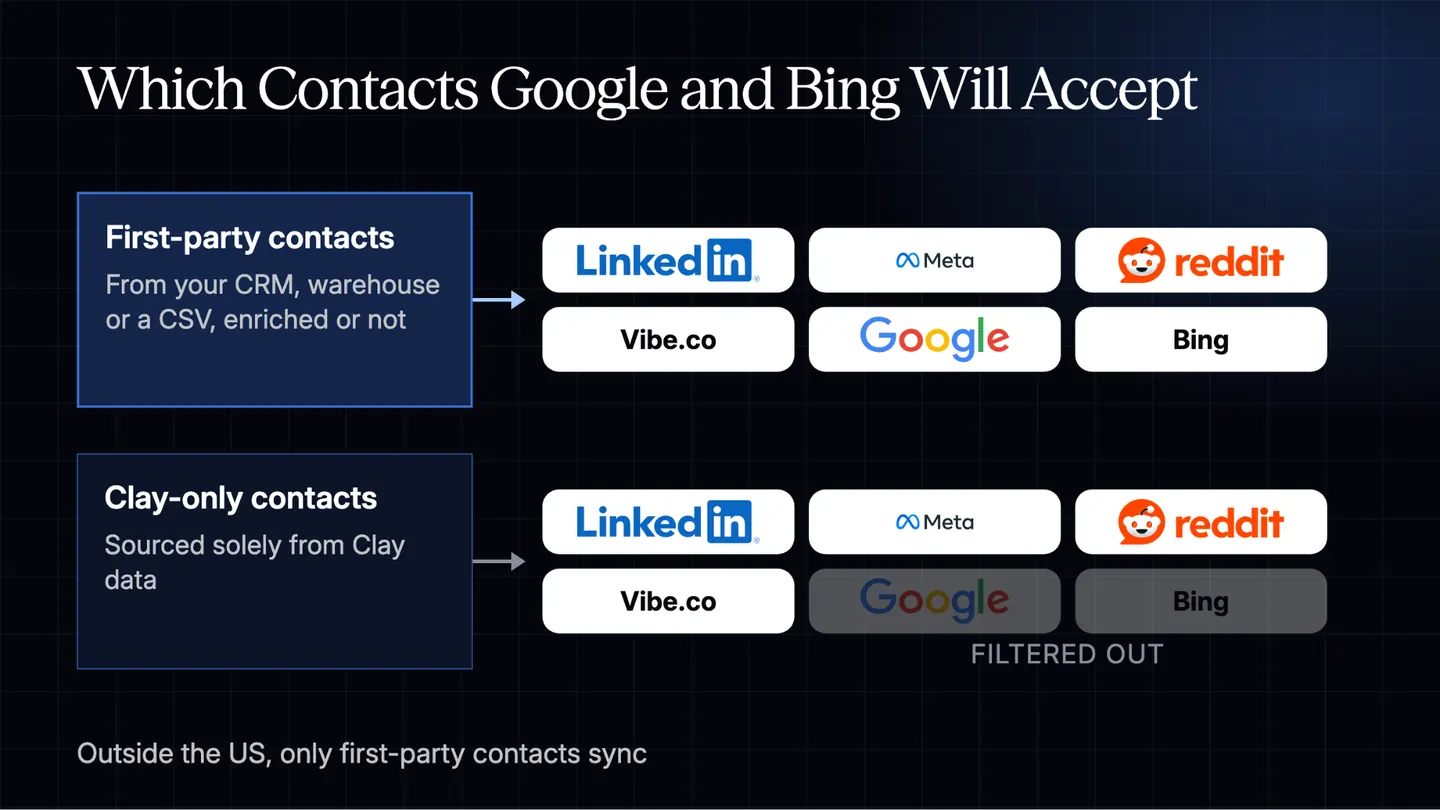
Google and Bing take first-party contacts only.
The definition is generous. Clay counts a contact as Clay-sourced only when Clay’s data is its sole source. A contact you imported from your CRM, warehouse or a CSV keeps first-party status under Clay’s rules even after you enrich it. Exclusion lists are filtered by the same rules, so build them from your own data if every contact must land.
Hashing isn’t anonymity. Clay sends emails as SHA-256 hashes, and the FTC’s Office of Technology wrote in July 2024 that hashing doesn’t make data anonymous. Treat hashed lists as personal data, and honor opt-outs at the source: Clay’s FAQ says removing someone there removes them from the synced audience on the next sync.
For Google audiences that include EEA contacts, Clay’s Google doc says to set Sending user data to Google and Ad personalization to granted.
How AirOps Ran Ads on Clay Account Lists
AirOps shows what a Clay ABM audience can do for paid media. In Frontal’s ABM campaign for AirOps, the brief was to move from under $600K of pipeline a month to over $2M in 90 days. It had a $136,000 ad budget and no cold outreach.
The audience came first. The case page says Clay “became the targeting engine for paid media”: account lists filtered by website traffic trends, tech stack, ARR and growth rate, and recent funding. Those lists went “straight into LinkedIn Ads with no CSVs in between.” Every interaction then triggered retargeting across LinkedIn, YouTube, Display and Native ads, and engagement synced into HubSpot so sales knew when to reach out.
The one 90-day campaign generated $9.6M in total pipeline and $543K in closed revenue, and added 182 qualified deals to the CRM. The case page puts the return on its $136K ad spend at 4x. Monthly pipeline grew from $536K in November 2024 to $2.9M in March 2025.
The campaign predates Clay Ads 2.0, which Clay launched in August 2026, so the sync method differed. The list-first approach is the same.
Common Sync Problems and Fixes
Clay’s docs name a cause and a fix for each of these sync problems. Check them before you open a support ticket:
- The sync shows Too small: the matched audience is under the destination’s floor, so widen the segment or add identifiers.
- Google can’t be added: Customer Match isn’t on for that ad account yet, which Google decides from account history and policy standing.
- You can’t create a sync: your ad account role is view-only, or the segment still has a legacy sync.
- Meta audiences stop updating: the OAuth token expired after 60 days, so reconnect or switch to a system user token.
- A Bing sync won’t connect: Clay’s Bing doc says you need a Microsoft Advertising developer token from your own organization.
- You need a different matching tier: the tier can’t change once the first enrichment has run, so duplicate the segment and build a new sync from the copy.
If the same problem keeps coming back, look upstream at the data. Our list of ABM agencies includes teams that build and run these audiences for you.
Put Your Ads and Outbound on One Account List
Ad audiences work best as part of one system, where the same scored list feeds your ads, your outbound and your CRM. That shared list is the core of account-based marketing done well. Start with a 5,000 to 10,000 record segment and an exclusion list, and test one matching tier against None. Check your Actions after two scheduled syncs, because full re-sends can outrun Growth’s allowance.
We build Clay workflows and run paid media for teams past product-market fit with a real sales team. Most clients start with one service, and scope and pricing are set on a call. Book an intro call.
Frequently Asked Questions
What is Clay Ads?
Clay Ads is Clay’s tool for sending audiences to ad platforms. It takes a segment of contacts or accounts from Clay Audiences and, unless you pick None, enriches each contact with as many as three hashed personal emails to raise match rates. Clay syncs the list to platforms such as LinkedIn, Meta and Google. An always-on sync then adds and removes members as records change.
Which ad platforms does Clay Ads sync to?
Clay’s docs listed six destinations on November 16, 2026: LinkedIn Ads, Meta Ads, Google Ads, Reddit Ads, Bing Ads and Vibe.co. Meta covers Facebook, Instagram, Messenger and WhatsApp, and Google covers Search, YouTube, Gmail and Display. Clay lists no TikTok or X destination.
Do you need the Growth plan to use Clay Ads?
Yes. Clay Ads is available on Growth and Enterprise only, and Clay’s pricing FAQ lists Growth as starting at $495 a month, and its pricing card shows $446 beside a 10% annual-billing toggle. You also need Clay Audiences set up in your workspace. If Ads shows an Upgrade badge in the sidebar, Clay’s docs say ads aren’t switched on for your workspace yet.
What match rate should you expect from Clay Ads?
On Meta, work emails alone typically match 10 to 20%, against 60 to 70% on LinkedIn, according to Clay’s docs. Adding hashed personal emails typically lifts Meta to 50 to 70%+ and LinkedIn to 90 to 95%. These are Clay’s ranges, so measure your own by running one sync without matching and one with it.
How often does an always-on Clay audience update?
Clay re-syncs an always-on audience every 3 days. Company syncs and any sync with Bing as a destination run every 7 days instead. Your segment’s own source refresh comes first: daily on Growth and every 15 minutes on Enterprise. Each platform then needs up to 48 hours to process the changes.
Can you send Clay company lists to Meta or Google?
No. LinkedIn Ads is the only destination that takes account segments, per Clay’s docs. For Meta, Google, Bing, Reddit and Vibe.co, you sync the contacts at those companies instead. Google’s doc puts it plainly: “Google Ads supports contact-level targeting only.”
Does Frontal build ad audiences in Clay?
Yes, as part of our paid media and ABM work. Our paid media team builds and tests audiences around your buyers, and for AirOps, Clay account lists went straight into LinkedIn Ads. Your ad accounts, audiences and history stay with you, and most clients start with one service.