Key Takeaways
- Claygent is Clay’s AI agent with web research. It reads public pages for each row in a table and writes the answer into columns you define, so use it for questions no data provider sells a field for.
- On Clay’s own AI keys, each row in a table run costs 1 action plus data credits set by the model. At Launch’s base rates, a 1,000-row column uses about $54 of credits and actions on Clay Helium and about $154 on Clay Argon.
- A clean column comes from the prompt: name the pages to read, fix the output fields, require a source URL and allow “Not found”. Test 10 rows before you run the rest.
- Use a regular enrichment or waterfall for headcount, funding or emails. Save Claygent for the last-mile questions providers can’t answer.
Claygent is the part of Clay that reads the web for you. You give it a column of company domains and a question, such as “Does this company publish its prices?” It visits each site and writes back an answer, row by row. That makes it the right tool for public facts no data provider sells. It also makes it easy to pay for confident answers nobody checked.
Frontal, the go-to-market partner for B2B tech companies, wrote this guide. Our team works as an extension of yours. As a Clay Elite Studio Partner, we build Clay workflows that research each target account for our clients’ sales teams.
Every Clay detail in this guide follows Clay’s pricing page and documentation as read on November 20, 2026. You’ll see what Claygent does, what a run costs, how to write a prompt that returns a clean column and when a plain enrichment does the job for less.
What Claygent Is and How a Run Works
Clay defines Claygents as “agents in Clay that perform tasks on your behalf.” Each one takes inputs from your table, follows your instructions and writes a structured output. Clay’s pricing page calls Claygent “Clay’s AI agent with access to web research.” So when people search for a Clay agent, this is usually the feature they mean.
What makes it an agent rather than a single prompt is the number of steps. Clay’s July 2026 post on open-weight models says it “can plan, browse, and reason across dozens of steps before returning an answer.” In practice, it searches, opens pages, reads them and decides whether it has enough to answer.
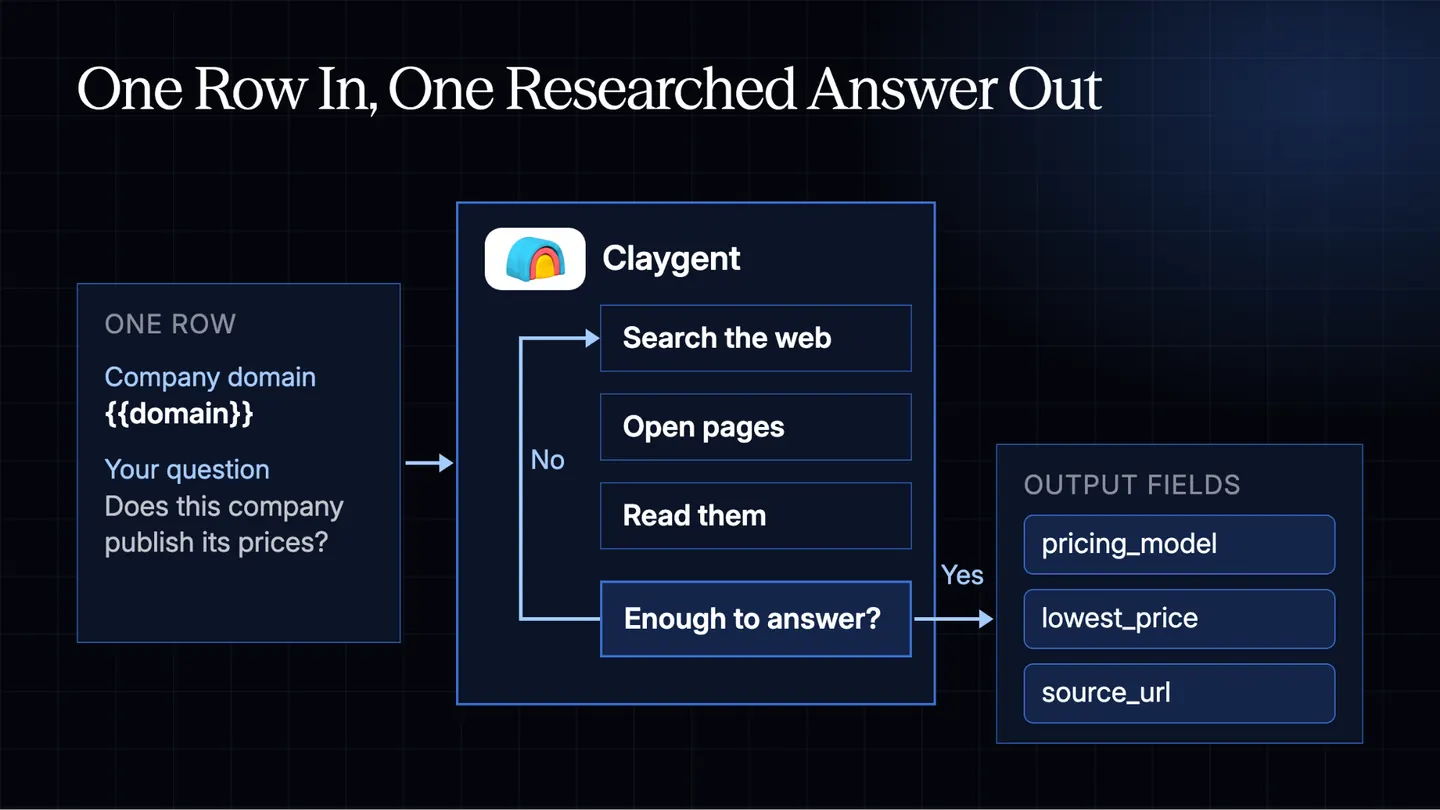
Claygent reads until it can answer, then fills your fields.
Clay counts that work in runs. Its June 2025 post on the agent’s first billion runs says a run “happens every time Claygent finds new data.” The same post says running it on a 10-row table “counts as 10 runs.” Clay launched the feature in September 2023. The counter on its Claygent page passed 5 billion runs by November 20, 2026.
Each row is then a small research job, with its own cost, its own sources and its own chance of being wrong. Filling the fields no data provider covers is one of the jobs GTM engineering teams hand to research agents.
Claygent vs Use AI and Clay’s Other AI Agents
Clay puts several AI features under one menu, and the names overlap. In a table, you click Add column, then Use AI. The Configure tab asks for a use case: “Web research (Claygent)” to scrape and analyze websites, or “Create or modify content” to work with data already in your table.
Clay’s FAQ draws the line: Claygent “is best for finding real-time research on the internet,” while Use AI “is best at writing personalized messages” and categorizing data. The content mode doesn’t browse the web, which is why Clay’s credits lesson calls it less credit-intensive.
Here’s how both modes compare with Clay’s newer agents, each with its own plan rule.
| Feature | What Clay says it does | Reads the web? | Plans |
|---|---|---|---|
| Use AI, content | Creates and modifies data already in your table | No | Every plan |
| Claygent (Use AI, web research) | Scrapes and analyzes websites, one row at a time | Yes | Every plan, including Free |
| Claygent Builder | Builds, tests and saves Claygents you reuse across tables | When you turn on web search | Every plan, no extra cost |
| Account Agents | Run in Audiences across every account in a segment and track what changed | Yes | Launch, Growth and Enterprise (beta) |
| Clay’s global agent | Builds the whole workflow, with Claygents as sub-agents for single jobs | Through its sub-agents | Launch, Growth and Enterprise (beta) |
Memory separates a Claygent in a table from an Account Agent. Clay’s Account Agents page says “Claygents in tables start fresh every run,” while Account Agents keep track of what changed since the last pass.
If you’re searching for a Clay AI agent that books meetings on its own, Clay’s inbound AI SDR was still waitlist-only on November 20, 2026. Teams that want that job done now compare AI lead generation services instead.
What Claygent Can Read and Where It Stops
Claygent works on public web pages. You can let it search the web, or point it at a page by mapping your domain column to the URL input. It “reaches any publicly available data that isn’t behind a login,” Clay’s scrape guide says. Some sites still block it in practice, so the same guide suggests Zenrows as a fallback “when a site fights back.”
Beyond web pages, the agent reads files. Clay’s July 2024 Neon changelog noted “significant capability jumps in parsing PDFs.” Claygent Builder lets you attach tone guides, messaging docs, PDFs or CSVs to an agent. You can also give a Claygent other Clay tools, such as a default enrichment, one of your Functions or a custom MCP server.
Claygent can’t reach “information hidden behind paywalls or password-protected areas,” according to Clay’s lessons. Clay’s August 2025 post on Navigator, a model that applies filters, fills in search forms and clicks buttons, says it handles “logging into websites.” With Clay’s own pages in disagreement, test any gated page before you rely on it. Clay’s pages don’t say whether the agent can read LinkedIn profiles, so don’t build a column on that assumption.
Clay’s prospect research guide gives a test that saves credits: “If you cannot name a public place the answer lives, Claygent cannot find it either.” Before you write a prompt, name the page that holds the answer, such as the pricing page, the careers page, a security page or a 10-K.
Pages like these fall into 12 categories of outbound data sources for account research, starting with review and feedback sites.
Choosing a Model: Auto, Clay Models or Frontier Models
Since October 27, 2026, Auto is on by default for new Claygents in tables and Use AI columns, and Clay picks a model for each row. Existing Claygents keep the model they had. Clay’s auto-mode post says Auto “cost 47% less than routing every task to the most capable model” on its production traffic. Auto itself carries no extra charge.
The trade-off is consistency. Clay’s AI pricing FAQ warns that “two rows in one column can run on different models.” It adds that the spread is widest on sparse or inconsistent lists, so a column of hard, judgment-heavy rows may deserve a fixed model.
Claygent Builder sorts the models you can pick yourself into three groups. Clay-managed models include Neon and Argon, frontier models include Sonnet 5 and GPT 5.6, and open-weight models include Kimi K2.6 and GLM-5.2. Navigator sits in the same dropdown.
Clay’s Build a Claygent lesson is blunt about the choice: “If a data point is valuable to you, spend more on it.”
For the rest, one Reddit user tested a cheaper approach, though the result is anecdotal. They ran a cheap model on every row, then reran only the rows with no answer on Argon. On 10 rows, they said it cost “34% less than just running the most sophisticated Claygent straight out.”
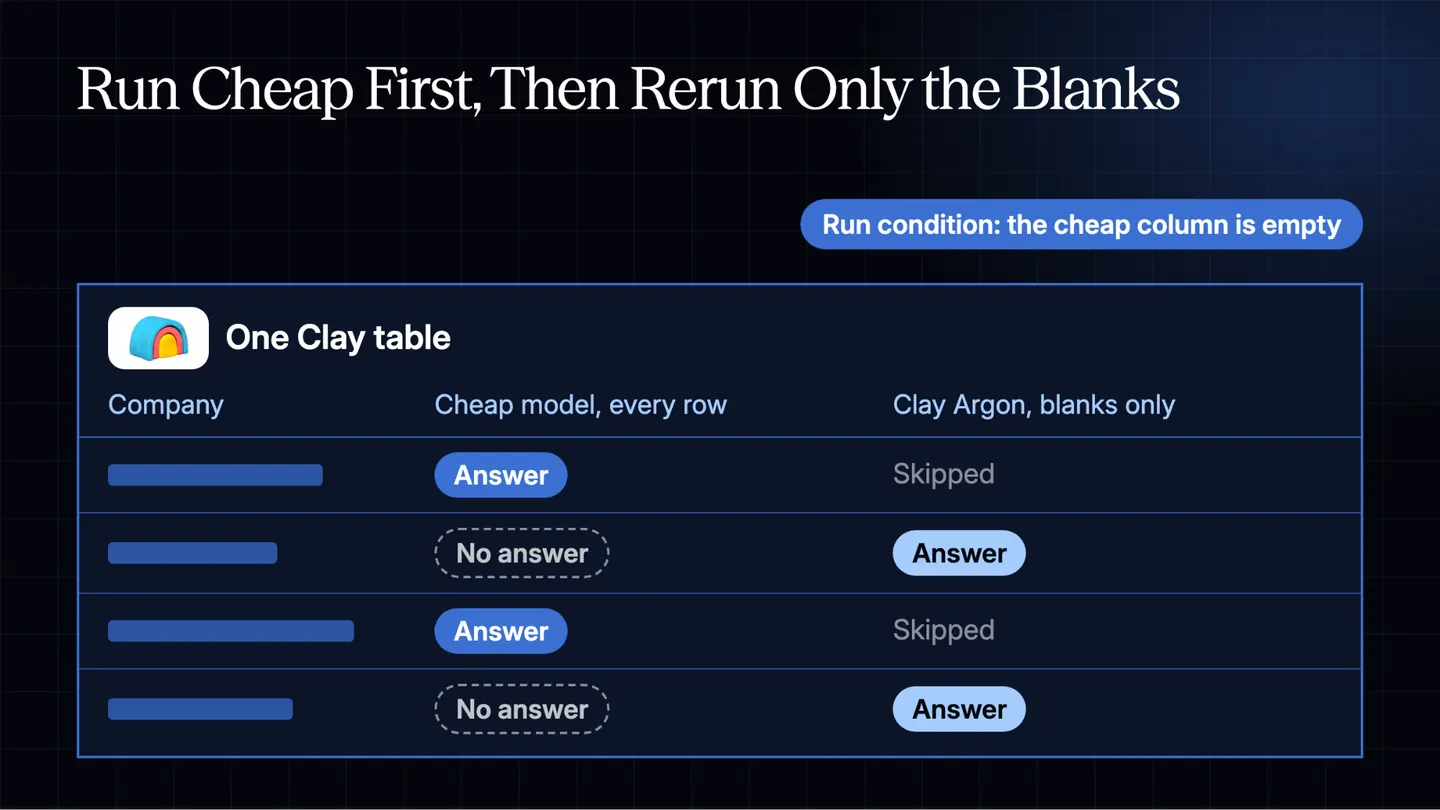
Argon only sees the rows the cheap model left blank.
The test dates from December 2024, before Clay’s 2026 pricing change, so copy the pattern, not the prices. A run condition on the second column makes the rerun automatic. Running the same frontier models outside Clay is possible too, and Claude Code for GTM work swaps per-row billing for code you maintain yourself.
What a Claygent Run Costs
A 1,000-row Claygent column uses about $54 in credits and actions on Clay Helium at Launch’s base rates, about $29 on GPT-5 Nano and $154 on Clay Argon. On Clay’s own AI keys, each row in a table run costs 1 action, plus data credits set by the model you choose.
Clay’s Claygent FAQ calls the credit part “fixed pricing for Clay’s own models” and “variable pricing for advanced reasoning models.” Clay’s AI pricing doc lists each model’s cost per row in data credits, for web research and for Use AI.
| Model | Web research (Claygent), credits per row | Content generation (Use AI), credits per row |
|---|---|---|
| GPT-5 Nano | 0.5 | 0.2 |
| Clay Helium | 1 | Not listed |
| GPT-5 Mini | 1 | 0.4 |
| Gemini 2.5 Flash | 1 | 0.5 |
| Clay Argon | 3 | Not listed |
| GPT-5.1 | Variable | 2 |
| Claude 4.5 Sonnet | Variable | 1.5 |
| Claude 4.6 Opus | Variable | 7.5 |
The rates come from Launch’s add-ons: $125 for 2,500 data credits is $0.05 a credit, and $60 for 15,000 actions is $0.004 an action. They’re our sums from Clay’s pricing page on November 20, 2026, and they measure usage value, since credits come in plan bundles. Bigger credit tiers lower the rate, and a row you rerun in a table is charged again.
Variable models bill in two steps. Clay shows an estimate marked with a tilde (~) and withholds credits “based on the 75th percentile of past runs for that model.” Once the run finishes, it refunds the surplus or charges the difference. Clay’s pricing FAQ says 75% of runs cost less than the estimate. If your balance hits zero mid-run, processing stops, and Clay says it never charges beyond your balance.
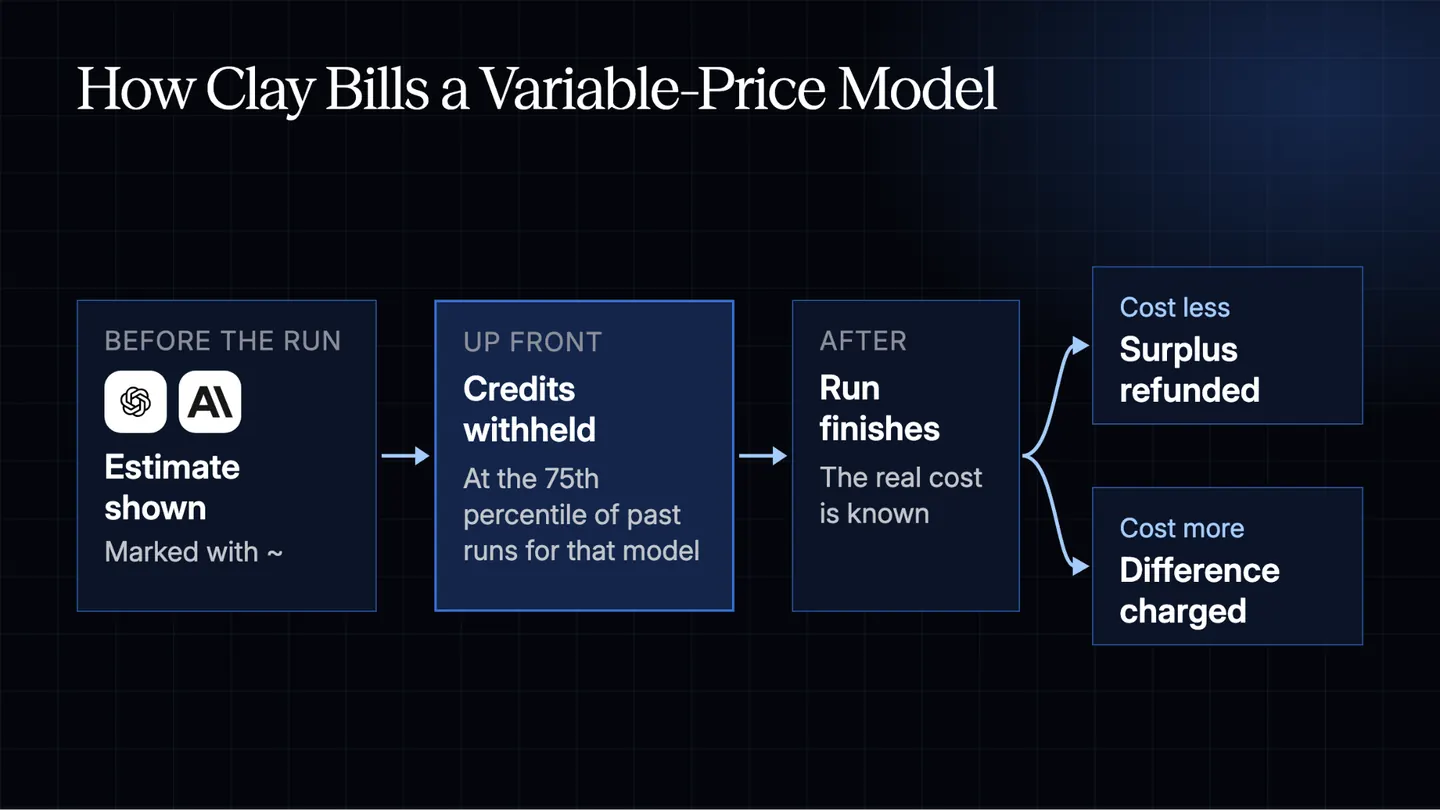
Credits are held first, then settled after the run.
With your own OpenAI or Anthropic key, each run still uses 1 action but no data credits, and you pay the AI provider for the tokens instead.
Clay’s token doc says Claygent web research needs OpenAI Tier 2 or higher, or Anthropic Tier 4 or higher. Clay also says AI runs are 2x faster on its own keys, because of the rate limits it has negotiated.
Expect to pay for empty answers. Clay’s pricing FAQ makes an enrichment that “returns no result” free. Its credit refunds doc, though, doesn’t list Claygent or Use AI among the AI actions refunded on no data. Rows skipped by a run condition, or that time out, are refunded.
How to Write a Claygent Prompt That Returns a Clean Column
Clay’s prospect research guide puts the idea plainly: “A good Claygent prompt is not a question. It is a contract.” The contract covers context, where to look, the answer shape you’ll accept and what to do when nothing turns up. These six steps build one.
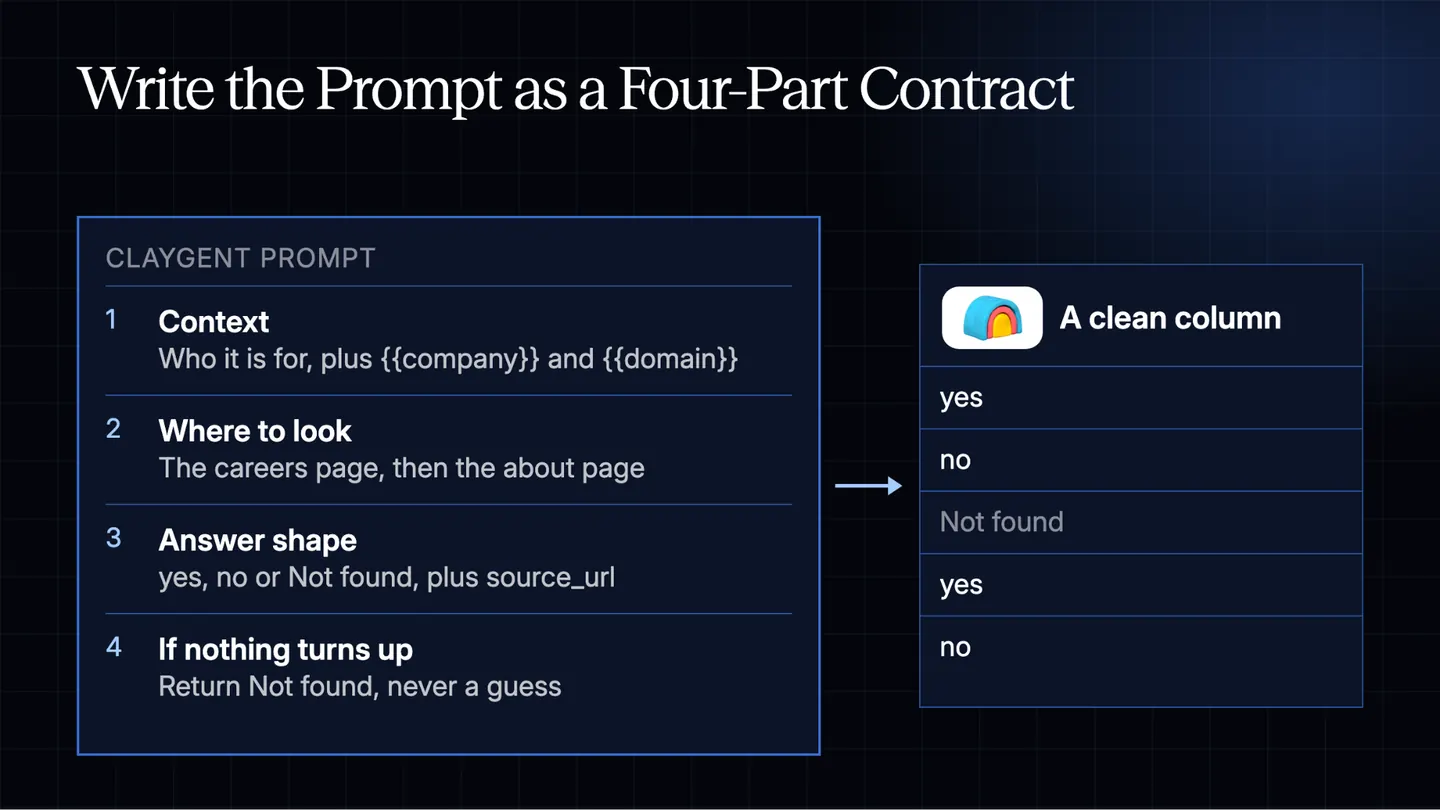
Four clauses decide whether the column comes back clean.
1. Turn Off Auto-Run First
Switch off auto-run before you add the column. Clay’s guide warns that otherwise “the agent fires on every row the moment it exists,” which spends credits on a prompt you haven’t tested.
2. Give It Context From Your Columns
Start with a short line on who the research is for and why, as Clay’s prompt engineering course advises. Then pull in row data by referencing columns inside the prompt, such as {{company}} and {{domain}}. Run your enrichments first, so the agent starts from a clean domain and company name instead of guessing.
3. Say Exactly Where to Look
Name the pages in order: “Look first at the company’s careers page, then its about page.” A named source keeps the agent off third-party directories and makes each answer quicker to check. If you already know the page, pass its URL as an input instead of asking the agent to search.
4. Define the Output Fields
Add each output as its own field in the Use AI panel and set its data type, such as text, number or list. Clay also accepts a JSON schema. Keep fields closed where you can, because “yes”, “no” or “Not found” sorts and filters, and a paragraph doesn’t.
One anecdotal report on Reddit backs closed fields. “For black and white use cases, it is very good,” the user wrote, though they found it unreliable on judgment-heavy tasks. Ask one question per column, and split a two-part question into two columns.
5. Allow “Not Found” and Require a Source
Clay’s guide explains why this step matters: “A model with no permission to fail will fabricate to fill the field.” Tell the agent to return “Not found” when no page confirms the answer. Add a source_url field, and forbid guesses from prior knowledge about the company.
6. Put the Verdict Last
Ask for evidence first and the final answer last. Clay’s guide says to “force the final verdict to be the last token the agent returns, after its reasoning and evidence.” The agent then lays out what it read before it commits to an answer.
If you’d rather not write all six parts, the Generate tab in Use AI builds the prompt, a recommended model and the output fields from a plain-English description. Check that its column references point at the right columns before you run it.
Three Research Prompts You Can Adapt
Each prompt follows the same contract and returns fields a sequence or CRM can use.
The first checks whether a company publishes its prices. “You are researching {{company}} ({{domain}}) for a sales team. Visit the company’s pricing page, then its homepage. Return source_url first, then lowest_price as a number or empty, and pricing_model last as “public”, “contact sales” or “Not found”. Use only what the page states, and do not guess.”
The second comes from Clay’s own guide and checks whether a company “runs an in-house security or AppSec team, versus outsourcing security.” It tells the agent to look first at the careers page, the engineering or security blog, and the about and security pages. Adapted with the verdict last, it returns one sentence of evidence, the source_url and then in_house_security as “yes”, “no” or “Not found”.
The third looks for a hiring signal. “Visit {{domain}}‘s careers page. Is the company hiring for a RevOps, sales operations or GTM engineering role now? Return source_url and job_title first, then hiring as “yes”, “no” or “Not found”. Count only open roles on the company’s own site.” Open roles are the kind of buying signal that B2B intent data providers sell as a feed.
Each prompt also needs a run condition and a next step. Clay’s run settings take a plain-language condition, with / to reference a column, such as “{{domain}} is not empty.”
| Prompt | Output fields | Run condition | What the answer feeds |
|---|---|---|---|
| Pricing model | source_url, lowest_price, pricing_model | Domain is not empty | Different openers for public-price and contact-sales companies |
| In-house security team | evidence, source_url, in_house_security | Company passed your industry filter | Security-led messaging for teams that run it in-house |
| Hiring signal | source_url, job_title, hiring | Company passed your ICP filter | An alert to the account owner, or a signal sequence |
The run condition keeps the agent off rows a cheaper column has already ruled out.
Check the Answers Before Anyone Uses Them
Clay’s guide names the main risk: “the failure mode of a confident model is a wrong answer that looks exactly like a right one.”
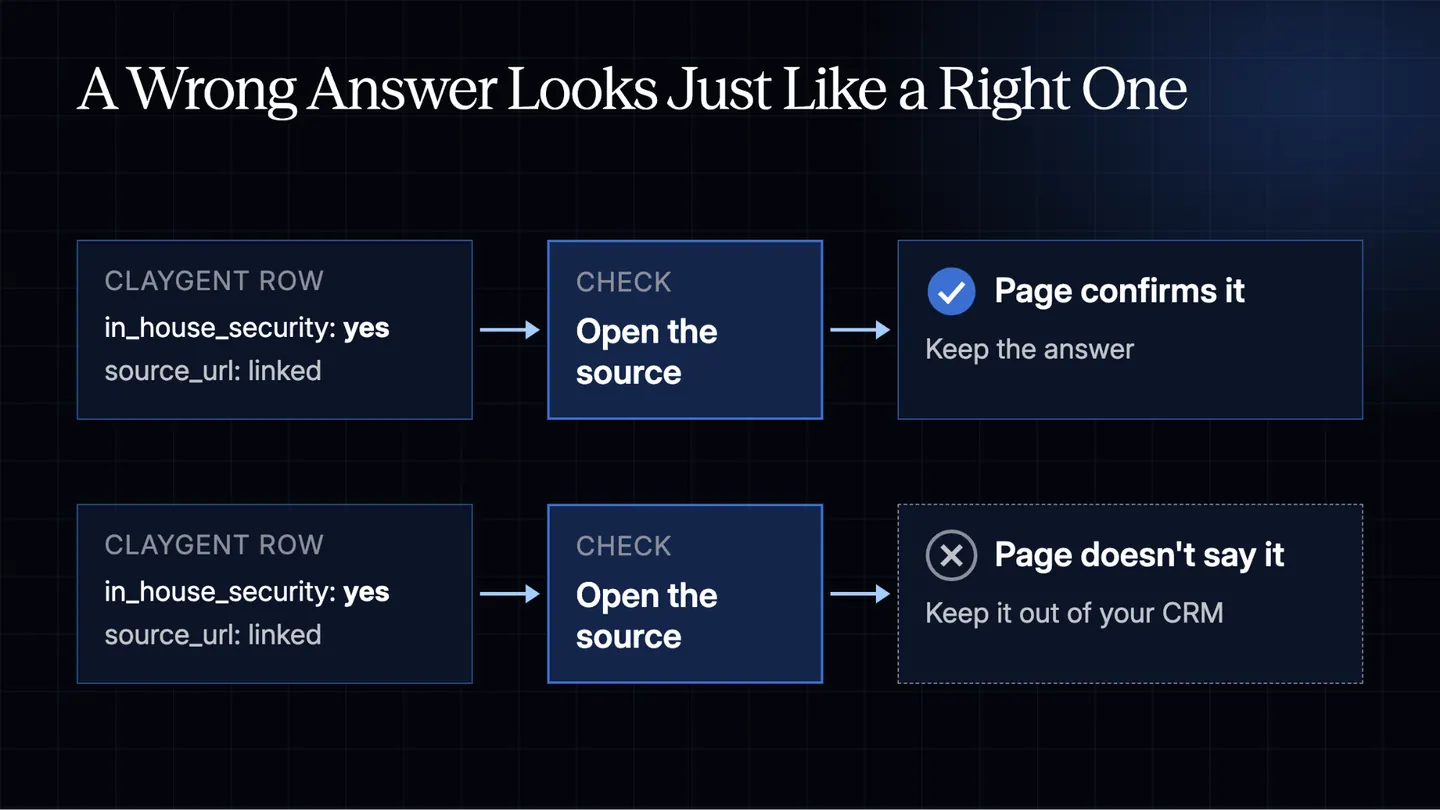
Only the source page can tell the two rows apart.
Outside research points the same way. The Tow Center’s March 2025 study tested eight AI search tools on news excerpts. “Collectively, they provided incorrect answers to more than 60 percent of queries,” and ChatGPT signaled doubt just 15 times in 200 responses.
News excerpts aren’t company websites, but hard web research shows the same pattern. In the BrowseComp benchmark, published by OpenAI researchers in April 2025, browsing lifted GPT-4o’s accuracy on hard-to-find facts only from 0.6% to 1.9%. The authors noted that web tools “may increase the model’s confidence in incorrect answers.”
So check every new column before it feeds a sequence or your CRM. Clay’s guidance comes down to a short routine:
- Run the prompt on 10 rows and read every answer, then scale to 50 and then 500.
- Sort by the answer field and open five or six rows across the range.
- Click through to each source URL and confirm the page says what the agent claims.
- Add hard rows to your test set, such as small private companies, because well-known names are easy.
- Read the reasoning trace Clay attaches to any answer that surprises you.
- Fix the prompt when the same mistake shows up twice, instead of editing rows by hand.
Formulas can catch what a person misses. Our Qualifying from Public Filings workflow puts it as “Guard in code, not in the prompt.” Every field returns a value or “unknown” with a reason, and every field carries its source URL. A formula column that flags blanks and missing sources does that check on every row.
When an Enrichment or Use AI Beats Claygent
Clay’s own guide gives the rule: “If a provider already sells the field, do not pay an agent to read pages for it.” A headcount or a funding round “is better handled by a regular enrichment, which is cheaper and more deterministic.”
Waterfalls cover most standard fields. Clay’s Claygent lessons say a waterfall of providers reaches 80 to 95% coverage. They call the rest “last-mile data,” meaning “the data no provider can give you.” Where the answer sits on a public page, that remainder is Claygent’s job, and choosing lead enrichment services for the first 80 to 95% is a separate decision.
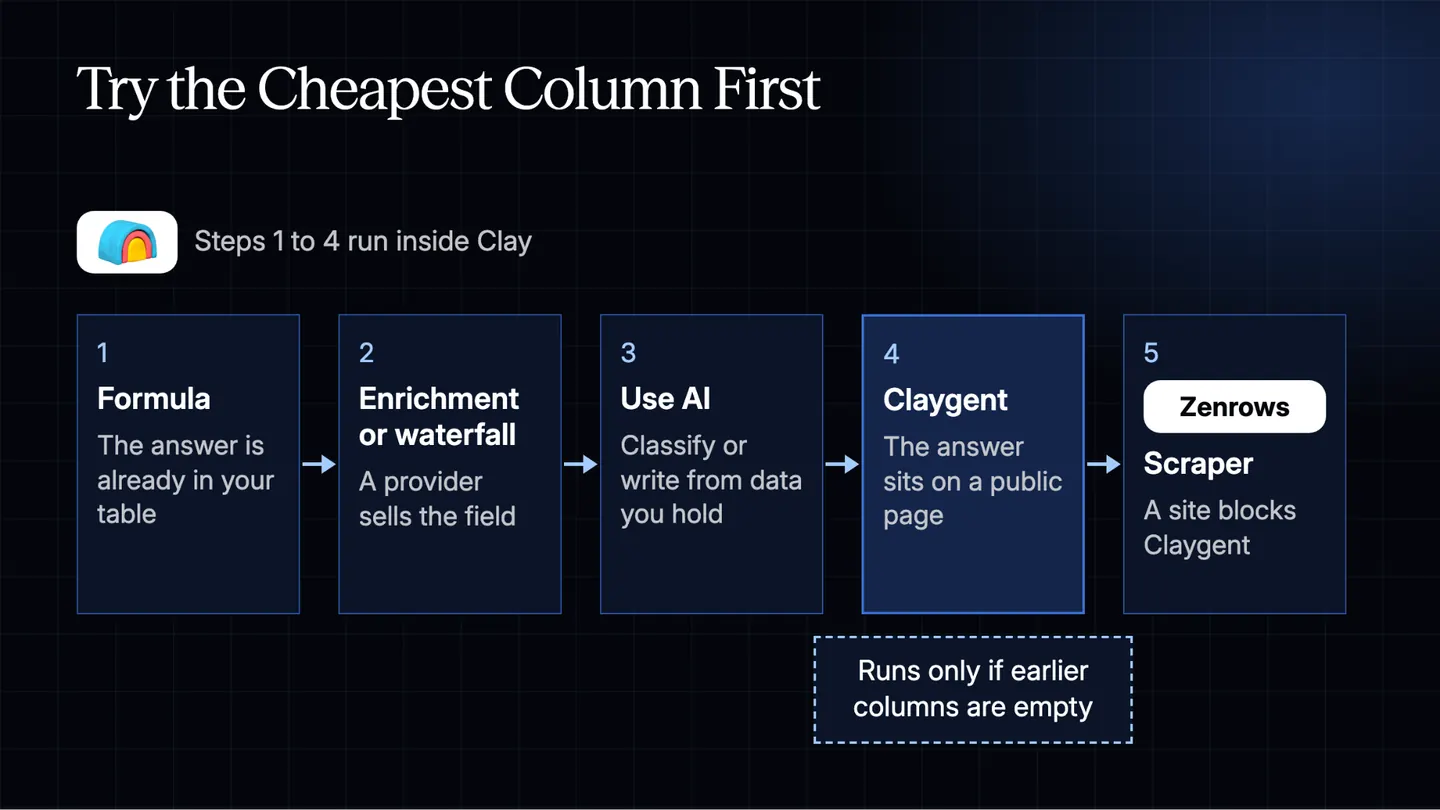
Claygent comes fourth, after three cheaper columns.
Clay’s credits lesson and scraping lessons suggest an order to try, cheapest first:
- A formula, when the answer is already in your table.
- A provider enrichment or waterfall, when someone sells the field.
- Use AI, when you need to classify or write from data you already hold.
- Claygent, when the answer sits on a public page and no provider has it.
- A scraper such as Zenrows, when a site blocks Claygent.
Build that order into the table itself. Run enrichments before the agent, and set its run condition to fire only when the earlier columns came back empty. Clay’s credits lesson words that rule as “Only run Claygent if no other data was found.”
Save Working Prompts with Claygent Builder
Once a prompt passes its checks, save it so nobody rewrites it. Claygent Builder, launched May 7, 2026, is Clay’s place to build, test and deploy Claygents. Click Agents in the left navigation, then start from scratch or from a template for prospecting, account scoring, contact scoring or copywriting.
You can also promote a column you’ve already tuned. Click the Use AI column’s name, choose Edit column, then click Create Claygent. In any other table, add an AI column and pick the “Use a saved Claygent” card. Builder lets you test up to 10 inputs at a time, and Clay’s docs say test runs don’t cost credits.
Builder is on every plan at no extra cost, and a saved agent costs the same as any other run. Since September 15, 2026, the Clay Agent Plugin can also run Claygents through Clay’s API from your own app.
A saved agent still needs an owner, because Clay changes defaults, as it did with Auto in October 2026. When Frontal sets up data enrichment in Clay, new records are enriched as they come in, and your team gets the documentation and training to run it.
What Research-Led Targeting Looked Like for Hemlane
Claygent pays off when the question is sharp, and sharp questions come from a precise buyer definition. Frontal’s work with Hemlane, a PropTech company, shows what that looks like.
The case page says the work “started with a sharper definition of the buyer.” The target wasn’t landlords in general. It was property owners with an active rental listing right now, on platforms like Zillow. The case page credits that change with doing “more for results than any tool.”
Clay sourced and enriched the contacts, and Smartlead ran the campaigns. One Zillow campaign produced 830 qualified contacts and a 5.5% reply rate, as the Hemlane case study reports. The page doesn’t say which Clay features found those contacts, so read it as a lesson in targeting, not as a Claygent result.
Write your own buyer definition the same way before you write a prompt. “Has an active rental listing” is a yes or no question a public page can answer, so the column has something real to look for.
Get Research Columns Your Team Can Trust
Start with one closed question whose answer sits on a public page and that no provider sells. Test it on 10 rows, check the sources, and save the prompts that pass as Claygents.
If you’d rather have that built inside your own Clay workspace and CRM, our GTM engineering team does this work. It suits B2B tech companies past product-market fit with a real sales team. Scope and pricing are set on a call, and most clients start with one service.
Frequently Asked Questions
What is Claygent in Clay?
Claygent is the Clay AI agent for web research. It runs as a column in a Clay table, visits public web pages for each row and writes the answer into output fields you define. Teams use it for questions no data provider sells a field for, such as whether a company publishes its prices.
How much does Claygent cost per row?
On Clay’s own AI keys, each row costs 1 action plus data credits set by the model. Clay’s AI pricing doc lists web research at 1 data credit a row on Clay Helium, 3 on Clay Argon and 0.5 on GPT-5 Nano. At Launch’s base rates, 1,000 rows on Helium come to about $54.
Is Clay AI free to use?
Claygent and Use AI are both included on Clay’s Free plan, which comes with 100 data credits and 500 actions a month. Clay’s pricing page lists 200 rows per table on Free, though one Clay FAQ still says 50. Each AI run draws on that allowance, so use a free account to test a prompt before you run it at volume.
What’s the difference between Claygent and Use AI?
Claygent reads the web, and Use AI’s content mode works only with data already in your table. Clay’s FAQ says Claygent is best for real-time research on the internet, while Use AI is best for writing personalized messages and categorizing data. Both start from the same Use AI column, where you pick “Web research (Claygent)” or “Create or modify content.”
Can Claygent read LinkedIn or pages behind a login?
Clay’s lessons say it can’t reach information behind paywalls or password-protected areas. Clay’s pages don’t say whether it can read LinkedIn profiles, so don’t base a column on it. Clay lists a LinkedIn profile URL as an input for its people enrichments, which is the safer route for profile data.
Does Claygent charge when it finds nothing?
Plan as if it does. Clay’s pricing FAQ says an enrichment with no result is free, but its credit refunds doc doesn’t list Claygent or Use AI among the refunded AI actions. Rows a run condition skips are refunded, so set each research column to run only where earlier columns came back empty.
Can Frontal build Claygent workflows for our team?
Yes, as part of our GTM engineering work. Our Clay page describes “an AI workflow that researches each target account and writes the summary for your reps.” We build it in your Clay workspace and test it on a sample first. After that, we either keep improving it alongside your team or hand it over.
Before you pick a partner, ask each of the Clay automation agencies on your shortlist who owns the prompts once the build is done.