Play 42Outbound · Inbound
CRM Hygiene
CRM Hygiene is a seven-step outbound and inbound play for your CRM, from “Audit, read-only” to “Keep it on”. It uses HubSpot, Salesforce, Clay, AI Ark, Prospeo and three more tools.

Kenny Damian, Co-founder & Head of GTM
- Motion
- Outbound, Inbound
- Channel
- CRM
- Steps
- 7
- Tools
- 8
The workflow
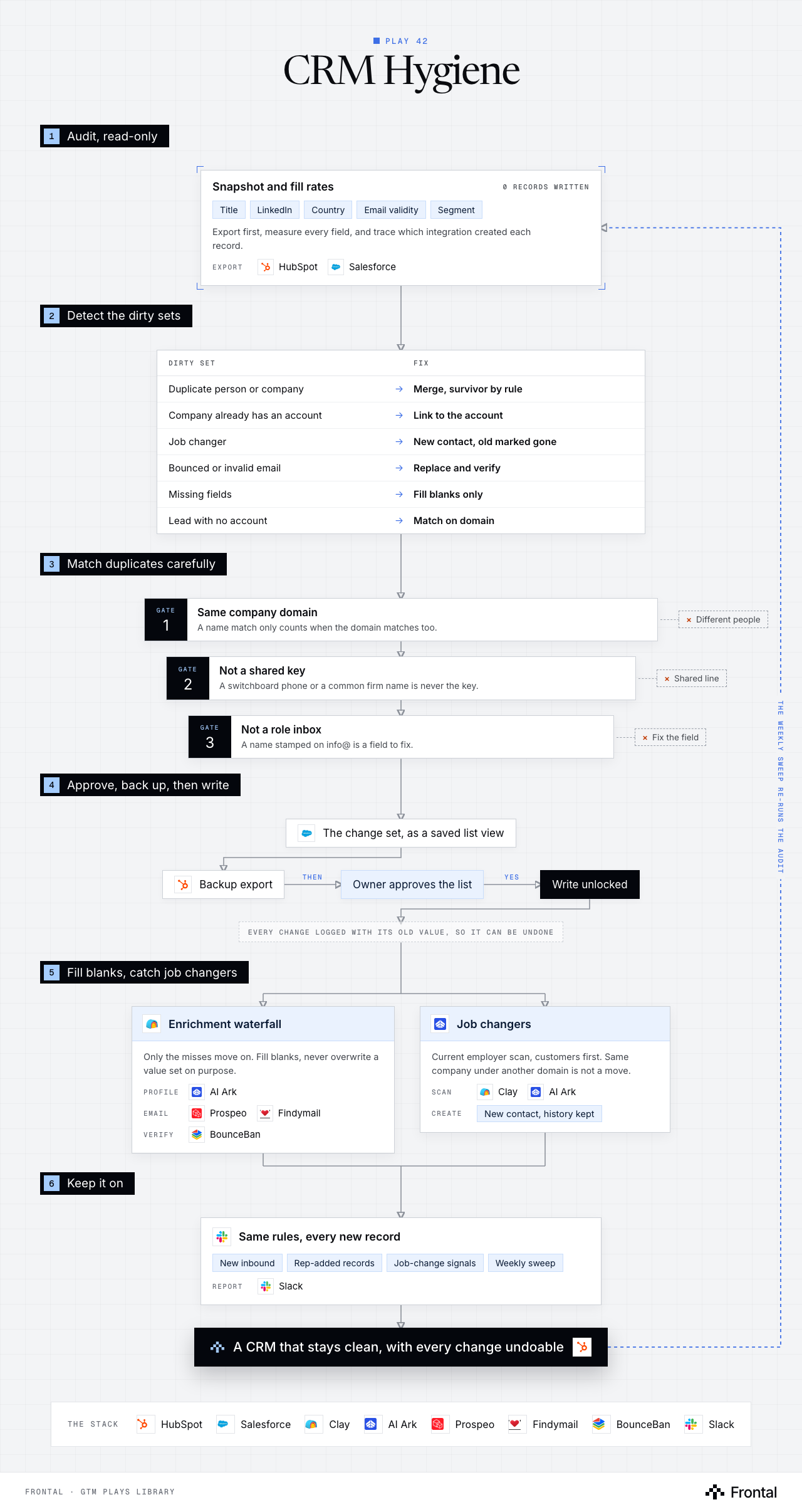
The diagram as text
1Audit, read-only
- Snapshot and fill rates (0 records written): Title, LinkedIn, Country, Email validity and Segment. Export first, measure every field, and trace which integration created each record. Export: HubSpot and Salesforce.
2Detect the dirty sets
- Dirty set → Fix
- Duplicate person or company → Merge, survivor by rule
- Company already has an account → Link to the account
- Job changer → New contact, old marked gone
- Bounced or invalid email → Replace and verify
- Missing fields → Fill blanks only
- Lead with no account → Match on domain
- Dirty set → Fix
3Match duplicates carefully
- Gate 1: Same company domain: A name match only counts when the domain matches too. Dropped: Different people.
- Gate 2: Not a shared key: A switchboard phone or a common firm name is never the key. Dropped: Shared line.
- Gate 3: Not a role inbox: A name stamped on info@ is a field to fix. Dropped: Fix the field.
4Approve, back up, then write
- The change set, as a saved list view. Tool: Salesforce.
- Backup export. Tool: HubSpot.
- Owner approves the list
- Write unlocked
- Every change logged with its old value, so it can be undone
5Fill blanks, catch job changers
- Enrichment waterfall: Only the misses move on. Fill blanks, never overwrite a value set on purpose. Profile: AI Ark. Email: Prospeo and Findymail. Verify: BounceBan. Tool: Clay.
- Job changers: Current employer scan, customers first. Same company under another domain is not a move. Scan: Clay and AI Ark. Create: New contact, history kept.
6Keep it on
- Same rules, every new record: New inbound, Rep-added records, Job-change signals and Weekly sweep. Report: Slack.
- Outcome: A CRM that stays clean, with every change undoable. Tool: HubSpot.
Labelled connections: Then: Backup export to Owner approves the list; Yes: Owner approves the list to Write unlocked.
Feedback loop: The weekly sweep re-runs the audit (from A CRM that stays clean, with every change undoable back to Snapshot and fill rates).
The stack: HubSpot, Salesforce, Clay, AI Ark, Prospeo, Findymail, BounceBan, Slack.
The play in seven steps
Step 1: Audit, read-only
The first pass never writes. It measures how dirty the CRM really is, so every later fix has a number behind it.
- Export a snapshot of HubSpot or Salesforce: contacts, companies, leads, owners and the fields that matter.
- Measure fill rates on title, LinkedIn, country, email validity and segment.
- Find which integration or import created each record. Duplicates regenerate unless the source is fixed.
- Treat default picklist values such as pending as blank.
- Prove nothing was written: count records last modified by your own user.
Step 2: Detect the dirty sets
Messy CRMs break in the same handful of ways, and each one gets its own rule and its own fix.
- Duplicates: two records for the same person or company.
- Contacts at a company that already has an account, but are not linked to it.
- Job changers: LinkedIn shows a different current employer.
- Bounced or invalid emails.
- Missing fields, and leads with no account.
- Never size a duplicate problem from a tool's suggestion count. Re-derive it per matching rule.
Step 3: Match duplicates carefully
Most records that look like duplicates are different people who share a name, a phone line or a company name.
- A name match only counts when the company domain matches too.
- Never use a shared phone or a company name as the key. Colleagues share a switchboard, and many firms share a name.
- Blank directory and link-in-bio domains before any domain rule, or unrelated companies merge.
- A role inbox with a person's name stamped on it is a field to fix, not a merge.
- Pick the survivor by rule: furthest through the funnel, then has an email, then most recent.
Step 4: Approve and back up before anything writes
Nothing touches the CRM without a human yes and a way back.
- Take a backup export of every record in the change set.
- The CRM owner approves the exact list, as a saved list view or report.
- Check workflows, validation rules and two-way syncs to other tools that will fire on the write.
- Estimate enrichment credits before the run.
- Log every change with the previous value before it is written, so any field can be restored.
Step 5: Fill the blanks with a waterfall
Enrichment fills what is missing and leaves alone what someone put there on purpose.
- Clay runs the providers in order: AI Ark for title, LinkedIn and country, then Prospeo and Findymail for email.
- Only the misses move to the next provider.
- BounceBan verifies every email before it lands.
- Fill blanks only. The two exceptions: bad emails get replaced, and job changers get a new contact.
Step 6: Catch the job changers
A contact who left is still worth something: the history stays, and the person becomes a lead at the new company.
- Scan current employers for the records that matter, customers first, through Clay and AI Ark.
- Check the new company is not the same company under another domain or another account record before moving anyone.
- Create a new contact at the new company and mark the old one as gone. Do not overwrite the old record.
Step 7: Keep it on
A cleanup decays the day it ends. A pipeline that every new record runs through does not.
- New inbound leads, records reps add by hand and job-change signals all run through the same rules.
- A weekly sweep re-checks fill rates and bounces.
- Post the weekly numbers and anything held for review to Slack.
Tools used
The eight tools this play names. Each links to the other plays that use it.
Related plays
HubSpot Account Tiering & Scoring
7 steps · CRM
Signals in the CRM, with Decay
6 steps · CRM
Product Sign-Up Outreach
7 steps · Email, LinkedIn

Have us run this play
Tell us what you're trying to hit this quarter, and we'll suggest where to start.