Play 43Outbound · Inbound
Meeting Prep and Follow-Up
Meeting Prep and Follow-Up is a six-step outbound and inbound play for calls, your CRM and email, from “Pull the next day's booked meetings” to “Update the CRM and draft the follow-up”. It uses Google Calendar, HubSpot, Exa, Fireflies, Slack and two more tools.

Kenny Damian, Co-founder & Head of GTM
- Motion
- Outbound, Inbound
- Channel
- Call, CRM, Email
- Steps
- 6
- Tools
- 7
The workflow
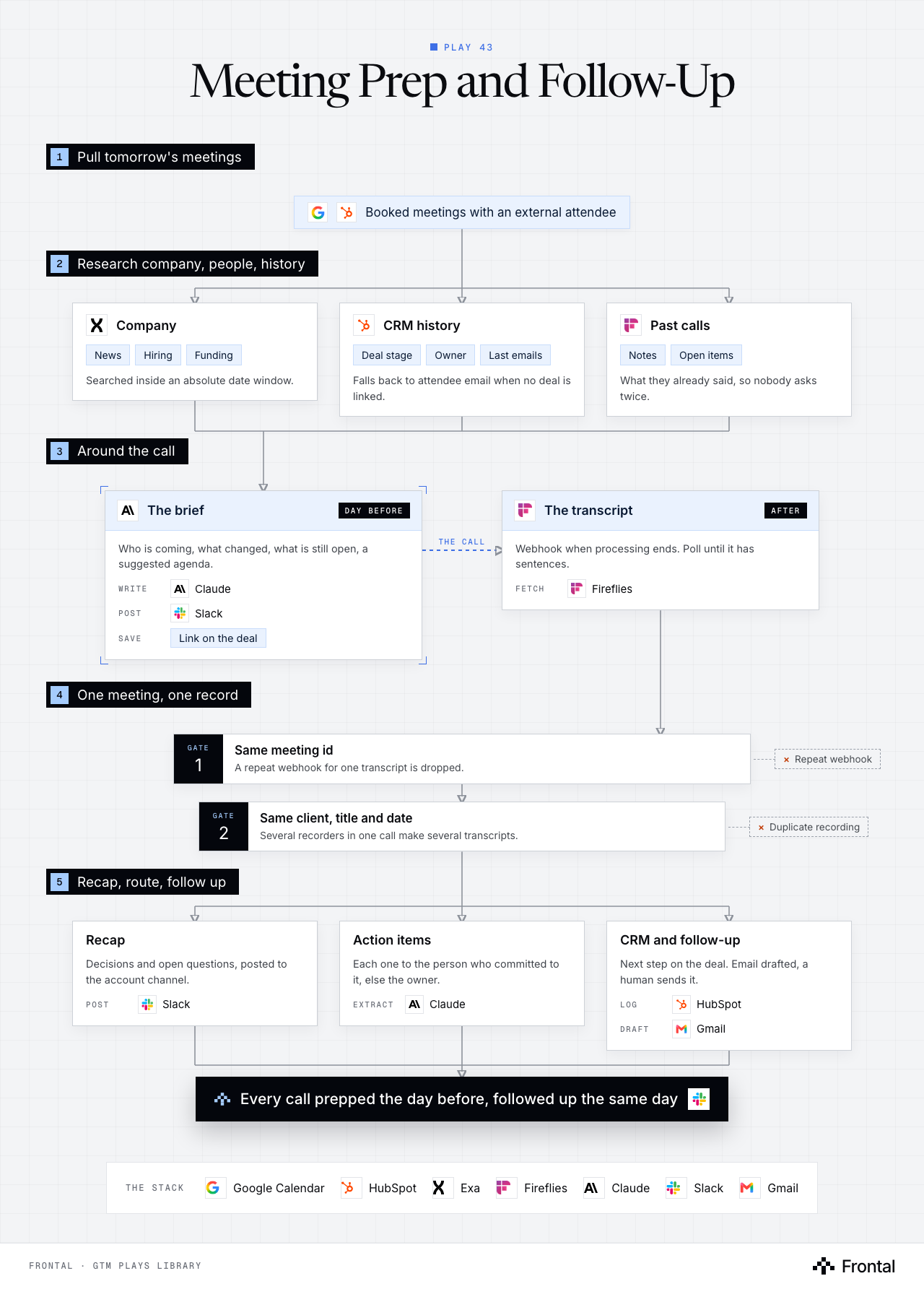
The diagram as text
1Pull tomorrow's meetings
- Booked meetings with an external attendee. Tools: Google Calendar and HubSpot.
2Research company, people, history
- Company: News, Hiring and Funding. Searched inside an absolute date window. Tool: Exa.
- CRM history: Deal stage, Owner and Last emails. Falls back to attendee email when no deal is linked. Tool: HubSpot.
- Past calls: Notes and Open items. What they already said, so nobody asks twice. Tool: Fireflies.
3Around the call
- The brief (day before): Who is coming, what changed, what is still open, a suggested agenda. Write: Claude. Post: Slack. Save: Link on the deal.
- The transcript (after): Webhook when processing ends. Poll until it has sentences. Fetch: Fireflies.
4One meeting, one record
- Gate 1: Same meeting id: A repeat webhook for one transcript is dropped. Dropped: Repeat webhook.
- Gate 2: Same client, title and date: Several recorders in one call make several transcripts. Dropped: Duplicate recording.
5Recap, route, follow up
- Recap: Decisions and open questions, posted to the account channel. Post: Slack.
- Action items: Each one to the person who committed to it, else the owner. Extract: Claude.
- CRM and follow-up: Next step on the deal. Email drafted, a human sends it. Log: HubSpot. Draft: Gmail.
- Outcome: Every call prepped the day before, followed up the same day. Tool: Slack.
Labelled connections: The call: The brief to The transcript.
The stack: Google Calendar, HubSpot, Exa, Fireflies, Claude, Slack, Gmail.
The play in six steps
Step 1: Pull the next day's booked meetings
A daily run reads the calendar so every external meeting gets a brief before anyone asks for one.
- A scheduled job reads Google Calendar each morning for the next day's meetings.
- Keep only the meeting types that matter, with at least one external attendee.
- Find the matching company and deal in HubSpot.
- Deals are not always associated to a company. Fall back to attendee email, then contact, then deal, and say so in the brief.
- Process one meeting at a time so one failure does not stop the rest.
Step 2: Research the company, the people and the history
The brief is only useful if it carries what changed outside and what was already said inside.
- Exa searches for company news inside an absolute date window, not a relative one.
- Each attendee: current role, time in seat, recent posts.
- HubSpot history: deal stage, owner, last emails, open tasks.
- Past call notes and action items from Fireflies, so nobody asks the same question twice.
Step 3: Write the brief and post it to Slack
One short brief lands where the person running the meeting already works.
- Claude writes: who is coming, what changed, what they said last time, what is still open, and a suggested agenda.
- Post it in Slack, tagging the meeting owner.
- Save the brief link on the HubSpot deal so the next person finds it.
- If research comes back thin, say so in the brief instead of padding it.
Step 4: Collect one transcript per meeting
After the call, the transcript arrives by webhook, and the same meeting often arrives more than once.
- A Fireflies webhook fires when the transcript is done.
- Poll until the transcript actually has sentences in it. A just-ended call is often still processing.
- De-duplicate twice: on the meeting id, and on the client, title and date.
- Several teammates' recorders in one meeting create several transcripts with different ids. The id check alone lets them all through.
- Alert when fetches fail, so a dead key does not drop calls silently for weeks.
Step 5: Recap, decisions and action items to the right owner
The call turns into work assigned to the person who committed to it.
- Claude extracts decisions, open questions and action items, each with the person who committed to it.
- Route each action item to that person's task board, falling back to the account owner.
- Post a short recap to the account's Slack channel.
- Skip items owned by the other side unless they block your own next step.
Step 6: Update the CRM and draft the follow-up
The record and the follow-up email are ready before the rep has opened their inbox.
- Log the summary, decisions and next step on the HubSpot deal.
- Draft the follow-up email in Gmail: recap, what was agreed, the next date.
- A human reads and sends it. Nothing goes to the prospect automatically.
Tools used
The seven tools this play names. Each links to the other plays that use it.
Related plays
Product Sign-Up Outreach
7 steps · Email, LinkedIn
CRM Hygiene
7 steps · CRM
HubSpot Account Tiering & Scoring
7 steps · CRM

Have us run this play
Tell us what you're trying to hit this quarter, and we'll suggest where to start.