Key Takeaways
- Start with job change if you have past customers, news and fundraising if new budget is your trigger, and web intent if target accounts already visit your site.
- Clay’s Free plan has no signals. On monthly billing, Launch adds job change, news and social listening signals from $185 a month. Growth adds web intent and webhooks from $495.
- Job change, promotion and new-hire checks cost 1 action plus 0.2 data credits each. A Daily check on 1,000 contacts uses about 30,000 actions a month. That’s twice what Launch includes.
- Speed comes from cadence and routing: Daily checks on top accounts, an ICP filter on every signal and a named owner per event.
This guide lists all Clay signals, the plan each needs, how to set one up and what each check costs. It also covers cutting noise and routing each event to an owner the same day. Every feature name, plan and credit rate below comes from Clay’s own site and docs, read on November 20, 2026.
Clay’s pitch for the feature is “Monitor signals your competitors overlook.” It doesn’t say how many days ahead of a competitor that puts you. It does publish the levers that decide speed: how often a signal checks, how fast web intent data arrives and where each event goes next.
We’re the team at Frontal, the go-to-market partner for B2B tech companies, working as an extension of your team. We hold Clay Elite Studio Partner status and build signal setups like these inside clients’ own Clay workspaces.
What Are Clay Signals?
Clay signals are scheduled checks on a list of companies or contacts that record a change when one happens. You choose the list, the change to watch for and how often Clay looks. Clay’s documentation calls them “automated tracking systems that notify you of important changes related to your contacts and target companies.”
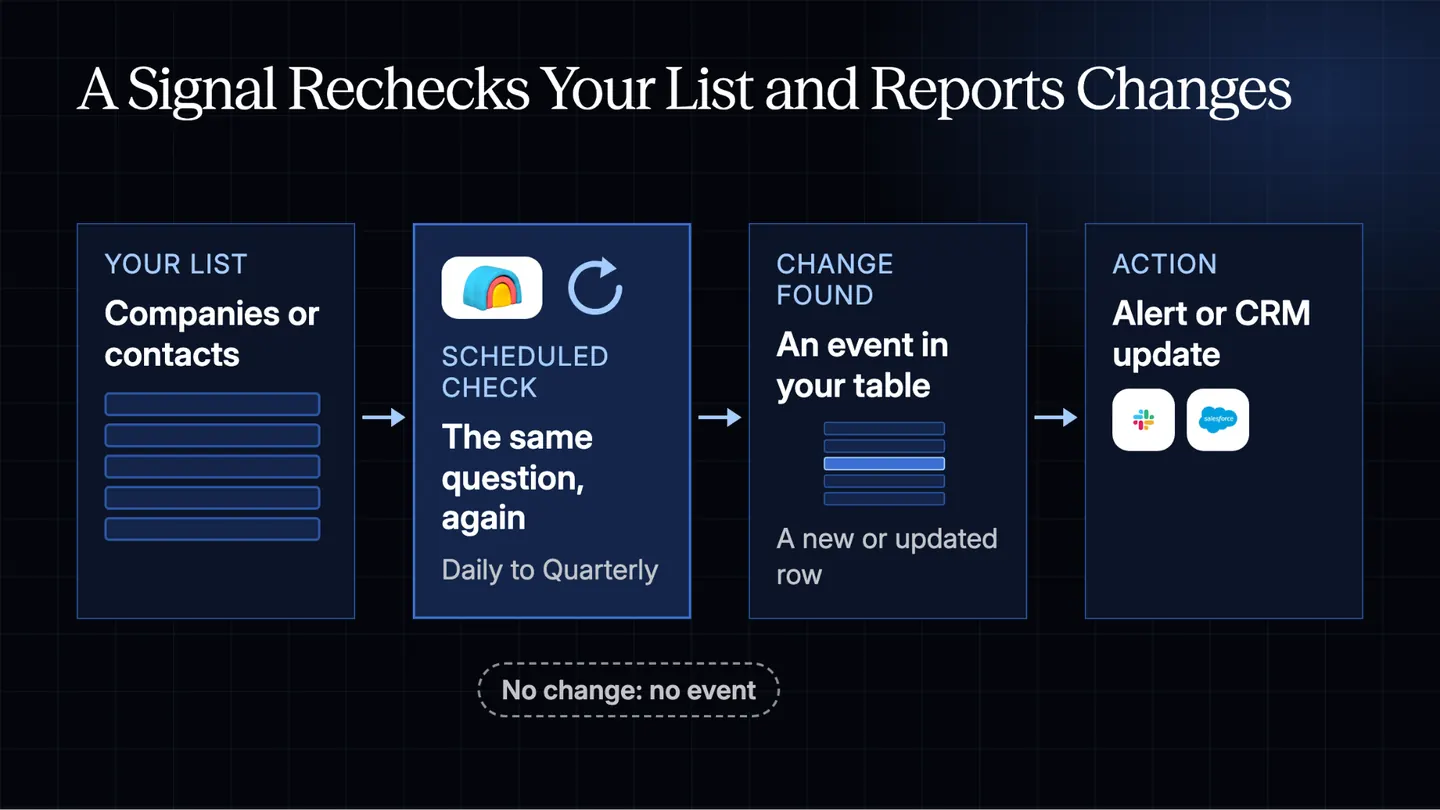
A signal rechecks the same list and reports only changes.
When a check finds a change, the signal writes an event into your table. The event is a new row or an update to an existing one. Enrichments on the table can then act on it, such as a Slack notification or a Salesforce update.
That repeat check separates a signal from a one-time enrichment. An enrichment answers a question once, such as where a contact works today. A signal asks it again on a schedule, from daily to quarterly, and only reports back when the answer changes.
Buying signals are changes that suggest an account may be ready to buy. Examples include new funding, a new leader in the buying role and repeat visits to your pricing page. They matter because most of your market isn’t buying right now.
The LinkedIn B2B Institute, working with the Ehrenberg-Bass Institute, makes that point in The 95:5 Rule. In its words, “95% of your potential buyers aren’t ready to buy today.” LinkedIn sells the ads that research recommends, so weigh the source. A signal is one way to look for the few accounts that may be in market now. It tells you something changed, not that the account will buy.
Most of Clay’s signals watch lists you already own. Topic intent adds third-party research data on top. Standalone B2B intent data providers sell that research data on its own, outside Clay’s tables.
Every Clay Signal, What It Watches and the Plan It Needs
Clay signals come in nine types, plus webhook automation. Clay’s docs describe what each one watches, and its pricing page sets the plan that includes it. This table combines the two.
| Signal | What it watches | Identifier it reads | How Clay bills it | Plan |
|---|---|---|---|---|
| Job change | Contacts who move to a new company | Professional profile URL | 1 action plus 0.2 data credits per check | Launch and up |
| Promotion | Contacts promoted inside their current company | Professional profile URL | 1 action plus 0.2 data credits per check | Launch and up |
| New hires | People hired at target companies in the last three months | Company domain or company profile URL | 1 action plus 0.2 data credits per check | Launch and up |
| Job postings | New roles opened at target companies | Company domain or company profile URL | Estimate shown before it runs | Every paid plan except Flex, no pricing row |
| News and fundraising | Funding rounds and key announcements | Company domain | 1 action plus 6 data credits per result | Launch and up |
| Topic intent (open beta) | Companies and people researching topics you pick | Company domain, or profile URL for people | Per topic, per record checked | Every paid plan except Flex, no pricing row |
| Web intent | Companies visiting your own website | None: a snippet on your site | 1 action plus provider data credits per identified IP | Growth and Enterprise |
| Social listening | Brand mentions in professional posts | Set by the source | Estimate shown per result | Launch and up |
| Custom signals | Any data source Clay can enrich | Set by the source | Estimated cost per result shown per source | Every paid plan except Flex |
| Webhook automation | Sends any signal to another system | Not applicable | Not listed separately | Growth and Enterprise |
The docs add that signals also run during a trial, web intent included. They place signals on “every paid plan except Flex,” a plan the current pricing page doesn’t list.
Six of the nine read a company domain or a profile URL, so a clean outbound list with both filled in comes first.
Pick the Signal That Comes Before Your Best Deals
Start from what happens at an account just before it buys from you, not from Clay’s menu. Then pick the signal that watches for that change:
- Use job change when a champion moves to a new company, watching a table of past buyers and power users.
- Use promotion when someone inside an account steps into the role that buys from you.
- Use new hires when that role is filled from outside, since the signal covers the last three months.
- Use job postings when a growing team is your trigger, filtered to the roles that use your product.
- Use news and fundraising when fresh budget is the moment, filtered to funding rounds.
- Use topic intent when accounts research your category before they fill out a form.
- Use web intent when target accounts already visit your pricing or product pages.
Clay’s lesson on signal types advises: “Start with Default Signals for common GTM triggers like job changes, funding rounds, or hiring patterns.” It also gives a worked case. For a marketing automation seller, it suggests a job postings signal “filtering for companies hiring Marketing Operations Managers or Demand Generation roles.”
The Clay plays built on website visits, job changes, hiring and funding show the follow-up message each default signal needs. Custom signals come later, once you know which change your market reacts to.
How to Set Up a Clay Signal on a Table
A table signal starts from the records you want to watch, and most of the work is picking the right column and filters. Clay’s setup takes five steps. Our example: you want to hear when any of 1,000 past buyers changes jobs.
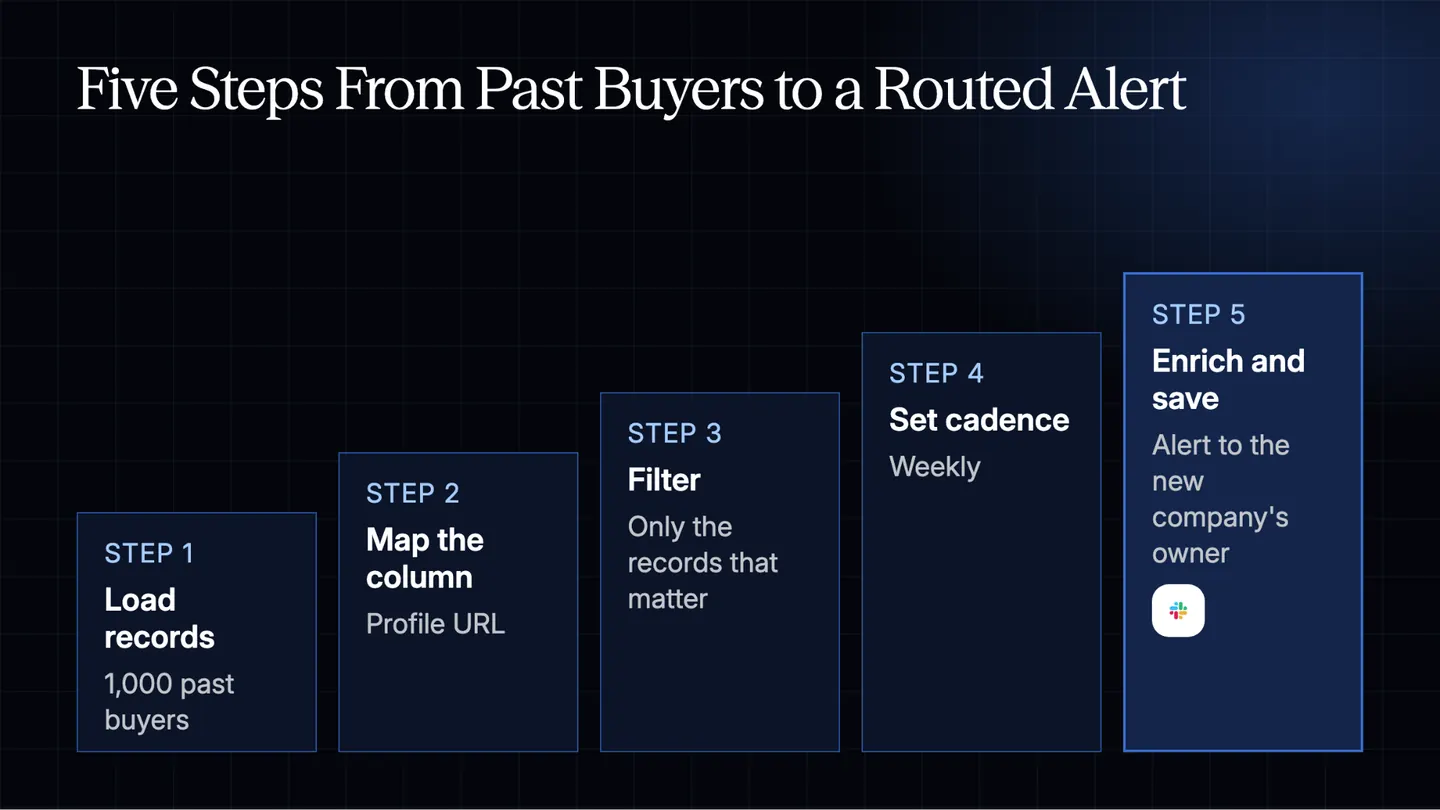
The running example through Clay’s five setup steps.
Step 1: Load the Records You Want to Watch
Clay asks for “a table of the companies or contacts you want to monitor, with a column holding the identifier that signal reads.” People signals read a profile URL. New hires, job postings and news read a company domain, and the first two also accept a company profile URL.
Clean that column before you turn anything on. A blank or wrong identifier gives the signal nothing to check. In the example, that’s 1,000 past buyers with a profile URL in every row.
Step 2: Choose the Signal and Map the Column
Go to Signals and pick a signal from the quick links, or click New signal to see the full set. Select the table you want to monitor and point the signal at the identifier column it needs.
Step 3: Filter Down to the Records That Matter
Filters stop a signal from reporting every change at every account. On new hires, Clay lets you filter by “job titles, experience, etc.” News and fundraising asks you to pick the news topics you care about. Tight filters also cost less on signals that bill per result.
Step 4: Set How Often It Checks
Clay offers Quarterly, Monthly, Biweekly, Weekly and Daily, and a new signal starts at Monthly. Topic intent is the exception: Weekly is both its default and its shortest option. You can’t pick a time of day, since signals “can only be adjusted by frequency, not set to run at specific times.”
On job change, you can also turn on Initial check. It adds a row for any contact whose current company no longer matches your records. That catches the moves that already happened. For the 1,000 past buyers, Weekly is a fair start. That’s about 4,000 actions a month, well inside the 15,000 that Launch includes.
Step 5: Add Enrichments, Preview and Save
Add enrichments to the table, such as a Slack alert or a CRM update. In the example, a Slack alert to the new company’s owner does the routing.
Clay’s Add sample results option then shows how the data will look before a real change happens. The Keep sample results in table setting decides whether those test rows stay. Turn it off to keep them out of your real events.
Click Save to finish. When you edit a scheduled signal later, Save only keeps your changes for the next run. Pick Save and re-run instead to run the signal again straight away.
Watch an Audiences Segment Instead
A signal doesn’t have to sit on a table. If your target accounts already live as segments in Clay audiences, open the segment and use Add signal to watch it in place. Account segments take topic intent, web intent, new hires, news and fundraising, and job postings. Contact segments take topic intent, job changes and promotions.
How to Turn On Clay Web Intent
Web intent is the one signal that doesn’t start from a list. It needs the Growth or Enterprise plan, though trials include it. It watches your own site and identifies “the companies visiting your own website, along with the pages they looked at and how they arrived.” Setup takes five steps:
- Click your account name, then Settings, then Web intent, and choose Add connection.
- Paste Clay’s snippet before the closing </body> tag on all pages, or connect through Segment instead.
- Set URL paths to exclude, such as /careers or the logged-in parts of your app. Add URL paths to include if only some pages matter.
- Choose One row per company, the default, to update one row on each return visit. Or choose New row per visit to log every visit.
- Add a country filter if you only sell in some regions.
Clay recommends installing the snippet directly rather than through Google Tag Manager, “as ad blockers often disable Tag Manager.” Two limits shape what you get back. Clay identifies “unique accounts visiting your website, not individuals,” so you learn the company, not the person. And data “may be delayed up to 30 minutes after user activity,” which is still the closest Clay gets to real time.
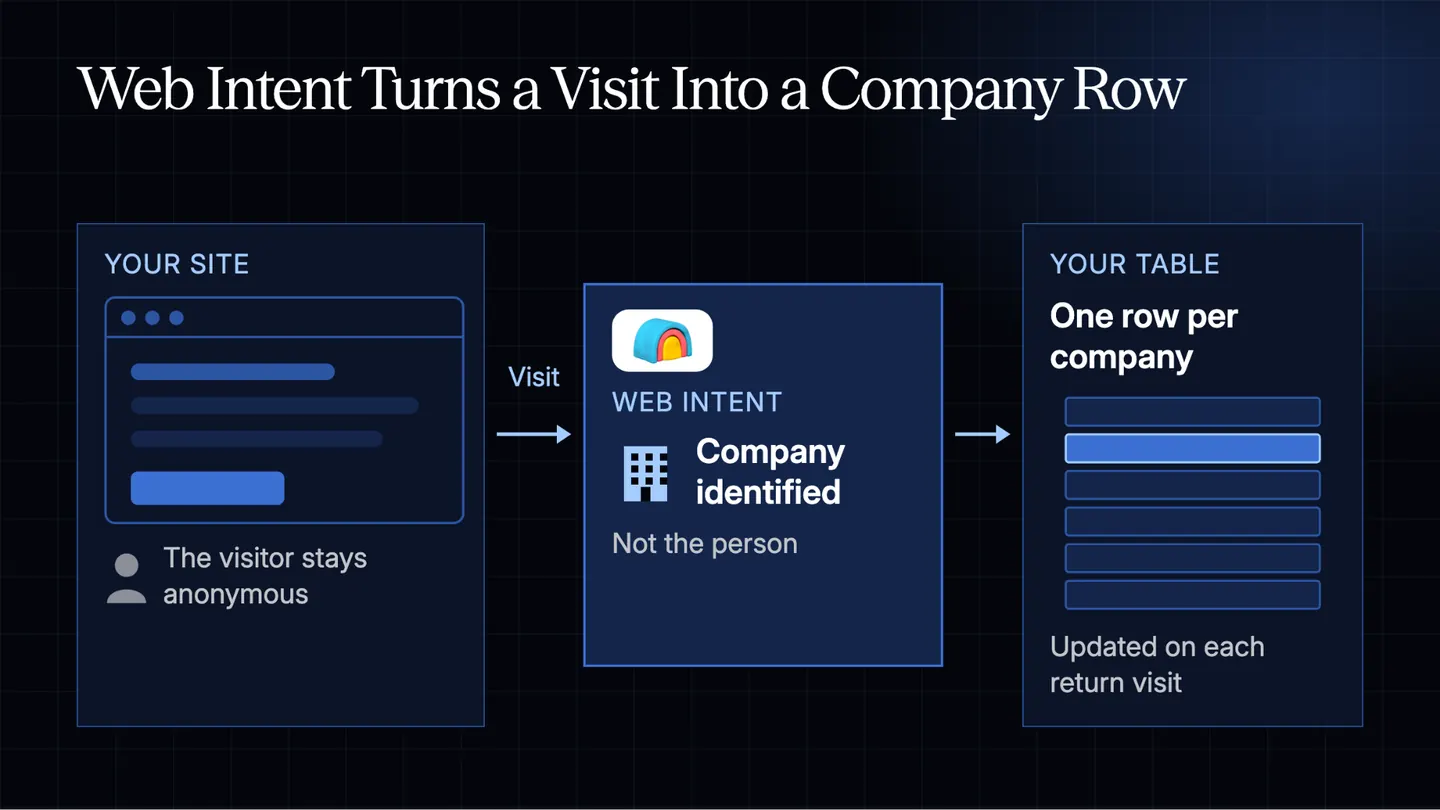
Web intent names the visiting company, not the person.
Before the snippet goes live, check it against your cookie banner with whoever owns privacy. For UK sites, the ICO’s guidance on PECR rules is direct: “You must tell users about any storage and access technologies you use and explain what they do. You must obtain prior consent to the UK GDPR standard for their use, unless an exception applies.”
That’s a rule for UK sites, not legal advice. Clay doesn’t say whether its snippet stores or reads anything on a visitor’s device. Once the snippet is cleared and a company shows up, our free website visitor de-anonymization recipe covers what to do next.
Build a Custom Signal When the Defaults Miss Your Market
When none of the defaults match the change that comes before your deals, build your own. Clay’s lesson on signal types sets the range: “if Clay can enrich for it, you can monitor for changes in it.”
To create one in a workbook, click + Add, then Custom signal. In a table, click Actions, then Import, then Custom signal. Clay shows “the estimated cost per result” next to each source, so you can price the signal before it runs.
For example, Clay’s signals page says Vanta “monitors four signals at once: SOC2 certification announcements, website changes related to compliance, funding announcements, and CISO job postings.”
If a source has no pre-built signal, Clay’s guide turns any enrichment into one. Schedule the enrichment with Re-run columns on a schedule. Then use Send table data to copy each run into a Run history table. Toggle off Update existing rows on re-run, so each run adds new rows instead of overwriting the last. You get a dated record to compare one run with the next.
Add a Slack or Salesforce enrichment, and a custom signal becomes the first step of sales workflow automation, with nobody checking a table by hand.
What a Signal Event Looks Like When It Lands
The kind of event a signal writes shapes what you send a rep. A job change event is a new row for a contact whose company no longer matches your records. A web intent event, on the default layout, updates the company’s existing row with its latest visit.
Topic intent adds “one event per topic as it surfaces,” so a company researching three of your topics produces three events. Each event carries the provider, a tier of Low, Medium or High, and a raw score on a 0 to 100 scale. Clay describes High as an account showing in-market signals above its own baseline. It calls High the tier most teams act on.
The providers differ in coverage. Bombora reports on companies only, while Delivr and Intentsify cover companies and people. Clay bills each provider separately.
A single event is still one data point. Deciding which events deserve a rep’s time is a scoring job. Clay lead scoring weights each signal by how often it comes before a won deal.
What Clay Signals Cost to Run
Each job change, promotion or new-hire check costs 1 action plus 0.2 data credits in Clay. News and fundraising bills only when there’s news: 1 action plus 6 data credits for each result. Before any signal starts, Clay shows an estimated cost for the cadence you picked.
The worked examples below are our arithmetic from Clay’s published rates. They assume one check per contact per run, and about 4 weekly or 30 daily runs a month.
| Setup | Clay’s billing rule | Monthly use |
|---|---|---|
| Job change on 1,000 contacts, Monthly | 1 action plus 0.2 data credits per check | 1,000 actions and 200 data credits |
| Job change on 1,000 contacts, Weekly | 1 action plus 0.2 data credits per check | About 4,000 actions and 800 data credits |
| Job change on 1,000 contacts, Daily | 1 action plus 0.2 data credits per check | About 30,000 actions and 6,000 data credits |
| News and fundraising, 50 results | 1 action plus 6 data credits per result | 50 actions and 300 data credits |
| Topic intent | Every selected topic on every record checked, per provider | No published per-check rate: read Clay’s estimate |
| Web intent | 1 action plus provider data credits per identified IP, once per IP per 30 days | Depends on your traffic and provider |
Compare those figures with Clay’s plans. Launch’s entry price is $185 a month on monthly billing, or $167 a month billed annually, with 15,000 actions and 2,500 data credits. A Weekly job change check on 1,000 contacts fits with room to spare.
Daily on the same list needs twice Launch’s actions and more than twice its data credits. Growth, from $495 a month billed monthly with 40,000 actions and 6,000 data credits, covers it. Daily then uses every Growth data credit, leaving none for other enrichments.
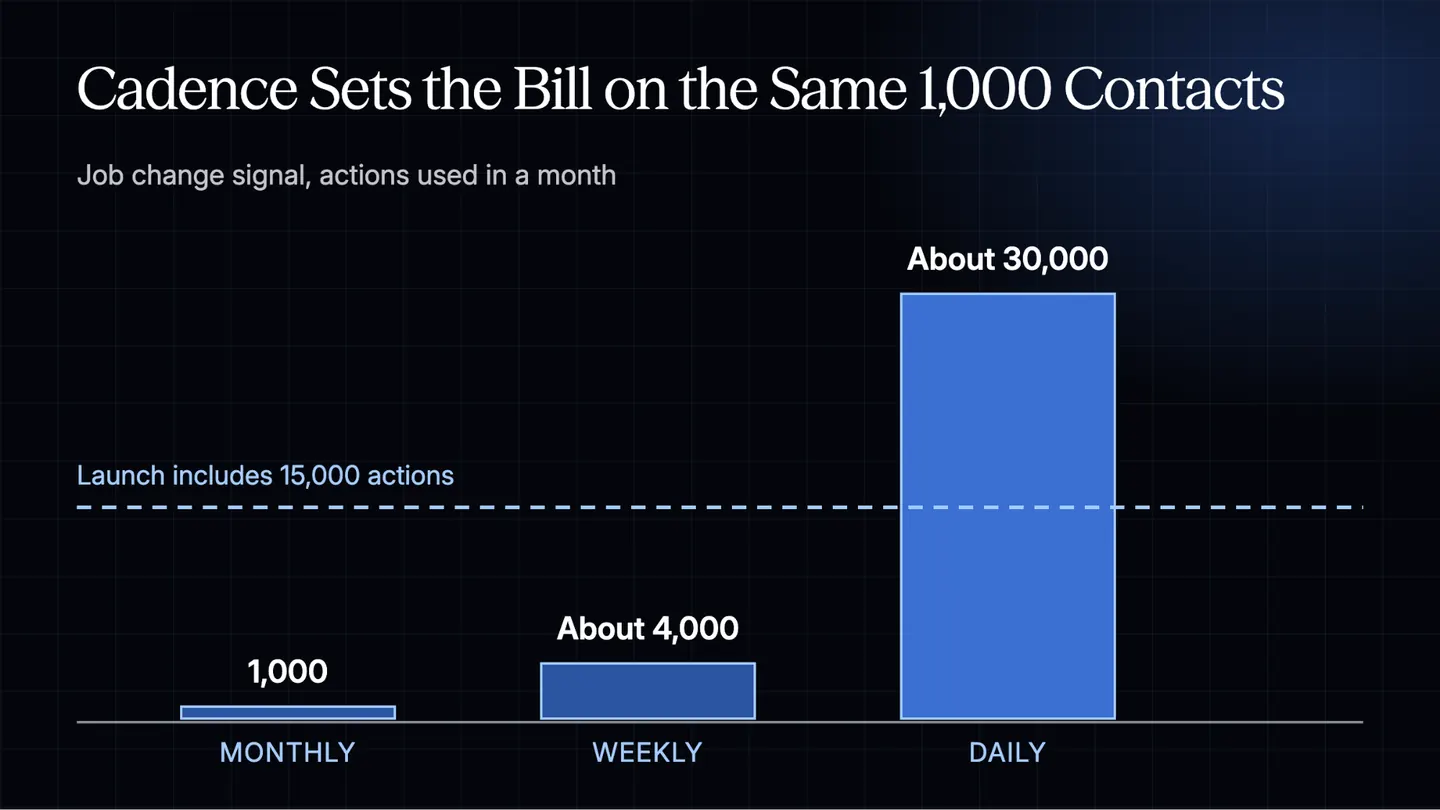
Same list, same signal: cadence alone sets the monthly actions.
Web intent comes with its own cost controls. Turn on Cap monthly credit spend and enter a limit. Then follow Clay’s suggested filters: a minimum session of 20 to 30 seconds, at least 2 unique pages and your own office or VPN ranges excluded. The Waterfall setting runs providers in turn and stops at the first match. Best match queries all of them, so it “costs more per visitor.”
Topic intent bills each topic on each record “whether or not a provider returns intent for that topic,” so keep the topic list short and the view small. Clay signals draw on the same monthly actions and data credits as everything else in your workspace. Your Clay pricing plan sets how many you can run at once.
Cut the Noise Before It Reaches a Rep
A signal that fires on every account teaches reps to ignore it. Clay’s docs name the main sources of noise. On topic intent, “narrow topics tend to beat broad ones.” On web intent, “traffic from bots, VPNs, cloud infrastructure, or ISP-owned IPs can appear as companies.”
Practitioners add their own tests. A thread on r/gtmengineering asked which signals seemed predictive but turned out to be noise. One commenter shared a lift test.
Take your last 50 closed-won accounts and 200 accounts in the same ICP that went nowhere. For each group, count how often the signal fired in the 90 days before first touch. If the two rates are close, treat the signal as noise.
Another commenter warned that tech-stack data is often an old script tag. You end up emailing people about a tool they dropped. They trusted it only next to something fresh, like a current job post naming the tool.
Both methods come from individual practitioners, not a controlled study. Treat a close result as a reason to look harder, not a verdict. A short checklist keeps the noise out:
- Put an ICP filter on every signal, so funding news at a company outside your market never reaches a rep.
- Drop repeat events for the same account inside a set window.
- Give each event a maximum age, and stop acting on it after that.
- Run the lift test on each signal once you have 50 closed-won deals to compare.
- Exclude your own office and VPN IP ranges from web intent.
- Check a week of identified web intent companies by hand, since Clay doesn’t publish its providers’ match rates.
- Pair stale-prone data, such as tech stack, with a fresh signal before anyone acts on it.
Stale data is often an enrichment problem more than a signal one. If your data source is the weak point, compare the lead enrichment services that refresh it.
Route Every Signal to an Owner the Same Day
Speed depends on what happens after the signal fires. A Daily check that lands in a table nobody opens is slower than a Weekly check that pings the account owner.
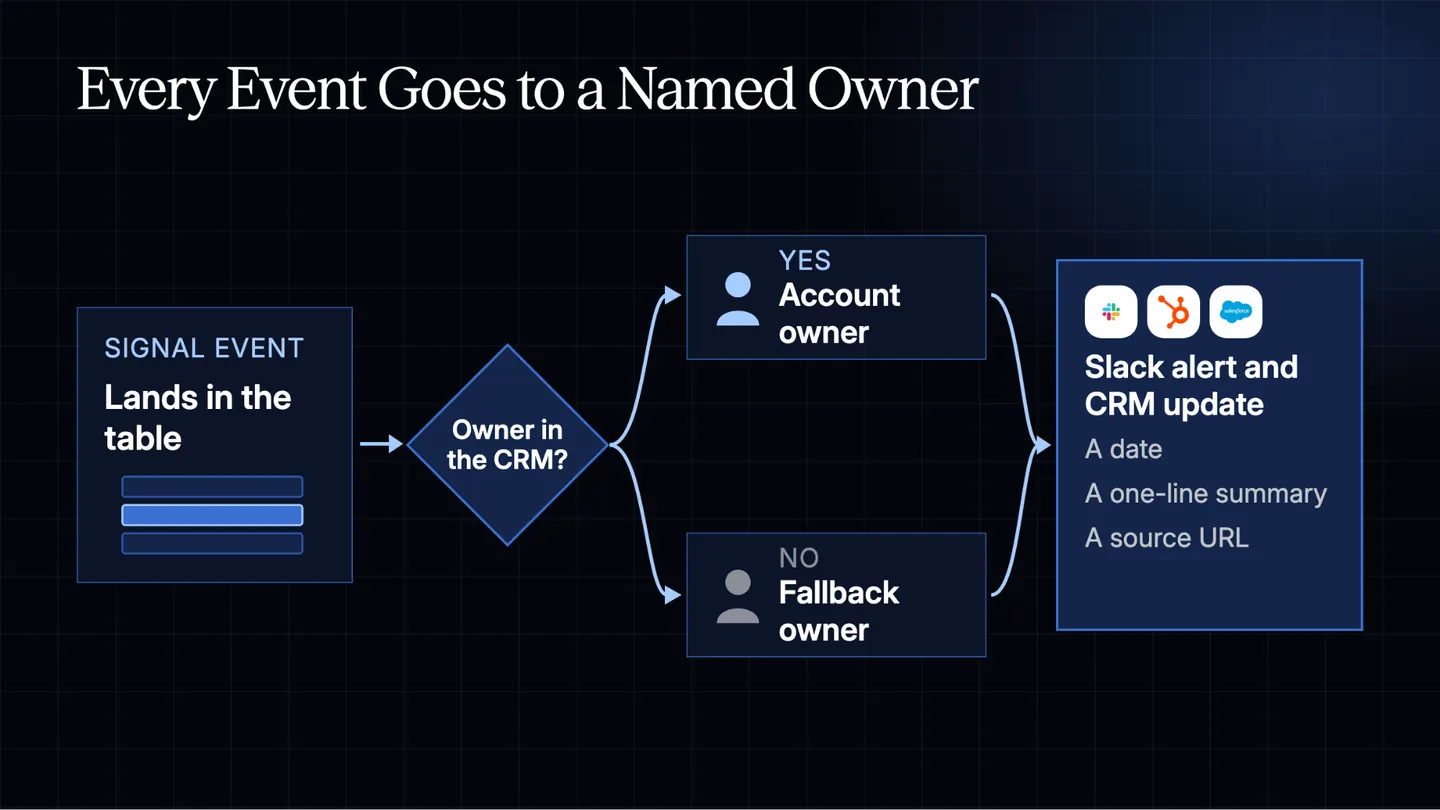
Every event reaches a named owner, or a fallback owner.
Start with cadence by tier. Put your top accounts on Daily and the long tail on Weekly or Monthly. Checks on people and companies bill on every run. Web intent needs no cadence, because its data arrives up to 30 minutes after a visit.
Send each event to the person who owns the account. Clay’s signals page lists two actions for this: “Update CRM” and “Slack a sales / CX rep” about high-value account activity. Add either as an enrichment on the signal’s table, so it runs on each new event. On Growth, CRM auto-sync and webhook automation can push any signal into the system your team already uses.
Clay’s own mock-up shows what a good alert carries. It names the company, the page it’s on, how many visits it made that week and the rep who should act. That’s the core of signal-based selling: each event goes to a named owner with enough context to act.
Give each event a date as well. A dated event tells a rep at a glance whether it’s this morning’s news or last quarter’s. Our free recipe for signals in CRM with decay uses a simple format: “Every signal arrives with a date, a one-line summary and a source URL.”
When we build this routing, the tables, alerts and CRM fields sit in the client’s own Clay workspace and CRM. That’s HubSpot or Salesforce, where the team already looks. Give every alert a fallback owner too, so an account with no CRM owner still reaches someone.
How Design Pickle Turned Site Visitors Into Same-Week Outreach
Frontal’s work with Design Pickle shows signal routing in practice. Design Pickle runs a design subscription platform and employs 201 to 500 people. The case page lists HubSpot, Clay, Apollo and Vector as the tools.
The visitor data came from Vector, not from Clay’s web intent signal. In the case page’s words, “Vector identified the companies browsing the site, so high-interest visitors stopped being anonymous traffic and became outreach the same week.”
Clay’s job sat after that step. Per the case page, it moved from “basic list-building” to enrichment and qualification that picks which companies get an AE’s time, “automatically.”
Each audience then got its own messaging. Demos had run at about 10 a week, then hit a record 58 in 14 days: 29 a week, for that window only. The Design Pickle case study counts demos booked, not pipeline. Acquisition cost moved from “High, carried by paid ads” to “Lower, carried by outbound.”
The order of work carries over if you use Clay’s own web intent signal instead of Vector. The case page says nothing about how the two compare. Identify the company, qualify it automatically against your ICP and get it to an owner the same week.
Get Your First Clay Signal Routed This Week
Pick one default signal, such as job changes or funding rounds, plus one table and one owner. Set it to Weekly and add an ICP filter and a Slack alert to the account owner. After a month, check whether the events led to real conversations.
If you’d rather have it built, that’s part of our GTM engineering work, done inside your Clay workspace and CRM. Most clients start with one service. We work with companies past product-market fit with a real sales team to act on each signal. Scope and pricing are set on a call. We’re measured on qualified pipeline.
Frequently Asked Questions
What is a Clay signal?
Clay signals watch a list of companies or contacts on a schedule and record an event when something changes, such as a job move or a funding round. You pick the list, the change and how often Clay checks.
What buying signals can Clay track?
Clay tracks job changes, promotions, new hires, job postings, news and fundraising, topic intent, web intent and social listening. Custom signals add any source Clay can enrich. Outside a trial, all of them need a paid plan from Launch up, and web intent needs Growth or Enterprise.
How often does each signal check for changes?
You choose Quarterly, Monthly, Biweekly, Weekly or Daily, and a new signal starts at Monthly. Topic intent runs Weekly at most, and no signal can be set to a time of day. Web intent reads visits from a snippet on your site instead, with data delayed up to 30 minutes.
What does each Clay signal cost?
Each check on a job change, promotion or new hire uses 1 action and 0.2 data credits. A news and fundraising result uses 1 action and 6 data credits. Topic intent bills every topic on every record checked. Signals need Launch, from $185 a month billed monthly, and web intent needs Growth, from $495.
What is the difference between Clay web intent and topic intent?
Clay web intent tracks companies visiting your own website and the pages they view. Topic intent, in open beta, uses providers such as Bombora, Delivr and Intentsify to surface accounts researching topics you pick. That can include accounts that haven’t visited your site yet.
How does Clay support signal based selling?
Signal-based selling means reaching out when an account changes, not on a fixed schedule. Clay supports it by checking your lists on a cadence and writing each change as an event. Slack alerts or CRM updates then run on each event, so the right owner hears the same day.
Does Frontal build Clay signal setups?
Yes. Frontal builds signals, filters and routing inside your own Clay workspace and CRM as part of GTM engineering. Most clients start with one service. We’re one of several Clay automation agencies, and scope and fit differ between them.