Key Takeaways
- Clay Audiences gathers the people and companies you import into profiles and merges records its matching rules identify as the same. An audience is a live filter over those profiles, so records join and leave the list as their data changes.
- Audiences comes with Launch, Growth and Enterprise at no extra charge, and Clay’s Free plan doesn’t include it. Only Growth and Enterprise can push an audience to ad platforms.
- Use a table for one-off runs and API-key data providers. Use Audiences for any list you reuse, segment or automate, or that outgrows a table’s 50,000 rows.
- Filter before you enrich. Clay charges credits per record enriched, so a run on All People pays for every record in your database.
In a LinkedIn post, Andrew Osborne of Understory names a familiar problem. “Every GTM team has that one person with the ‘real’ account list,” the post says. “It lives in a CSV on their laptop.” Nobody else can see that list, so nobody can point ads or outbound at it.
Clay Audiences is Clay’s answer to the laptop file. “You do not rebuild the list, you query it,” as Clay’s own guide puts it. That moves the real work upstream: which fields you import, which match key merges records and how often your filter fields are filled in.
This guide covers those choices, then building a target account list, finding the accounts your CRM lacks and keeping the list current before it feeds your ads. Every Clay feature, plan and limit below was checked on clay.com and in Clay’s docs on November 20, 2026.
The advice comes from our list-building work at Frontal, the go-to-market partner for B2B tech companies, working as an extension of your team. As a Clay Elite Studio Partner, we build account and contact lists in Clay and write them into our clients’ CRMs.
What Is Clay Audiences?
Clay Audiences is a database of people and companies inside your Clay workspace. Clay’s documentation calls it “the unified data layer for your workspace.” It “combines your CRM, data warehouse, and third-party enrichments into one persistent profile per contact and account, updated in real time.”
Clay keeps those profiles in two global lists, All People and All Companies. An audience, which Clay also calls a segment, is a saved set of filters on top of them. Clay’s guide describes it as “a live query over your whole database, so it never goes stale.”
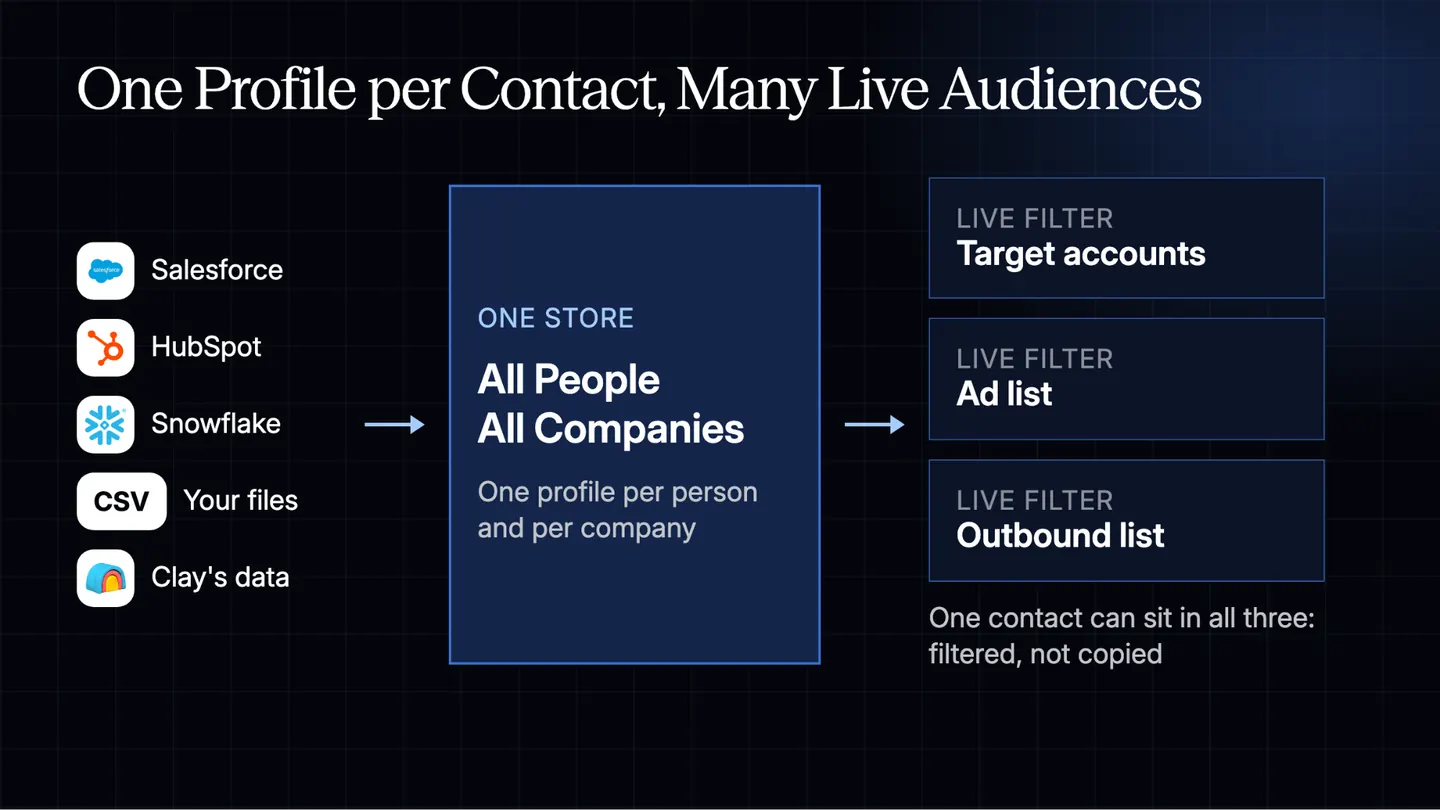
Every audience filters the same profiles, so nothing is copied.
Because an audience is only a filter, one profile in All People can sit in several audiences at the same time. The records “are not copied, just filtered differently,” Clay says. When a contact’s job title changes, every audience that filters on job title reflects it at the next refresh, with no outbound list to rebuild by hand.
Audiences vs Tables: Which to Use
Use a table for one-off work and Audiences for every list you keep. Clay’s Audiences FAQ puts it plainly: “Tables are how you work on data. Audiences is where your data lives.” The same page says a table holds up to 50,000 rows, while Audiences holds millions of records.
Clay’s June 2026 announcement says some customers built 10 to 12 tables to stay under that limit, and can now run the same workflow as one filtered audience. The table below compares the two, using Clay’s guidance.
| Factor | Use a Clay table | Use Clay Audiences |
|---|---|---|
| List size | Up to 50,000 rows | Millions of records |
| How long the data lives | One-off runs, or data that doesn’t need to persist | Anything you reuse, segment on or automate |
| Third-party data through your own API key | Start the workflow here, per Clay | Save the results in with a table column action |
| Enrichments that depend on each other | Chain them in order | Bulk enrichments run in parallel, with no set order |
| A source Audiences can’t import yet | Use the table as a bridge | Receives the rows through Create or update Audiences record |
| A new workflow | Build and prove it here | Point the finished version at an audience |
Clay’s guide calls the table “the laboratory” and Audiences “production,” so build and test a new workflow in Clay tables first. Then move the version that works onto an audience.
What Each Clay Plan Includes for Audiences
Clay Audiences adds $0 to a paid plan. Clay’s docs say it’s “Available on all paid plans at no additional charge,” and you pay only for the credits and actions you use. Clay’s Free plan doesn’t include it.
What changes by plan is where records come from, how often sources sync and whether a segment can reach an ad platform. If your goal is ads, Growth is the entry point.
The table uses Clay’s pricing page as read on November 20, 2026, with prices on monthly billing.
| Plan | Price on monthly billing | Audiences data on the pricing page | Fastest source sync | Push audiences to ad platforms |
|---|---|---|---|---|
| Launch | From $185 a month | Unlimited Search and CSV upload | Once a day | Not included |
| Growth | From $495 a month | Unlimited Search and CSV upload, plus up to 250k imports from CRM and data warehouse | Once a day | Unlimited ad audiences |
| Enterprise | Custom pricing with an annual commitment | Unlimited Search and CSV upload, plus unlimited CRM and data warehouse imports | Every 15 minutes | Unlimited ad audiences |
Billed annually, the Launch and Growth cards show $167 and $446 a month. The sync column is the fastest case: HubSpot list imports and warehouses without a timestamp field sync less often, even on Enterprise.
Launch can’t connect a CRM at all. Clay’s docs say it imports “from Clay’s people and companies database and CSV only,” and they cap Enterprise at 25 million synced CRM and warehouse records. The pricing page says Enterprise imports are unlimited, so confirm the cap in your contract.
Audiences launched in March 2026 as an Enterprise beta. Clay’s June 23, 2026 announcement opened it to Launch, Growth and Enterprise, and to new users on the free trial. Credits and actions are what you actually spend, so check the Clay pricing rules before a large enrichment run.
How to Get Records Into Audiences
Every audience filters records you’ve already brought in, so imports come first. Clay’s docs list nine sources: Salesforce, HubSpot, Snowflake, BigQuery, Databricks, Gong, CSV, Clay tables and Clay’s own people and companies database. You add one from the Sources tab of All People or All Companies, through Add source. Only workspace admins can add or manage sources, CSV and table imports included.
Before your first import, settle a few choices, because each one is harder to change later:
- Import Accounts and Contacts before Leads and Opportunities.
- Pick one unique identifier per source, usually email for people and domain for companies.
- Import more fields than today’s segment needs, since a field you didn’t import can’t be a filter.
- Count your field budget, which is roughly 70 fields each of text, number, date and checkbox on non-Enterprise plans, and 135 on Enterprise.
- Leave CRM write-back off until you’ve checked Clay’s data against your own.
The field budget and the advice to import more conflict, so choose fields you’d actually filter or personalize on. Clay’s FAQ adds that hiding a field doesn’t free its slot.
Sync Salesforce or HubSpot
Salesforce imports Accounts, Contacts, Leads and Opportunities. You can take all records or a subset defined by a SOQL query, which must include Id, SystemModstamp and IsDeleted. If you don’t write SOQL, the Generate button drafts the query from plain language. The scheduled export rule defaults to Never write, so nothing goes back to Salesforce until you change it.
HubSpot imports Companies, Contacts and Deals, and you can import HubSpot lists. List imports sync every 24 hours, or every 12 hours on Enterprise. HubSpot is import-only: Salesforce is the only CRM Audiences writes back to.
A messy CRM isn’t a reason to wait, with one exception: Salesforce duplicates carry over. Clay’s FAQ says “You don’t need a clean CRM to get started,” and cleanup is often the first job Audiences does.
Connect a Data Warehouse
Snowflake, BigQuery and Databricks connect the same way. Each object needs a unique identifier: email or user_id for people, and company_id or domain for companies. With a timestamp field, Clay syncs every 15 minutes on Enterprise and every 24 hours on other plans. Without one, Enterprise drops to every 12 hours.
In a Reddit thread on r/gtmengineering, an agency mapping a client’s real-estate TAM said Clay automations failed on lookups beyond 300 records. One reply blamed using Clay “as the database and it was never built to be one,” and suggested Postgres or BigQuery as the central store, with Clay reading off it. It’s one thread, but Audiences now imports from BigQuery directly, so the warehouse can stay the source.
Upload a CSV
For a CSV, you name the source, pick People or Companies and choose a unique identifier column. People rows need a Name, and company rows need a Company name. The identifier column decides “whether an incoming row updates an existing record or creates a new one.”
Pull From Clay’s Database or a Table
Find people and Find companies search Clay’s own data with filters such as Job title, Experience and Technographics. Results land in a draft and don’t mix with your data until you commit them, and you can enrich them while they’re still drafts. Where Clay’s data comes back thin, outside lead enrichment services can fill the same fields.
From a table, the column action Create or update Audiences record saves rows into Audiences. Blank cells are skipped by default, “so an empty column won’t clear a value already on the record.”
How Audiences Matches Records and Removes Duplicates
One profile per person only holds if Clay can tell that two records are the same person. Matching is optional and set per object. You pick a single alias field, not a ranked list of fallbacks, and Clay “will merge records where the alias values match exactly.”
For people, the choices are email, phone, professional profile URL, Twitter handle or an external record ID. Companies swap email and phone for domain and exact company name. Clay calls email “the most reliable alias field for people records,” and says domain works well for companies.
Pick the field with care, because the merge is literal and every audience filters the merged profile. Records that share a value on your chosen identifier get merged, “and this includes duplicate records within a single source,” Clay warns. Two CRM contacts on one shared inbox, such as a sales@ address, would become one person.
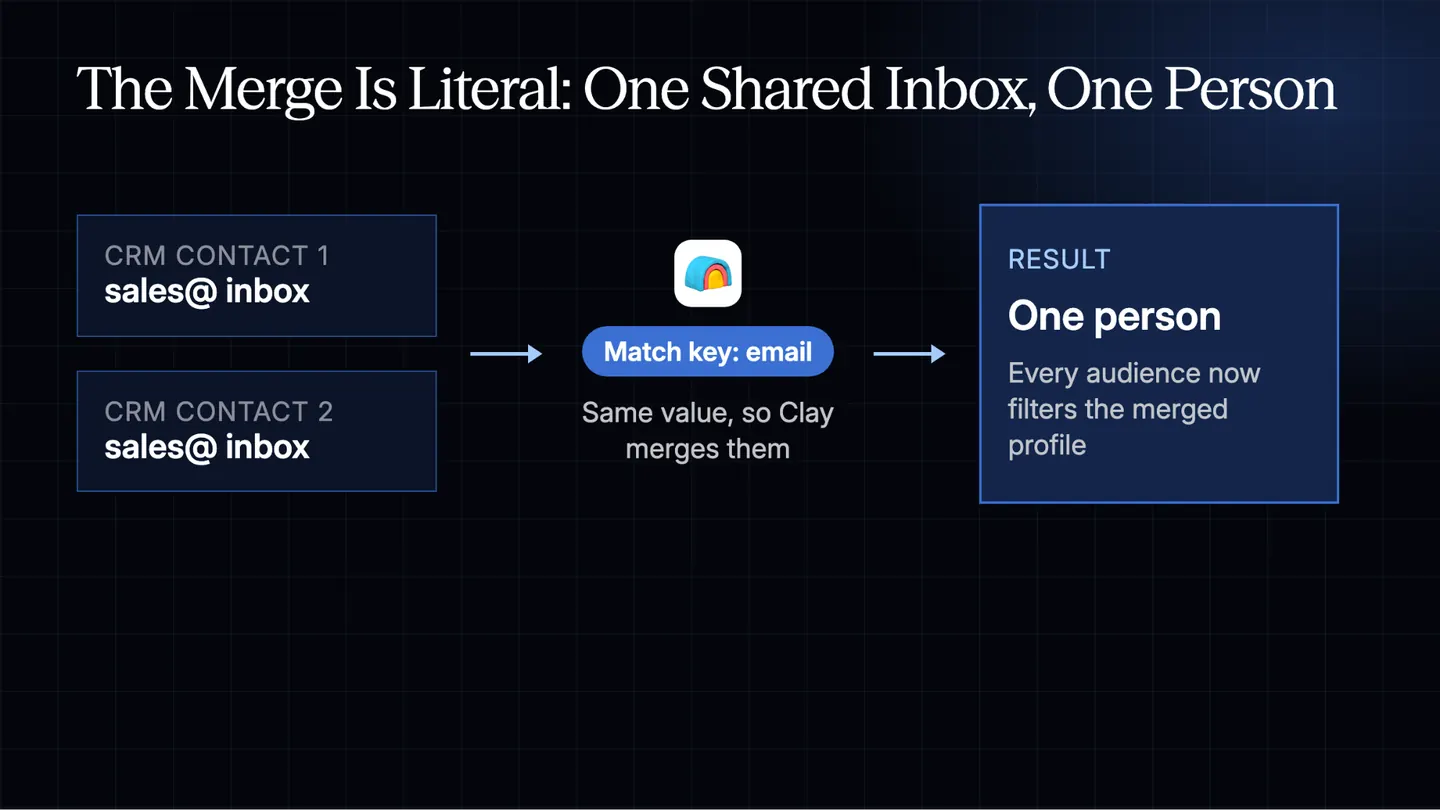
Records that share the match key become one person.
Clay’s docs treat Salesforce imports differently: they match on Salesforce IDs, so duplicates in your org carry over, and native deduplication within a source is still coming. The docs don’t say how an alias interacts with that, so check known duplicates after the first import. Until it ships, clean duplicates on the CRM side first, in-house or with one of the CRM data cleansing services we’ve compared.
Auto-enrichment also adds a professional profile URL to records at no cost, which gives later imports more to match on.
How to Build a Target Account List in Clay Audiences
A target account list in Audiences is a Companies segment: the accounts your team has agreed to pursue, defined by filters instead of a spreadsheet. The steps below build one from scratch, and the same steps work for a people list.
Step 1: Start With What Happens Next
Clay’s FAQ says to “Start with the finish line: what action will be taken on this segment, and by whom?” Its examples split by use: rep assignment for outbound, product signals for product-led growth and deal stage for pipeline work.
For an ad list, the finish line is a campaign: which accounts should see it, and which team follows up when they engage. A list built for an outbound campaign and one built for ads can share most filters. Build the shared part once and save the differences as separate segments.
Step 2: Create the Audience and Add Filters
Click Companies in the left sidebar, then the + next to My Audiences. Select Criteria and add a Filter or a Filter group. Filters join three kinds of data with AND and OR. Those are CRM fields mapped on import, Clay enrichment data such as firmographics and tech stack, and Clay signals such as funding or hiring spikes.
If you’d rather type the rule, Create filters with AI turns a sentence like “employee count less than 500” into a filter.
Step 3: Check Field Coverage Before You Trust the Count
A filter can only match records that have the field filled in. The Data hub’s Fields tab lists every field with a fill-rate indicator, and its side panel shows Records covered. If only half your companies carry an industry value, an industry filter drops the other half without telling you.
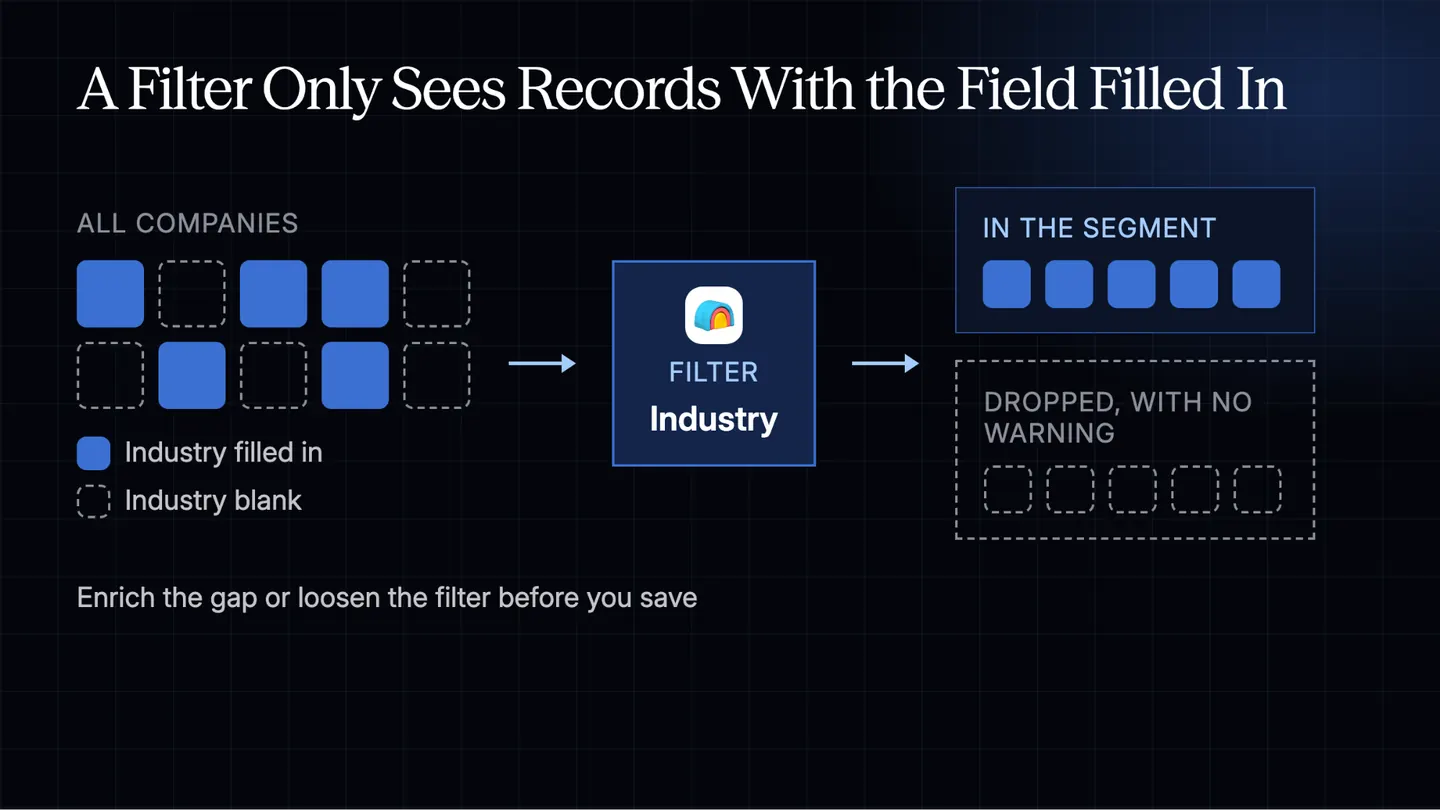
A blank field drops a record from the segment silently.
Enrich the gap or loosen the filter before you save.
Step 4: Size the First Segment
“Start narrow, then expand,” Clay advises. A practitioner on Reddit’s r/revops said “3k is good enough for a starting point” for a first outbound audience. Their inputs were one rep making 100 calls a day, which takes 100 working days to cover 10,000 prospects once.
Treat that as one person’s rule of thumb. An ad list can run larger, since follow-up starts only when an account engages, but the same check applies to the team doing that follow-up.
What Aircall’s Regional Tiers Show About Segment Design
Aircall shows why the definition behind a segment matters more than the tool that stores it. Before the project, “Every region built target lists its own way: by hand, with its own rules, in its own corner of the stack,” according to the Aircall case study. There was “no shared definition of a good-fit account.”
Frontal’s fix started with a field dictionary, so each data field had one agreed definition across systems. Then came regional tier grading: each region got its own ideal-customer definition, and every account got a grade against it, stored in Salesforce. The case page says that put the day’s priorities in the CRM rather than in one person’s head.
Over six months, 3,655 accounts were created and enriched into a TAM that now refreshes itself. The case page names Salesforce and Clay as the tools, not Audiences. A tier field written into your CRM imports into Audiences like any other field, so every segment you build there can filter on the same grade.
TAM Sourcing: Find the Accounts Missing From Your CRM
Your CRM only holds the accounts someone already found. In Clay’s guide, TAM sourcing “builds the market that should be in your CRM but is not.” It works by “pulling net-new accounts from Clay’s database, filtering to your ICP, and pushing verified records in.”
New companies keep forming after any list is pulled. The Census Bureau’s Business Formation Statistics project that applications filed in October 2026 will produce 27,867 new businesses with payroll within four quarters, seasonally adjusted. Only some will fit your ICP, but a CSV pulled last spring misses every one that does.
Clay’s July 2026 update turned the fix into a saved search. You can “save a search as an Audience so it refreshes automatically as new people and companies match,” says Clay’s announcement. Search takes plain language across company, people and job data, and it’s opt-in while in open beta.
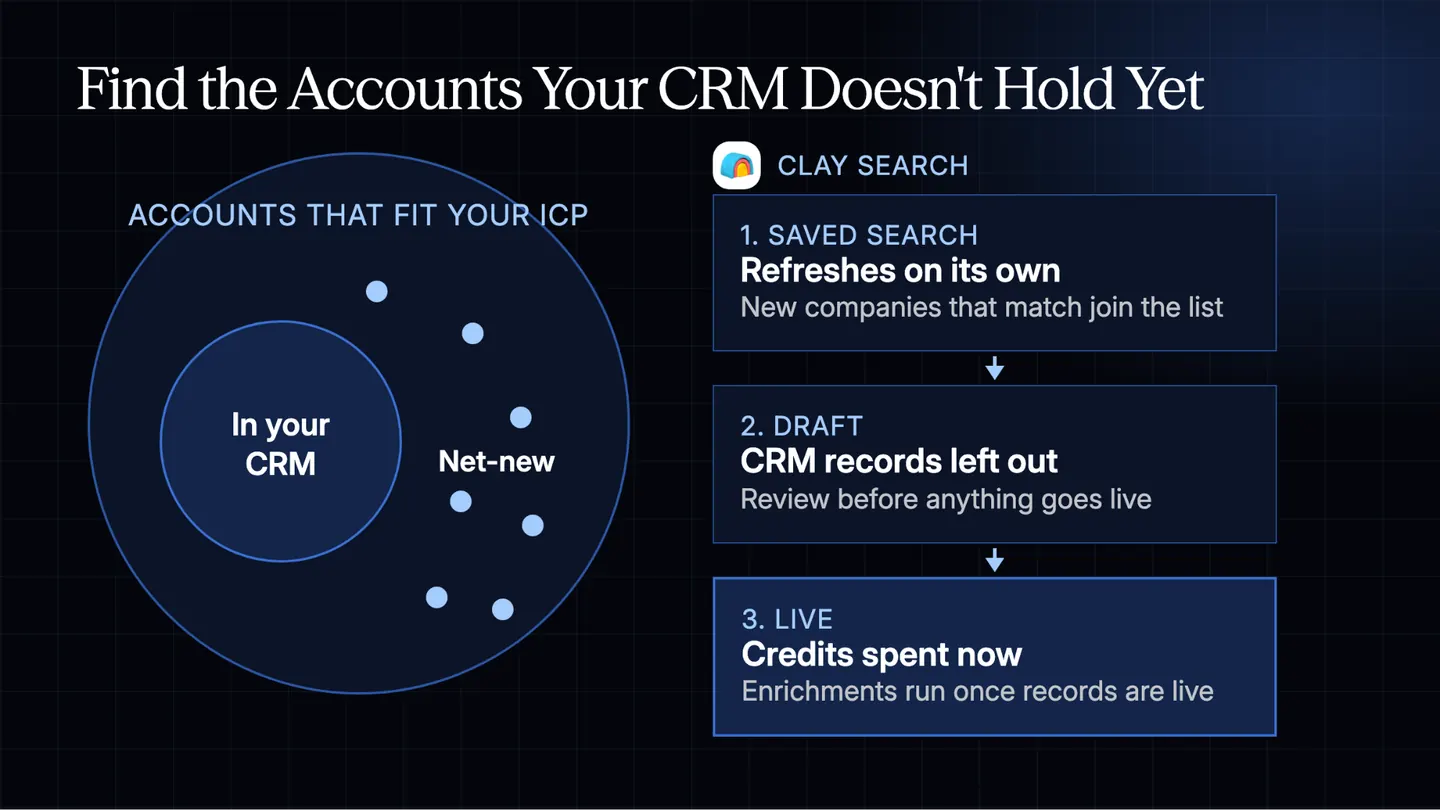
A saved search finds fitting accounts your CRM doesn’t hold.
To avoid paying for every result, send search results to a draft and review them there. Credits for downstream enrichments and actions “are not spent until records are live,” Clay’s FAQ notes. Whitespace detection also excludes records already in your CRM when you import from Clay’s people search, so the draft holds net-new names.
For local markets, our local business TAM play builds the list from Google Maps and industry directories instead.
Grow the List With Clay Lookalikes
Clay’s Lookalikes take “a list of up to 15,000 companies,” and Clay “finds Lookalike records with similar traits.” Results are grouped by category, such as industry, and you can run Lookalikes as a recurring search. Clay’s July post says Search and Lookalikes “are available across all Clay plans.”
Your closed-won accounts make a natural seed. Clay Lookalikes is a different tool from lookalike audiences on an ad platform, which the platform builds inside its own system from your seed list.
Clay’s version runs before the ad platform and returns the companies themselves, so you can filter, enrich and check them before any of them see an ad. For account-based marketing, that means every account in the campaign is one you chose and can name. A platform’s lookalike audiences never show you that list.
Enrich and Watch a Segment Without Wasting Credits
Credits are where Audiences gets expensive. Clay’s FAQ says credits are charged per record enriched, so enriching All People instead of a filtered segment means paying for every record in your database. Audiences won’t stop you, either: unlike tables, it lets you enrich the whole dataset when no segment is applied.
“Always filter your audience to the specific segment you want to enrich before running enrichments,” Clay advises. Its own example filters to Email Status = Valid or Company Size > 50 first. From there, an enrichment run on a segment takes six steps:
- Choose Create enrichment workflow and assign it to the filtered segment.
- Set an optional credit budget for the run.
- Click Run 10 rows and check the output by hand.
- Keep Field mapping on, so results land in the right fields.
- Turn on Auto-enrich new records if new members should be enriched as they arrive, typically within 15 minutes.
- Click Finish setup and run, or schedule runs daily, monthly or on a custom schedule.
Results write back to All People, not only to the segment you ran from. Clay says that means “any enriched field is immediately available as a filter in any other segment,” so one enrichment can serve several audiences. Enrichments also run in parallel, so chain any that depend on each other in Workflows or a table.
Signals attach to a segment the same way, checking for changes such as job moves or funding and storing the result on each record. Clay shows a Cost row before any Clay signal runs.
Keep the List Current After It’s Built
A list starts aging the day you export it. The Bureau of Labor Statistics counted 323,000 new US private-sector establishments in the first quarter of 2026. Its latest closings data, for the second quarter of 2025, shows 310,000 establishments closing. In Q1 2026, gross job gains and gross job losses each equaled 5.5% of private-sector employment, so headcount filters drift too.
An audience follows that drift only as far as its data does. “Segments update in real time as records enter or exit your filter criteria,” says Clay’s FAQ, but records change only when a source syncs, a saved search adds companies or an enrichment rewrites a field. On Growth, sources refresh daily. Enterprise CRM syncs run as often as every 15 minutes, and every plan with Audiences runs a full re-import of each source once a week.
Clay’s guide names the mistake to avoid: “Treating an audience like a saved list.” An export freezes the segment as it was that day. Keep the audience as the source and send it onward, so each campaign starts from current members.
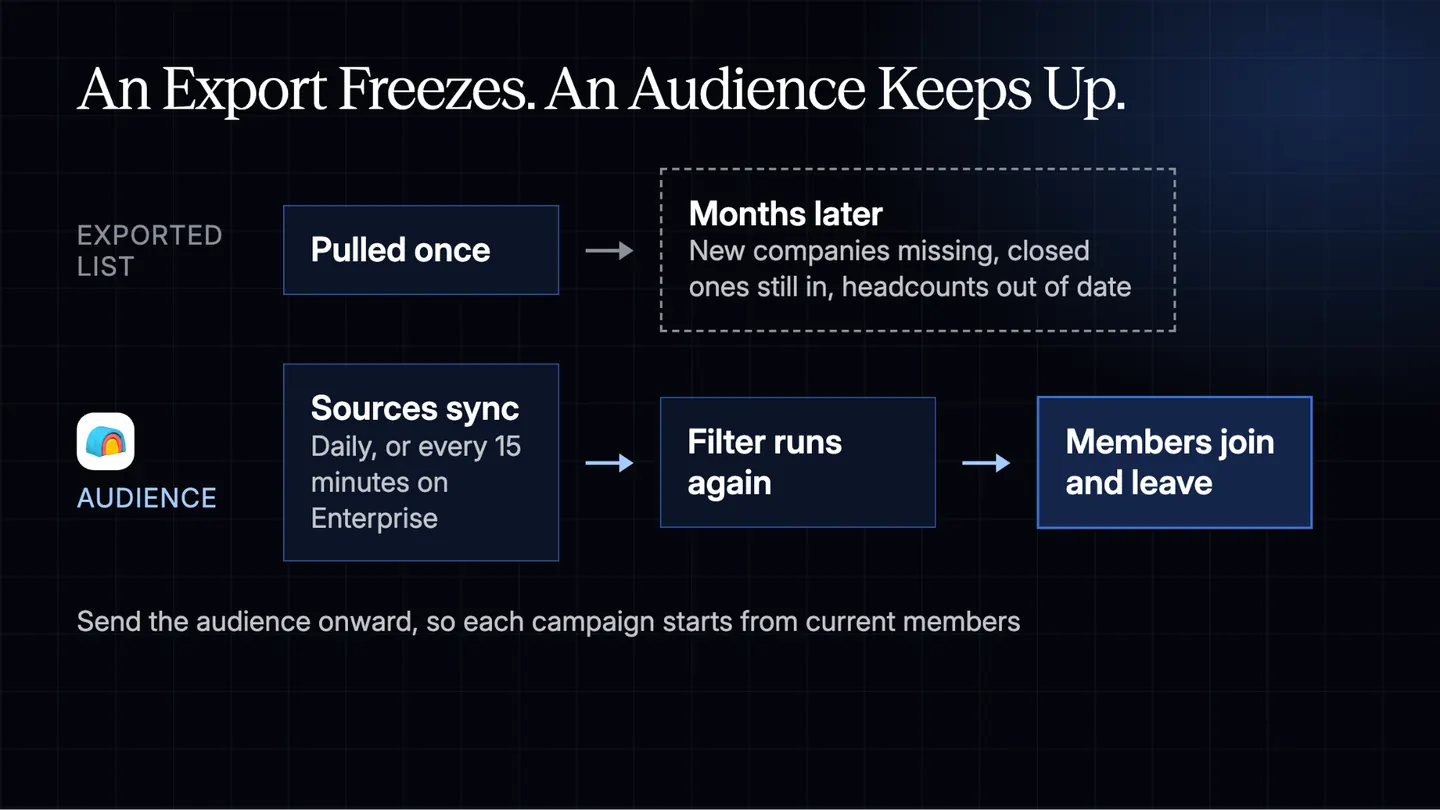
An export ages, while an audience re-runs its filter.
Records that no longer belong anywhere can be archived, and archived records “can be browsed and restored at any time,” Clay says. On the CRM side, a regular CRM hygiene routine keeps bad records from flowing back in.
Send the Segment to Ads, Outbound or Your CRM
A finished segment’s Add menu offers up to four actions: Send to workflow, Add to workbook, Sync to ad platforms and, on people segments, an export to an email sequence.
For ads, the sync keeps the platform audience tied to the segment. “Contacts and accounts who no longer qualify are automatically removed from the synced ad audience,” Clay’s docs say. The newer sync flow is in open beta and rolling out to Growth and Enterprise workspaces.
Match rates, identifiers and platform rules decide how much of a segment an ad platform can reach, and our Clay Ads guide walks through each one.
For your CRM, Audiences writes back to Salesforce Accounts and Contacts. Segment membership can map to a field such as CRM status, campaign enrollment, lead score or owner assignment, and exports run every 24 hours. HubSpot needs a detour: route the segment through a table with Look up in Audiences, then a HubSpot action such as HubSpot: Update Contact.
Our Aircall case reports records created and kept current, with no ad results. To see what an ad list returns, Enterprise workspaces get a Reporting tab that ties active pipeline and closed-won revenue to the records Clay sourced.
Get a Target Account List That Keeps Itself Current
The laptop CSV stops being a problem once the list lives in one place and its sources keep refreshing. Before the first segment, settle the fields you import and the match key that merges records. Then build one segment tied to one campaign, check its field coverage, and sync it only after the members look right.
If you’d rather not build that list yourself, Frontal’s list-building service is designed around “Lists that keep up.” On that service, new accounts and contacts “are enriched as they enter your CRM, so the next campaign starts from current data.” Most clients start with one service. You settle scope and price with us on a call, and both go into a statement of work.
Frequently Asked Questions
What is Clay Audiences?
It’s where your Clay workspace keeps its people and company records, built from your CRM, data warehouse, CSVs and Clay’s own data. Records Clay’s matching rules identify as the same merge into one profile, held in All People and All Companies. An audience is a saved filter over those profiles, so its members change as the records change.
Which Clay plans include Audiences?
Launch, Growth and Enterprise include it with no add-on fee, though enrichments still spend credits and actions. Clay’s Free plan doesn’t include Audiences. Launch imports from Clay’s database and CSVs, Growth adds up to 250,000 CRM or warehouse records, and only Growth and Enterprise push audiences to ad platforms.
When should I use a table instead of Audiences?
Use a table for one-off runs, data that doesn’t need to persist, sources Audiences can’t import yet and third-party providers you reach with your own API key. A table also tops out at 50,000 rows. Lists you reuse, segment or automate belong in Audiences, which holds millions of records.
How often does a Clay audience update?
Membership changes as records enter or leave the filter criteria, so the real pace is set by the source sync. CRM and warehouse sources sync once a day on Growth and as often as every 15 minutes on Enterprise. Every source also gets a full re-import once a week, on every plan that includes Audiences.
Can Audiences write back to HubSpot?
Not directly. HubSpot is import-only in Audiences, and Salesforce is the only CRM it writes back to. To update HubSpot, pass the segment through a Clay table: look each record up through Look up in Audiences and finish with HubSpot: Update Contact or HubSpot: Create records.
What is TAM sourcing in Clay?
TAM sourcing in Clay means pulling accounts that fit your ICP from Clay’s database into Audiences when they’re missing from your CRM. With Clay’s Search, you can save the search as an audience, so new companies that match join the list automatically instead of waiting for the next manual pull.
Does Frontal build target account lists in Clay?
Yes. Our list-building work covers ICP and TAM mapping, enrichment and lists written into HubSpot or Salesforce. For Aircall, we created and enriched 3,655 accounts into a self-refreshing TAM in Salesforce and Clay over six months. Other Clay agencies build lists too, so ask each one who will run the tables in your workspace.