Play 37ABM · Outbound
Signals in the CRM, with Decay
Signals in the CRM, with Decay is a six-step ABM and outbound play for your CRM, from “Capture signals, dated” to “Hot account: map the committee and alert the rep”. It uses Clay, Claude Code, Claude, HubSpot, Salesforce and five more tools.

Kenny Damian, Co-founder & Head of GTM
- Motion
- ABM, Outbound
- Channel
- CRM
- Steps
- 6
- Tools
- 10
The workflow
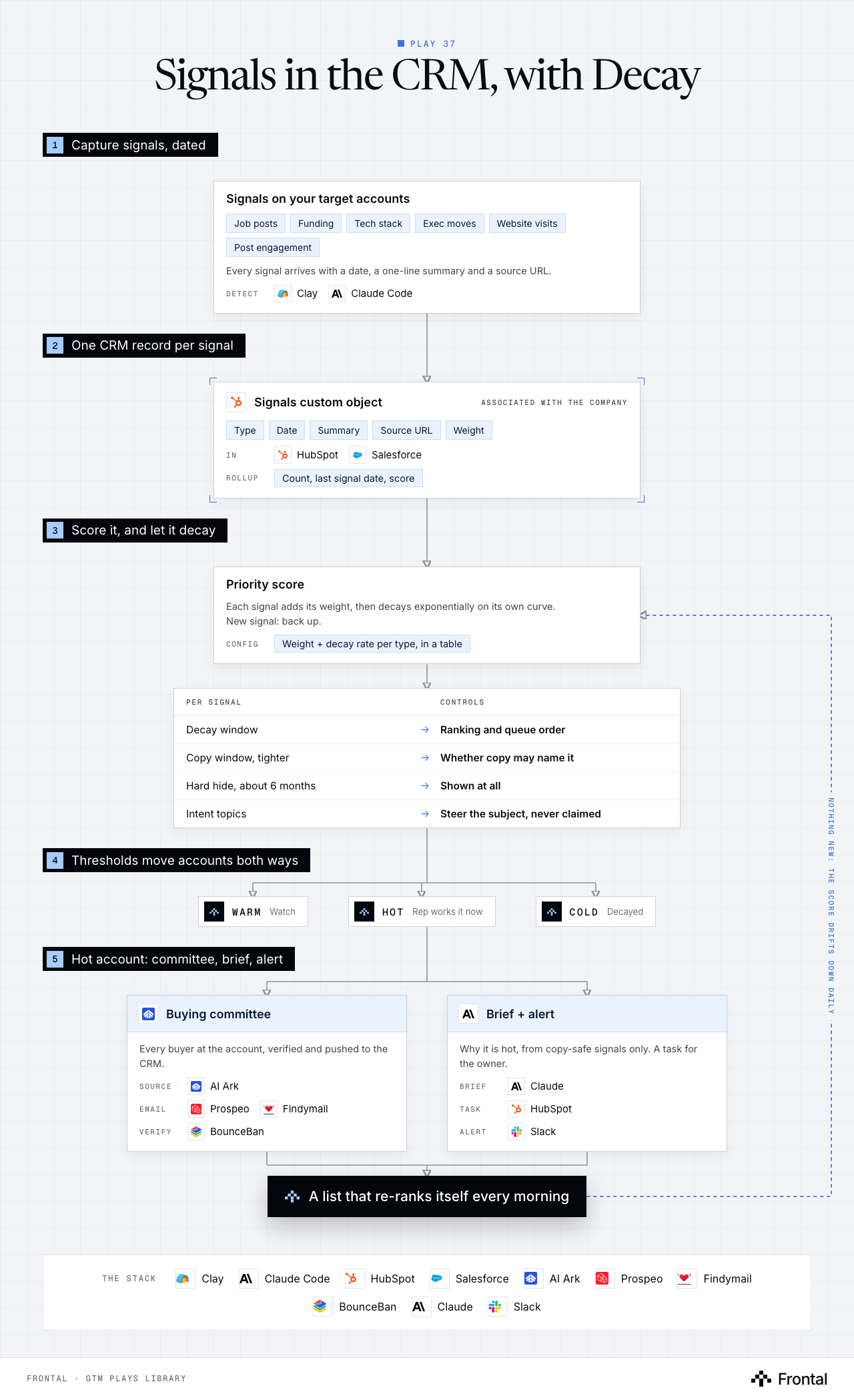
The diagram as text
1Capture signals, dated
- Signals on your target accounts: Job posts, Funding, Tech stack, Exec moves, Website visits and Post engagement. Every signal arrives with a date, a one-line summary and a source URL. Detect: Clay and Claude Code.
2One CRM record per signal
- Signals custom object (associated with the company): Type, Date, Summary, Source URL and Weight. In: HubSpot and Salesforce. Rollup: Count, last signal date, score.
3Score it, and let it decay
- Priority score: Each signal adds its weight, then decays exponentially on its own curve. New signal: back up. Config: Weight + decay rate per type, in a table.
- Per signal → Controls
- Decay window → Ranking and queue order
- Copy window, tighter → Whether copy may name it
- Hard hide, about 6 months → Shown at all
- Intent topics → Steer the subject, never claimed
4Thresholds move accounts both ways
- Warm: Watch.
- Hot: Rep works it now.
- Cold: Decayed.
5Hot account: committee, brief, alert
- Buying committee: Every buyer at the account, verified and pushed to the CRM. Source: AI Ark. Email: Prospeo and Findymail. Verify: BounceBan.
- Brief + alert: Why it is hot, from copy-safe signals only. A task for the owner. Brief: Claude. Task: HubSpot. Alert: Slack.
- Outcome: A list that re-ranks itself every morning
Feedback loop: Nothing new: the score drifts down daily (from A list that re-ranks itself every morning back to Priority score).
The stack: Clay, Claude Code, HubSpot, Salesforce, AI Ark, Prospeo, Findymail, BounceBan, Claude, Slack.
The play in six steps
Step 1: Capture signals, dated
Signals are only worth something when they reach the place the rep already works, with a date attached.
- Job posts, funding, tech stack changes, exec moves, website visits, post engagement.
- Detect them in Clay or in Claude Code. Either works; where they land is what matters.
- Every signal carries its date, a one-line summary and a source URL.
- An undated signal cannot be decayed or checked for freshness, so it is not stored.
Step 2: Store each signal as its own CRM record
A text field gets overwritten every week. A record keeps the history and the why.
- Create a Signals custom object in HubSpot or Salesforce, associated with the company.
- Properties: signal type, signal date, summary, source URL, weight, age in days.
- The company keeps the rollups reps filter on: signal count, last signal date, priority score.
- Dedupe on account, signal type and source, so the same event is not scored twice.
Step 3: Score it, and let it decay
An account with three signals a month ago and nothing since should not still sit at the top.
- Each signal adds its type's weight: an exec hire or a funding round counts more than one page visit.
- Each signal's contribution decays exponentially with age, on its own curve per signal type.
- A storm or an intent spike fades in weeks. A new leader still matters months later.
- Keep weights and decay rates in a config table, not in code, so they can be tuned without a deploy.
- The score drifts down every day and jumps back up when something new lands.
Step 4: Set two thresholds per signal
Ranking an account on a signal and naming that signal in an email are different decisions.
- Decay window: how long the signal still counts toward ranking the account.
- Copy window: how long it may be named in an email or on a call. Always tighter than the decay window.
- Hard hide at around six months: past that the signal is not shown at all.
- Intent topics may steer which subject gets chosen, but are never stated as a claim. Naming them tells the buyer they were watched.
- Generators check a yes or no flag per signal before naming it, rather than a prompt rule.
Step 5: Let thresholds move accounts both ways
Accounts climb and fall on their own as signals arrive and age.
- Score thresholds set HOT, WARM and COLD on the company record.
- Reps sort by score: the list re-ranks itself every morning before they log in.
- An account that cools drops out of the hot view without anyone touching it.
Step 6: Hot account: map the committee and alert the rep
The rep is told why the account is hot and who to talk to, not just that it is hot.
- Source the buying committee with AI Ark.
- Find verified emails with Prospeo and Findymail, verified with BounceBan.
- Claude writes a short account brief from the live, copy-safe signals.
- Push contacts and brief to the CRM next to the score, create a task for the owner and alert them in Slack.
Tools used
The ten tools this play names. Each links to the other plays that use it.
Related plays
CRM Hygiene
7 steps · CRM
Target-Account Exec Posts
6 steps · LinkedIn, Email, CRM
HubSpot Account Tiering & Scoring
7 steps · CRM

Have us run this play
Tell us what you're trying to hit this quarter, and we'll suggest where to start.