Play 21Outbound
Founder Connections Mining
Founder Connections Mining is a six-step outbound play for email and LinkedIn, from “Export the founder's connections” to “Route by tier”. It uses LinkedIn, Clay, BetterContact, Findymail, Nooks and three more tools.

Kenny Damian, Co-founder & Head of GTM
- Motion
- Outbound
- Channel
- Email, LinkedIn
- Steps
- 6
- Tools
- 8
The workflow
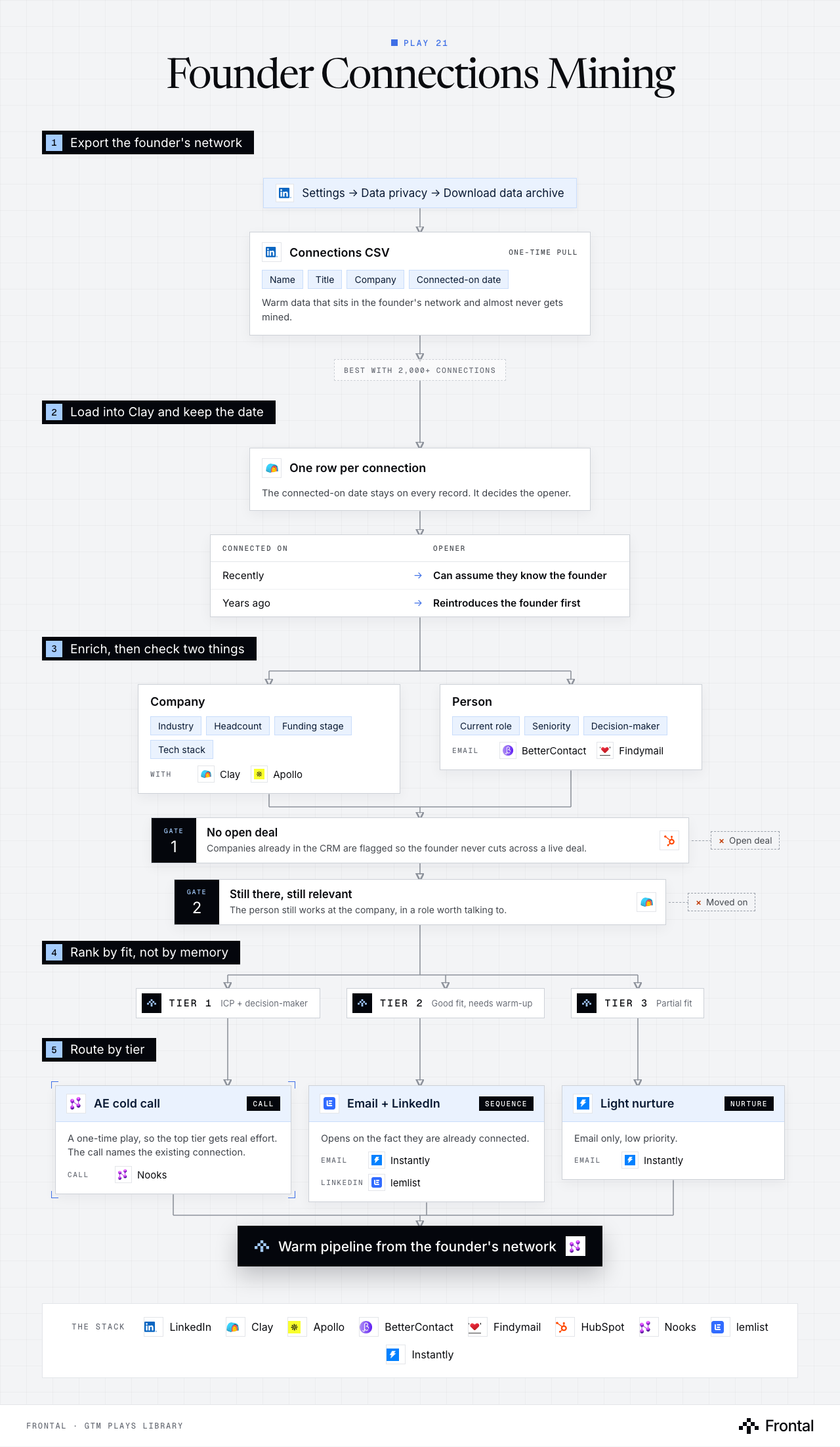
The diagram as text
1Export the founder's network
- Settings → Data privacy → Download data archive. Tool: LinkedIn.
- Connections CSV (one-time pull): Name, Title, Company and Connected-on date. Warm data that sits in the founder's network and almost never gets mined. Tool: LinkedIn.
- Best with 2,000+ connections
2Load into Clay and keep the date
- One row per connection: The connected-on date stays on every record. It decides the opener. Tool: Clay.
- Connected on → Opener
- Recently → Can assume they know the founder
- Years ago → Reintroduces the founder first
3Enrich, then check two things
- Company: Industry, Headcount, Funding stage and Tech stack. With: Clay and Apollo.
- Person: Current role, Seniority and Decision-maker. Email: BetterContact and Findymail.
- Gate 1: No open deal: Companies already in the CRM are flagged so the founder never cuts across a live deal. Dropped: Open deal. Tool: HubSpot.
- Gate 2: Still there, still relevant: The person still works at the company, in a role worth talking to. Dropped: Moved on. Tool: Clay.
4Rank by fit, not by memory
- Tier 1: ICP + decision-maker.
- Tier 2: Good fit, needs warm-up.
- Tier 3: Partial fit.
5Route by tier
- AE cold call (call): A one-time play, so the top tier gets real effort. The call names the existing connection. Call: Nooks.
- Email + LinkedIn (sequence): Opens on the fact they are already connected. Email: Instantly. LinkedIn: lemlist.
- Light nurture (nurture): Email only, low priority. Email: Instantly.
- Outcome: Warm pipeline from the founder's network. Tool: Nooks.
The stack: LinkedIn, Clay, Apollo, BetterContact, Findymail, HubSpot, Nooks, lemlist, Instantly.
The play in six steps
Step 1: Export the founder's connections
Warm data that is already sitting in the founder's personal network and has almost never been mined systematically.
- LinkedIn → Settings → Data Privacy → Download Data Archive.
- Export the Connections CSV (name, title, company, connected-on date).
- Best when the founder has 2,000+ connections.
Step 2: Upload to Clay
One row per connection, preserving how long they have been connected.
- Create a single record per contact.
- Keep the connected-on date: older connections need a different opener.
Step 3: Enrich the companies
Work out which of those connections sit at companies you can actually sell to.
- Industry, headcount, funding stage, tech stack.
- Flag companies that already appear in the CRM so you do not cut across an open deal.
Step 4: Enrich the contacts
Confirm the person is still there and still relevant.
- Current role and seniority.
- Decision-maker flag.
- Verified email via BetterContact or Findymail.
Step 5: Score against ICP
Rank the network by fit, not by how well the founder remembers them.
- Tier 1: strong ICP match and a decision-maker.
- Tier 2: good fit, needs a warm-up touch.
- Tier 3: partial fit, low priority.
Step 6: Route by tier
This is a one-time play, so the top tier deserves real effort.
- Tier 1: AE cold calls through Nooks, referencing the existing connection.
- Tier 2: email plus LinkedIn, opening on the fact they are already connected.
- Tier 3: light email nurture only.
Tools used
The eight tools this play names. Each links to the other plays that use it.
Related plays
New Hire & GTM Leader Tracking
6 steps · Email, LinkedIn
Brand Mentions Monitoring
6 steps · LinkedIn, Email
Webinar & Event Attendee Capture
6 steps · Email, LinkedIn

Have us run this play
Tell us what you're trying to hit this quarter, and we'll suggest where to start.