Play 17Inbound · Outbound · ABM
HubSpot Account Tiering & Scoring
HubSpot Account Tiering & Scoring is a seven-step inbound, outbound and ABM play for your CRM, from “Analyze CRM data” to “Monitor and optimize”. It uses Clay, HubSpot, Findymail and ChatGPT.

Kenny Damian, Co-founder & Head of GTM
- Motion
- Inbound, Outbound, ABM
- Channel
- CRM
- Steps
- 7
- Tools
- 4
The workflow
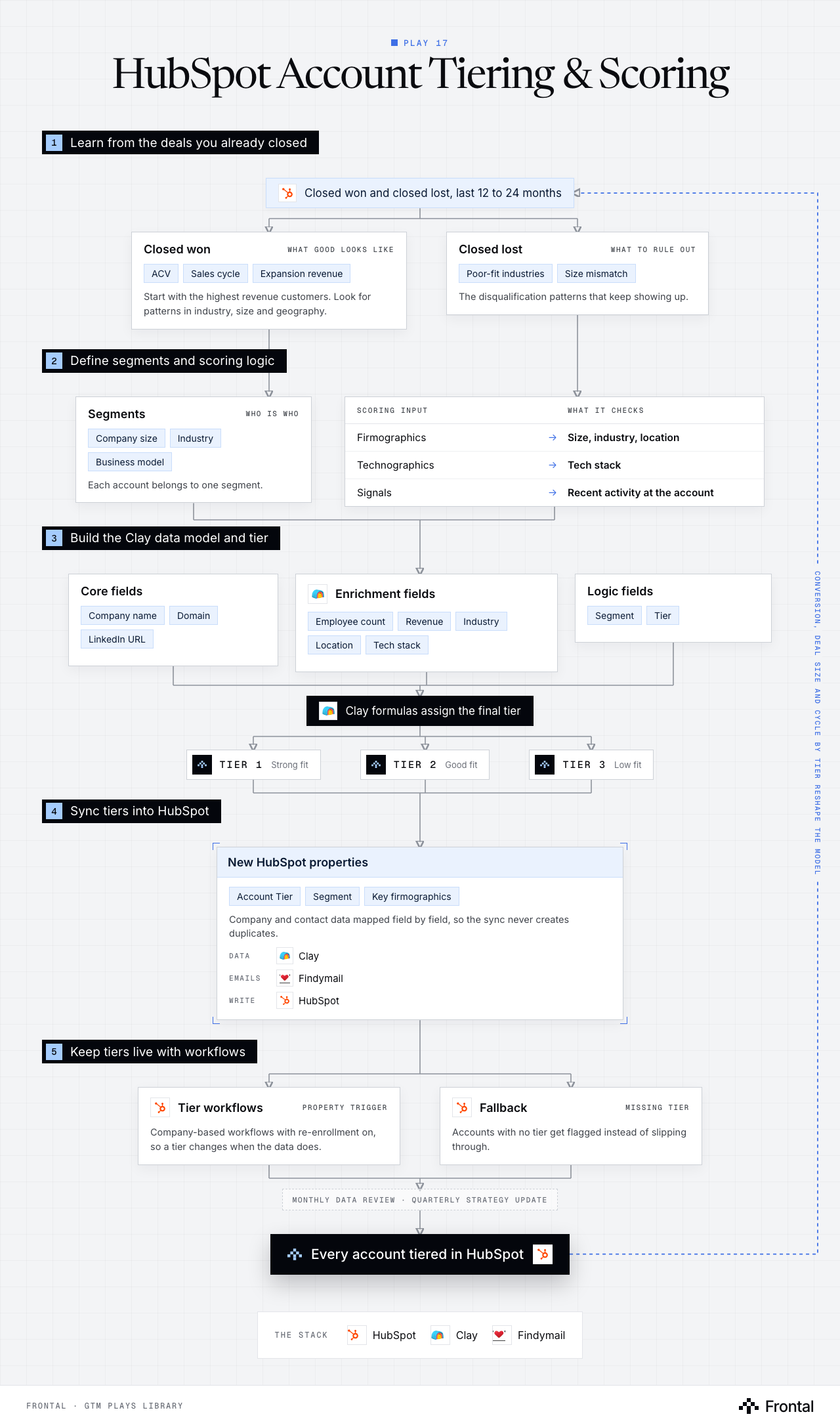
The diagram as text
1Learn from the deals you already closed
- Closed won and closed lost, last 12 to 24 months. Tool: HubSpot.
- Closed won (what good looks like): ACV, Sales cycle and Expansion revenue. Start with the highest revenue customers. Look for patterns in industry, size and geography.
- Closed lost (what to rule out): Poor-fit industries and Size mismatch. The disqualification patterns that keep showing up.
2Define segments and scoring logic
- Segments (who is who): Company size, Industry and Business model. Each account belongs to one segment.
- Scoring input → What it checks
- Firmographics → Size, industry, location
- Technographics → Tech stack
- Signals → Recent activity at the account
3Build the Clay data model and tier
- Core fields: Company name, Domain and LinkedIn URL.
- Enrichment fields: Employee count, Revenue, Industry, Location and Tech stack. Tool: Clay.
- Logic fields: Segment and Tier.
- Clay formulas assign the final tier. Tool: Clay.
- Tier 1: Strong fit.
- Tier 2: Good fit.
- Tier 3: Low fit.
4Sync tiers into HubSpot
- New HubSpot properties: Account Tier, Segment and Key firmographics. Company and contact data mapped field by field, so the sync never creates duplicates. Data: Clay. Emails: Findymail. Write: HubSpot.
5Keep tiers live with workflows
- Tier workflows (property trigger): Company-based workflows with re-enrollment on, so a tier changes when the data does. Tool: HubSpot.
- Fallback (missing tier): Accounts with no tier get flagged instead of slipping through. Tool: HubSpot.
- Monthly data review · quarterly strategy update
- Outcome: Every account tiered in HubSpot. Tool: HubSpot.
Feedback loop: Conversion, deal size and cycle by tier reshape the model (from Every account tiered in HubSpot back to Closed won and closed lost, last 12 to 24 months).
The stack: HubSpot, Clay, Findymail.
The play in seven steps
Step 1: Analyze CRM data
Export Closed Won and Closed Lost deals from the last 12 to 24 months. For successful deals, identify highest revenue customers and analyze ACV, sales cycle, and expansion revenue; look for patterns in industry, company size, and geography. For lost deals, identify common disqualification patterns like poor-fit industries and company size mismatches.
Step 2: Define account segmentation
Define segments based on company size, industry, and business model. Create scoring logic using firmographics, technographics, and signals. Establish a three-tier structure: Tier 1 (strong fit), Tier 2 (good fit), Tier 3 (low fit).
Step 3: Build Clay data model
Create core fields including company name, domain, and LinkedIn URL. Add enrichment fields for employee count, revenue, industry, location, and tech stack. Include logic fields for segment and tiering calculations.
Step 4: Enrich accounts and assign tiers
Run enrichment in Clay to populate missing firmographic and technographic data. Apply scoring logic using Clay formulas to assign final tier classifications.
Step 5: Sync data to HubSpot
Create new properties for Account Tier and Segment, plus key firmographic fields. Sync company and contact data from Clay with proper field mapping to avoid duplication.
Step 6: Build HubSpot automation workflows
Create company-based workflows with property-based triggers. Enable re-enrollment for dynamic tier assignment. Add fallback logic to flag accounts with missing tier information.
Step 7: Monitor and optimize
Track conversion rates, deal size, and sales cycle by tier. Monitor data quality and tier distribution. Conduct monthly data reviews and quarterly strategy updates.
Tools used
The four tools this play names. Each links to the other plays that use it.
Related plays
Signal Activation
11 steps · Website, LinkedIn, Email
CRM Hygiene
7 steps · CRM
Product Sign-Up Outreach
7 steps · Email, LinkedIn

Have us run this play
Tell us what you're trying to hit this quarter, and we'll suggest where to start.