Play 34Outbound
Closed-Lost Revival
Closed-Lost Revival is a seven-step outbound play for email, LinkedIn, calls and your CRM, from “Pull closed-lost deals” to “Reopen the deal”. It uses HubSpot, Salesforce, Clay, AI Ark, LinkedIn and eight more tools.

Kenny Damian, Co-founder & Head of GTM
- Motion
- Outbound
- Channel
- Email, LinkedIn, Call, CRM
- Steps
- 7
- Tools
- 13
The workflow
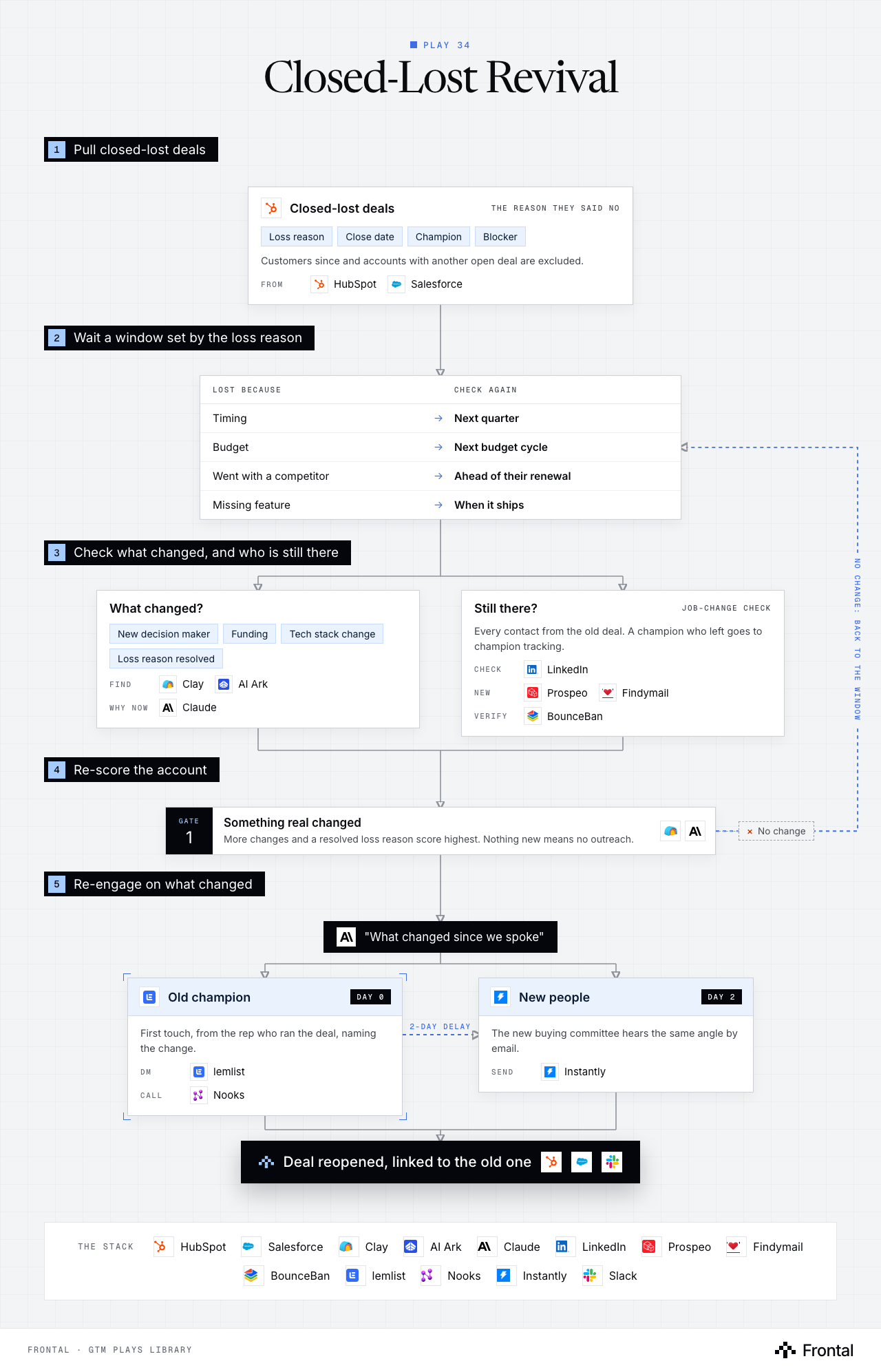
The diagram as text
1Pull closed-lost deals
- Closed-lost deals (the reason they said no): Loss reason, Close date, Champion and Blocker. Customers since and accounts with another open deal are excluded. From: HubSpot and Salesforce.
2Wait a window set by the loss reason
- Lost because → Check again
- Timing → Next quarter
- Budget → Next budget cycle
- Went with a competitor → Ahead of their renewal
- Missing feature → When it ships
- Lost because → Check again
3Check what changed, and who is still there
- What changed? New decision maker, Funding, Tech stack change and Loss reason resolved. Find: Clay and AI Ark. Why now: Claude.
- Still there? (job-change check): Every contact from the old deal. A champion who left goes to champion tracking. Check: LinkedIn. New: Prospeo and Findymail. Verify: BounceBan.
4Re-score the account
- Gate 1: Something real changed: More changes and a resolved loss reason score highest. Nothing new means no outreach. Dropped: No change. Tools: Clay and Claude.
5Re-engage on what changed
- "What changed since we spoke". Tool: Claude.
- Old champion (day 0): First touch, from the rep who ran the deal, naming the change. DM: lemlist. Call: Nooks.
- New people (day 2): The new buying committee hears the same angle by email. Send: Instantly.
- Outcome: Deal reopened, linked to the old one. Tools: HubSpot, Salesforce and Slack.
Labelled connections: 2-day delay: Old champion to New people.
Feedback loop: No change: back to the window (from Gate 1: Something real changed back to Lost because).
The stack: HubSpot, Salesforce, Clay, AI Ark, Claude, LinkedIn, Prospeo, Findymail, BounceBan, lemlist, Nooks, Instantly, Slack.
The play in seven steps
Step 1: Pull closed-lost deals
These accounts already know you, and the CRM already holds the reason they said no.
- Export closed-lost deals from HubSpot or Salesforce with the loss reason, the close date and every contact on the deal.
- Mark who the champion was and who blocked the deal.
- Exclude accounts that became customers since, or that have another open deal.
- Deals with a blank loss reason go to a rep to fill in first: the reason is the angle later.
Step 2: Wait a set window
Reaching back a week after a no just reopens the same argument. Something has to have changed.
- Set a revival window per loss reason, not one global date.
- Timing or budget losses come back sooner than losses to a competitor.
- Lost to a competitor: line the window up with their likely renewal.
- Each deal enters the check queue once its window opens, in Clay.
- Set a revival window per loss reason, not one global date.
Step 3: Check what changed
The revival only works when there is a real, dated reason to come back.
- New decision maker in the buying function, found with AI Ark and LinkedIn.
- A funding round since the loss.
- A tech stack change, for example dropping the tool they chose instead of you.
- The loss reason itself resolved: the missing feature shipped, the budget cycle reset.
- Claude reads the loss reason against what changed and writes one line on why now.
Step 4: Check the contacts are still there
Half the value is knowing who is left from the last conversation.
- Run a job-change check on every contact from the old deal (Clay, LinkedIn).
- Champion still there: they are the first touch.
- Champion left: hand them to champion tracking at their new company and find their replacement.
- Find verified emails for anyone new with Prospeo and Findymail, verified with BounceBan.
Step 5: Re-score the account
Not every lost deal deserves a second run. The score decides who gets worked.
- Score on how many changes stacked up and how strong each one is.
- Weight the loss reason: resolved reasons score highest.
- No change found: the deal goes back to wait for the next window, not to outreach.
Step 6: Re-engage on what changed
The opener is never a check-in. It names the change and connects it to why they said no.
- Claude drafts a "what changed since we spoke" message from the loss reason and the change.
- The old champion gets a LinkedIn message first through lemlist.
- Two days later, new people on the buying committee get an email through Instantly with the same angle.
- The original rep calls the champion through Nooks.
Step 7: Reopen the deal
A revived account goes back into pipeline with its history attached.
- On a positive reply, reopen the deal in HubSpot or Salesforce, linked to the old one.
- Log what changed and the reply on the deal.
- Alert the original owner in Slack.
- Track which loss reasons revive and tune the windows from that.
Tools used
The 13 tools this play names. Each links to the other plays that use it.
Related plays
Competitor Post Engagers
6 steps · LinkedIn, Email, CRM
Public Records Signals
5 steps · Email, Call, CRM
Target-Account Exec Posts
6 steps · LinkedIn, Email, CRM

Have us run this play
Tell us what you're trying to hit this quarter, and we'll suggest where to start.