Play 39Outbound · ABM
Qualifying from Public Filings
Qualifying from Public Filings is a six-step outbound and ABM play for your CRM, from “Name the fact that actually qualifies” to “Audit, then load to the CRM”. It uses HubSpot, Clay, SEC EDGAR, Claude and Exa.

Kenny Damian, Co-founder & Head of GTM
- Motion
- Outbound, ABM
- Channel
- CRM
- Steps
- 6
- Tools
- 5
The workflow
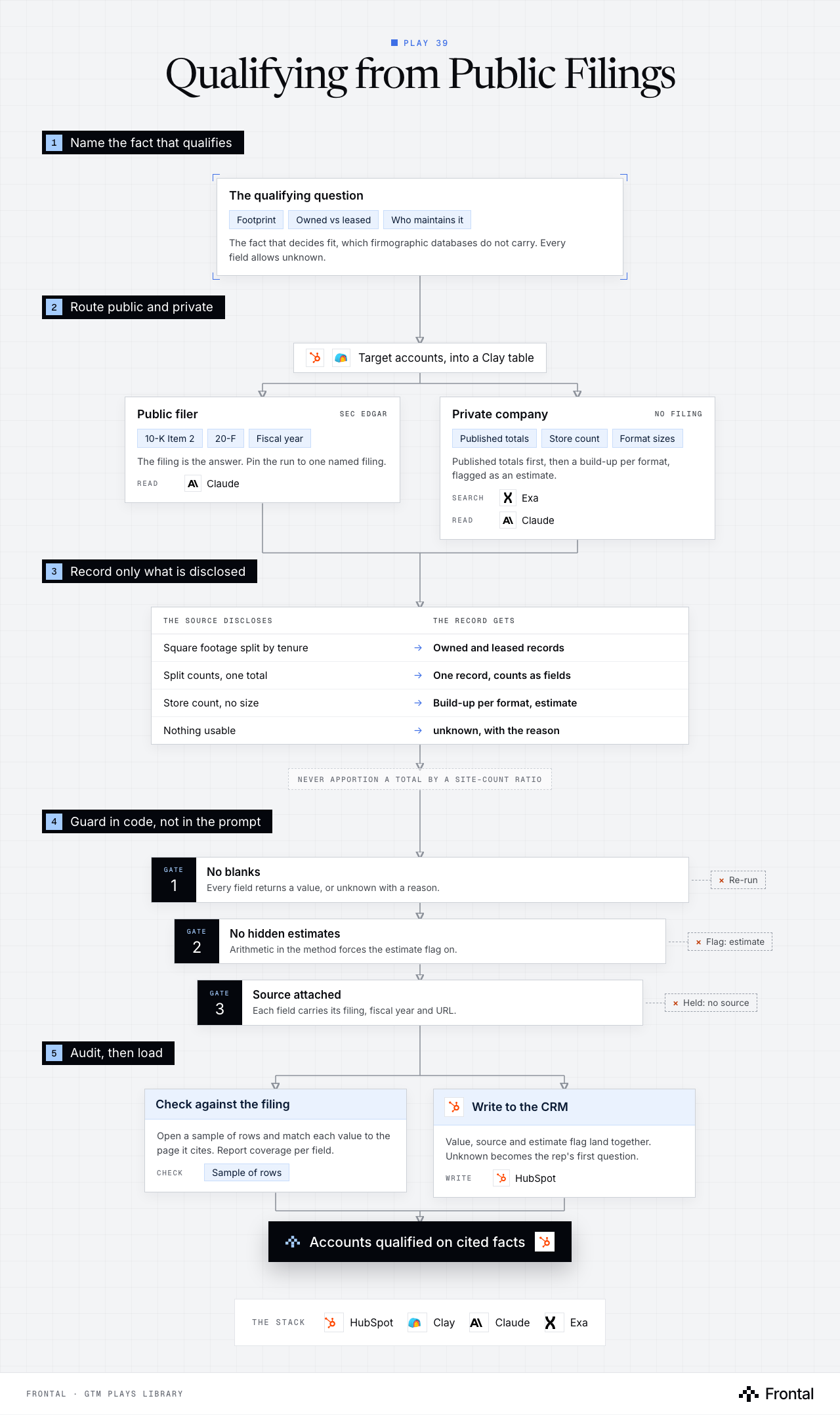
The diagram as text
1Name the fact that qualifies
- The qualifying question: Footprint, Owned vs leased and Who maintains it. The fact that decides fit, which firmographic databases do not carry. Every field allows unknown.
2Route public and private
- Target accounts, into a Clay table. Tools: HubSpot and Clay.
- Public filer (SEC EDGAR): 10-K Item 2, 20-F and Fiscal year. The filing is the answer. Pin the run to one named filing. Read: Claude.
- Private company (no filing): Published totals, Store count and Format sizes. Published totals first, then a build-up per format, flagged as an estimate. Search: Exa. Read: Claude.
3Record only what is disclosed
- The source discloses → The record gets
- Square footage split by tenure → Owned and leased records
- Split counts, one total → One record, counts as fields
- Store count, no size → Build-up per format, estimate
- Nothing usable → unknown, with the reason
- Never apportion a total by a site-count ratio
- The source discloses → The record gets
4Guard in code, not in the prompt
- Gate 1: No blanks: Every field returns a value, or unknown with a reason. Dropped: Re-run.
- Gate 2: No hidden estimates: Arithmetic in the method forces the estimate flag on. Dropped: Flag: estimate.
- Gate 3: Source attached: Each field carries its filing, fiscal year and URL. Dropped: Held: no source.
5Audit, then load
- Check against the filing: Open a sample of rows and match each value to the page it cites. Report coverage per field. Check: Sample of rows.
- Write to the CRM: Value, source and estimate flag land together. Unknown becomes the rep's first question. Write: HubSpot.
- Outcome: Accounts qualified on cited facts. Tool: HubSpot.
The stack: HubSpot, Clay, Claude, Exa.
The play in six steps
Step 1: Name the fact that actually qualifies
Firmographic databases tell you industry and headcount. The fact that decides fit (footprint, owned vs leased, who carries the maintenance) usually only lives in filings.
- Write down the qualifying question the buyer would ask on a first call, then the field that answers it.
- Check the obvious proxy against real accounts before trusting it.
- Example: owning buildings does not mean maintaining them. A net-lease landlord owns everything and maintains nothing; a tenant on a long lease can carry every roof.
- Give every field a closed set of answers, and make unknown one of them.
- Unknown is a legitimate answer. Blank is not.
Step 2: Route public filers and private companies
Public and private companies need different research methods, so each account is routed before anything is read.
- Pull the target accounts out of HubSpot into a Clay table: name, domain, country, CRM id.
- Route each one: public filer, private operator, private landlord, or not relevant to the question.
- Public filers go straight to the filing. Private companies go to published totals and a build-up.
- Tag out-of-scope segments rather than dropping them, so reopening a segment later costs nothing.
Step 3: Read the filing for public companies
For a public company the annual filing is the answer, so the research starts at SEC EDGAR, not a search engine.
- Name SEC EDGAR as the first source in the prompt and the most recent 10-K as the document.
- Item 2 Properties carries site counts, owned vs leased and total square footage.
- Foreign filers: use the 20-F or the annual report and say which.
- Claude reads the section and returns structured fields, each with the filing, fiscal year and sec.gov URL it came from.
- Pin the run to one named filing. Without it the same company returns different counts on different runs.
- Split records only where the filing splits them. If counts are split by tenure but square footage is one total, keep one record with the counts as fields.
- Name SEC EDGAR as the first source in the prompt and the most recent 10-K as the document.
Step 4: Research private companies without guessing
Private companies file nothing, so the method changes and every estimate is labelled as one.
- Exa and web search find published totals: press releases, investor pages, landlord tenant tables.
- When no total exists, build it up: store count times typical size, per format, with the working shown.
- A build-up is only fair on a single-format estate. On a mixed one, do it per format.
- Never apportion a total by a site-count ratio. Owned and leased sites are rarely the same size.
- A labelled estimate beats a null. An unlabelled estimate is worse than both.
Step 5: Enforce the rules in code
A rule written in the prompt loses to the model often enough to matter. A post-step in code does not.
- Reject any row with a blank field. Unknown must come with a reason.
- If the method text contains arithmetic, force the estimate flag to true, whatever the model said.
- Flag any ratio-shaped derivation as apportioned and keep it out of the CRM.
- Hold any field with no source attached.
- Cache every raw response so a parse failure can be re-read without paying for the research again.
Step 6: Audit, then load to the CRM
Coverage and accuracy are measured before a single field reaches the CRM.
- Open a sample of rows and check each value against the filing it cites.
- Report coverage per field, on the in-scope accounts and on the whole list separately.
- Write the fields to HubSpot with their source and the estimate flag alongside.
- Every unknown becomes a qualifying question the rep asks on the first call.
Tools used
The five tools this play names. Each links to the other plays that use it.
Related plays
Target-Account Exec Posts
6 steps · LinkedIn, Email, CRM
HubSpot Account Tiering & Scoring
7 steps · CRM
Signals in the CRM, with Decay
6 steps · CRM

Have us run this play
Tell us what you're trying to hit this quarter, and we'll suggest where to start.