Key Takeaways
- Start with scheduled enrichment if your account data goes stale, lead routing if inbound leads wait overnight, and campaign events if you send email through Clay.
- A Clay automation starts on a clock or on an event, such as a webhook or a new segment member. On Enterprise, table alerts flag failing columns, oversized tables and tables that stop getting data.
- Free has no scheduled sources and no recurring enrichment runs. On monthly billing, Launch costs $185 a month and Growth, which adds CRM sync and webhooks, costs $495 a month. Table alerts are Enterprise only.
- Test each automation on a few records first, as Clay advises, rather than relying on its cost estimates alone. Only Enterprise can cap a workflow’s credits.
The 10 Clay automation ideas below each take one recurring chore off your team’s week. Three run on a schedule, four react to something that happens, two connect Clay to your other systems, and one watches your tables for failures. Every entry names the chore, the Clay mechanism that takes it over, its trigger and cadence, the plan it needs and one setup detail.
We read each feature, limit and plan in Clay’s docs and on its pricing page on November 20, 2026, because Clay changes both often. Clay doesn’t publish a time saving per automation, so each entry names the work it removes. Time that work on your own team to see what it’s worth.
Most of what runs without you also spends credits, and any of it can fail without telling you. That’s why the list ends on table alerts and four checks to make before you leave one running.
We’re Frontal, the go-to-market partner for B2B tech companies, working as an extension of your team. Setting up Clay automations like these inside clients’ own workspaces is part of our work as a Clay Elite Studio Partner.
What Clay Automation Covers
Clay automation is the work Clay starts without anyone clicking run. Some of it starts on a clock: a scheduled source, a scheduled column, a workflow trigger set to Scheduled, or an agent task. Other work starts on an event, such as a webhook POST, a record joining a segment, a signal result or a campaign event. Table alerts watch for failing columns and tables that go quiet.
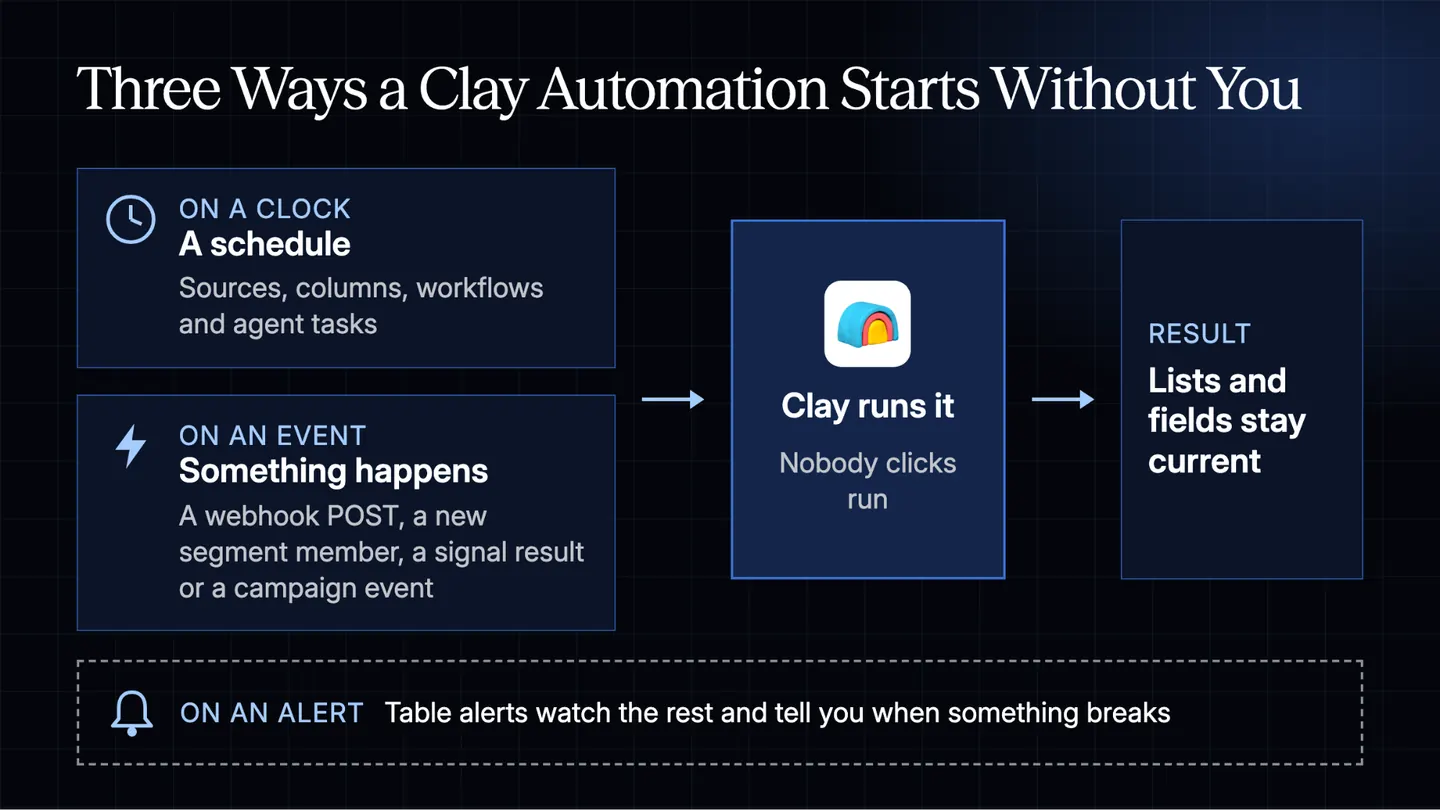
Clay runs the work on a clock or an event, and alerts watch for breaks.
In a wider GTM automation stack, Clay is the layer that keeps lists and fields current between campaigns. Clay’s workflow FAQ says when that layer needs a workflow: a job has to start without you, from a trigger or a timer, and different records need different paths. Lead-to-outreach Clay workflows, from the first search to the first email, use the same triggers for a different job.
Keeping lists current by hand lands on teams already short of time. When Gartner surveyed sellers in 2023, 77% of the 501 it asked said they struggle to complete their assigned tasks efficiently. The survey didn’t test automation, so read it as a measure of the load, not as proof that a tool lifts it.
The table maps eight Clay mechanisms to what starts each one, where you set it up and the lowest plan that includes it.
| Mechanism | What starts it | Where you set it up | Lowest plan |
|---|---|---|---|
| Scheduled source | A day, week or month cadence | The source’s schedule settings | Launch |
| Scheduled columns | A day, week or month cadence | The table’s Run settings | Launch |
| Workflow trigger | A schedule, a record joining a segment, or a webhook POST | The workflow’s trigger card | Free for schedules (100 runs per workflow); a paid plan for Segment and Webhook |
| Webhook source | Each POST from another tool | A workbook, under Monitor webhook | Growth, for webhook automation |
| Signal | A check on a cadence from daily to quarterly | The signal’s settings | Launch, for job change and company news |
| Campaign events | Each send, reply, bounce or unsubscribe | Sequencer, then Events | Launch |
| Agent scheduled task | A daily, weekday, weekly or monthly cadence | Agent, then Scheduled | Launch, in beta |
| Table alerts | A failure rate, a row count or no new data | Each table’s alert settings | Enterprise |
Hourly schedules for sources and columns are Enterprise only. A source’s lowest plan also isn’t always the plan its data needs: a HubSpot or Salesforce source needs Growth for the CRM integration. Ideas 8 and 9 use two more mechanisms. From Growth, a CRM action can auto-run on new or edited rows. On any plan, a workflow can become a routine your other systems call.
The 10 Clay Automation Ideas at a Glance
Find the chore that eats the most of your week, then go to its entry. The plan column shows the lowest plan each idea needs.
| # | Chore it takes over | Clay mechanism | Cadence | Lowest plan |
|---|---|---|---|---|
| 1 | Exporting a CRM list to re-import it | Scheduled source | Day, week or month | Growth |
| 2 | Re-running headcount, funding and tech stack columns | Scheduled columns | Day, week or month | Launch |
| 3 | Building the Monday account coverage list | Agent scheduled task | Up to once a day | Launch (beta) |
| 4 | Uploading a weekly CSV of sign-ups or registrants | Webhook source | Each POST | Growth |
| 5 | Assigning overnight leads each morning | Workflow with a Segment trigger | Each new lead | Launch, or Growth to write to the CRM |
| 6 | Reading account news before reviews | News & fundraising signal | Daily to quarterly | Launch |
| 7 | Updating the blocklist and pausing converted leads | Campaign events table plus Pause lead in campaign | Each event | Launch |
| 8 | Copying enriched fields into the CRM | CRM update action with auto-run | Each new or edited row | Growth |
| 9 | Rebuilding the same enrichment in each tool | Workflow exposed as a routine | Each call | Every plan |
| 10 | Checking tables for errors by hand | Table alerts | Immediately or as a digest | Enterprise |
Ideas 1, 2 and 8 work as a set: pull the records, keep them fresh, and write the results back.
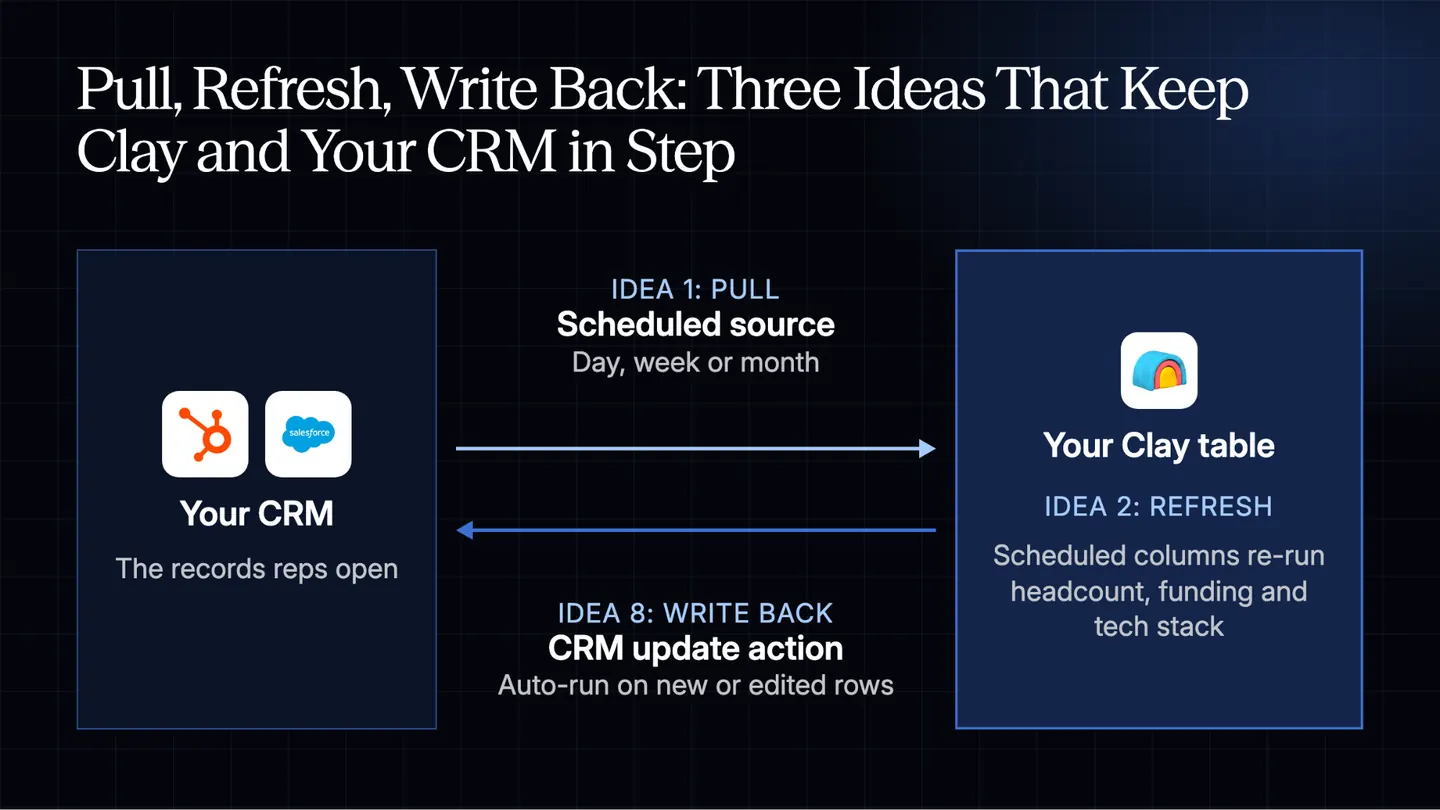
Ideas 1, 2 and 8 form one loop between your CRM and Clay.
A chore that spans several tools is a full build rather than one automation, the kind our free plays library maps step by step.
Chores a Schedule Can Take Over
Scheduled ideas replace work someone does on the same day every week. The three below run on a cadence you set, and none needs a person to start it.
1. CRM Records Pulled Into Clay on a Schedule
If your Clay table started life as a CRM export, a scheduled source can pull those records itself. The table then picks up CRM changes without a weekly upload.
Best for: Teams that enrich HubSpot or Salesforce records in Clay and re-import them every week.
The chore: Exporting a CRM list each Monday, uploading it to Clay and matching it against last week’s table.
What takes it over: A scheduled source. Clay’s docs say it refreshes data “from any source (like Find People, Find Jobs, Salesforce or HubSpot) on a recurring basis.”
Trigger and cadence: Day, Week or Month, with Hourly reserved for Enterprise.
Plan: Growth, because Clay’s CRM integrations start there. A Find People or Find Jobs source can run on a schedule from Launch, which allows 100 scheduled sources. Free has none.
Setup detail: Turn on Update existing rows, so each re-run writes new information into the rows you already have. A scheduled source copies the CRM as it stands, duplicates included, so a messy CRM may need CRM data cleansing before you schedule it.
2. Stale Enrichment Fields Refreshed
Headcount, funding and tech stack drift from the day you enrich them. A scheduled column re-runs the enrichment, so the value you filter on stays recent.
Best for: Teams that score or segment accounts on firmographic fields.
The chore: Re-running headcount, funding and tech stack columns by hand before each campaign or quarterly review.
What takes it over: Scheduled columns. Clay’s docs give “company headcount, funding info, or tech stack changes” as the use, and only enrichment and action columns can be scheduled.
Trigger and cadence: Day, Week or Month, set under the table’s Run settings with Re-run columns on a schedule. An hourly option exists on Enterprise.
Plan: Launch, since Free doesn’t include recurring enrichment runs. Launch and Growth allow 100 tables with scheduled columns, and Enterprise allows 1,000.
Setup detail: Schedule the columns that change, not the whole table, because each scheduled re-run is another enrichment run that spends credits. Which provider fills each column is set in your Clay data enrichment setup, not in the schedule.
3. Monday Account Coverage Review
Whoever builds your Monday list of target accounts nobody is working can hand it to Clay’s global agent. The agent runs that review on a schedule and has the answer ready before the week starts.
Best for: Sales leaders who review account coverage every week from records already in Clay Audiences.
The chore: Filtering target accounts for missing contacts or no recent activity, then sending the list to the team.
What takes it over: A scheduled task for the agent. Clay ships three templates: Weekly pipeline priorities, Weekly account coverage review and Monthly workflow optimization review. You can also write the task in your own words, such as Tier 1 accounts with no contact added in 30 days.
Trigger and cadence: Daily, Weekdays, Weekly or Monthly, and a schedule runs at most once a day. Runs missed while a schedule is paused don’t happen later.
Plan: Launch, Growth or Enterprise. Agent is in beta, and Clay says its results may not always be accurate, so check its work. Launch and Growth get 1,000 free beta credits, and Clay estimates 3 to 12 data credits to answer a question about your records.
Setup detail: Each schedule carries its own permission level. Keep it at Ask for approval, the default, so a run nobody watches waits for you before it acts. The schedule runs as the person who created it and stops if they leave, so set it up under the person who owns the review.
Chores an Incoming Event Can Take Over
Event ideas react to something that happens: a form fill, a new lead, a news story or an unsubscribe. The news signal looks for its stories on a cadence, and the other three start the moment the event arrives. Ideas 5 to 7 are Clay sales automation: each one acts on a lead or account that someone on your team owns.
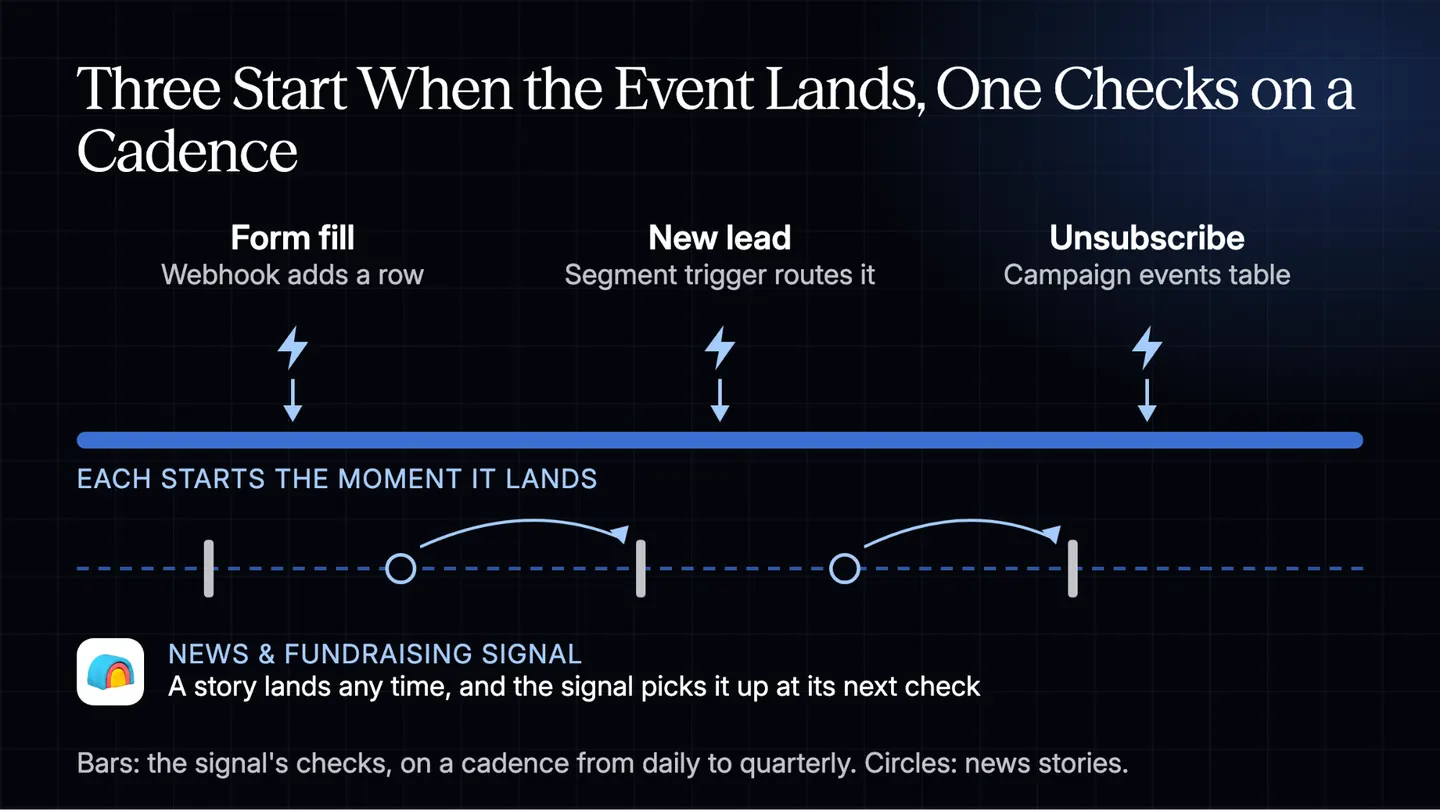
Webhooks, segment triggers and campaign events fire on arrival, and the news signal waits for its next check.
4. A Webhook Instead of the Weekly CSV Export
Event tools, product databases and form builders can usually post to a URL. A Clay webhook turns each post into a row, so nobody exports a file.
Best for: Teams that move sign-ups, event registrants or form fills into Clay from a tool with no native Clay integration.
The chore: Exporting a CSV from that tool each week and uploading it to a Clay table.
What takes it over: A webhook source. In a workbook, choose + Add, search for Webhooks, pick Monitor webhook and paste its URL into the sending tool. Clay’s guide says the table “updates instantly with new data, eliminating manual entry.”
Trigger and cadence: Each POST, as it arrives.
Plan: Growth. Clay’s pricing page lists webhook automation from Growth up.
Setup detail: Send a stable ID of 1 to 250 characters in the x-clay-webhook-idempotency-key header. A repeated delivery then keeps the latest payload instead of adding a duplicate row. If the sender has no stable ID, turn on Auto-dedupe rows for the email column.
For security, set an auth token, which the sending tool passes in the x-clay-webhook-auth header. Clay shows the token only once. A webhook source also stops at 50,000 submissions, a count that deleting rows doesn’t reset, so below Enterprise you create a new webhook at that point.
5. New Leads Routed to an Owner
When your inbound leads wait overnight for someone to assign them, a segment trigger can start the routing the moment each one lands.
Best for: Teams that hand inbound leads to owners by territory, company size or account ownership.
The chore: Opening the overnight leads each morning and giving each one an owner.
What takes it over: A workflow with a Segment trigger set to On event. It starts one run for each record that joins the segment, and Clay’s docs name routing a new inbound lead as the fit. A Rules conditional, which is free, sends each lead down a path by region or size.
Trigger and cadence: Every new member of the segment, plus, if you choose, each change to a record already in it.
Plan: Launch or above, because the Segment trigger needs a paid plan. Writing the owner back to your CRM needs Growth. Workflows is in open beta, so first enroll your workspace in the beta program from workspace settings.
Setup detail: Send the result where reps already look. Clay’s Slack integration can post each lead to a channel through a bot. Weighted rotation between reps is a separate build on top, one of the common Clay use cases.
6. Account News Sent to the Account Owner
Account managers read up on each account before a review call. A news signal checks each account for news on a cadence and passes on what it finds.
Best for: Account managers and customer success teams who cover dozens of existing accounts.
The chore: Searching the news for each account before a quarterly business review.
What takes it over: The News & fundraising signal, which Clay says will alert you “to significant events at monitored companies.” It needs a company domain, and on an account segment you add it with Add signal. A Slack message to the owner’s channel passes each result on.
Trigger and cadence: Quarterly, Monthly, Biweekly, Weekly or Daily. A new signal starts at Monthly, and you can’t set a time of day.
Plan: Launch, the first plan with company news signals.
Setup detail: Read the cost estimate before you start the signal. Clay charges for each result it returns or each record it checks, and it shows an estimate for the cadence you pick. On an account segment, Add signal also offers new hires, job postings, and web and topic intent among its Clay signals.
7. Unsubscribes and Converted Leads Pulled From Sequences
Yahoo’s sender requirements ask bulk senders to honor unsubscribes within 2 days, which a weekly blocklist pass can’t meet. If you send through Clay’s Sequencer, its campaign events table can handle unsubscribes as they arrive.
Best for: Teams that run email sequences through Clay’s Sequencer.
The chore: Copying unsubscribes into the blocklist once a week, and pausing leads who registered for an event or filled in a form.
What takes it over: The Campaign events table. Every sequence writes one row per event into it, and one table covers every segment-based sequence. Run Add email to blocklist on unsubscribe events. A registration or form fill lands outside the sequence, so run Pause lead in campaign from the table that receives it. Or enable Pause lead on segment exit, and a lead who leaves the segment pauses on its own.
Trigger and cadence: Each event. Clay targets five minutes for 99% of events on sender accounts bought through Clay.
Plan: Launch, since Free doesn’t include email campaigns.
Setup detail: Actions arrive as run-on-click columns, so nothing fires until you run them. Move to running on a condition once you trust the output. Clay doesn’t send sequence events to a webhook URL of your own, so these automations live in this table. Bounces and sender setup are the rest of email deliverability, and the blocklist alone doesn’t cover them.
Chores Between Clay and Your Other Systems
Carrying data between tools by hand is the chore here. Idea 8 writes Clay’s results into your CRM, and idea 9 lets any system call your Clay logic.
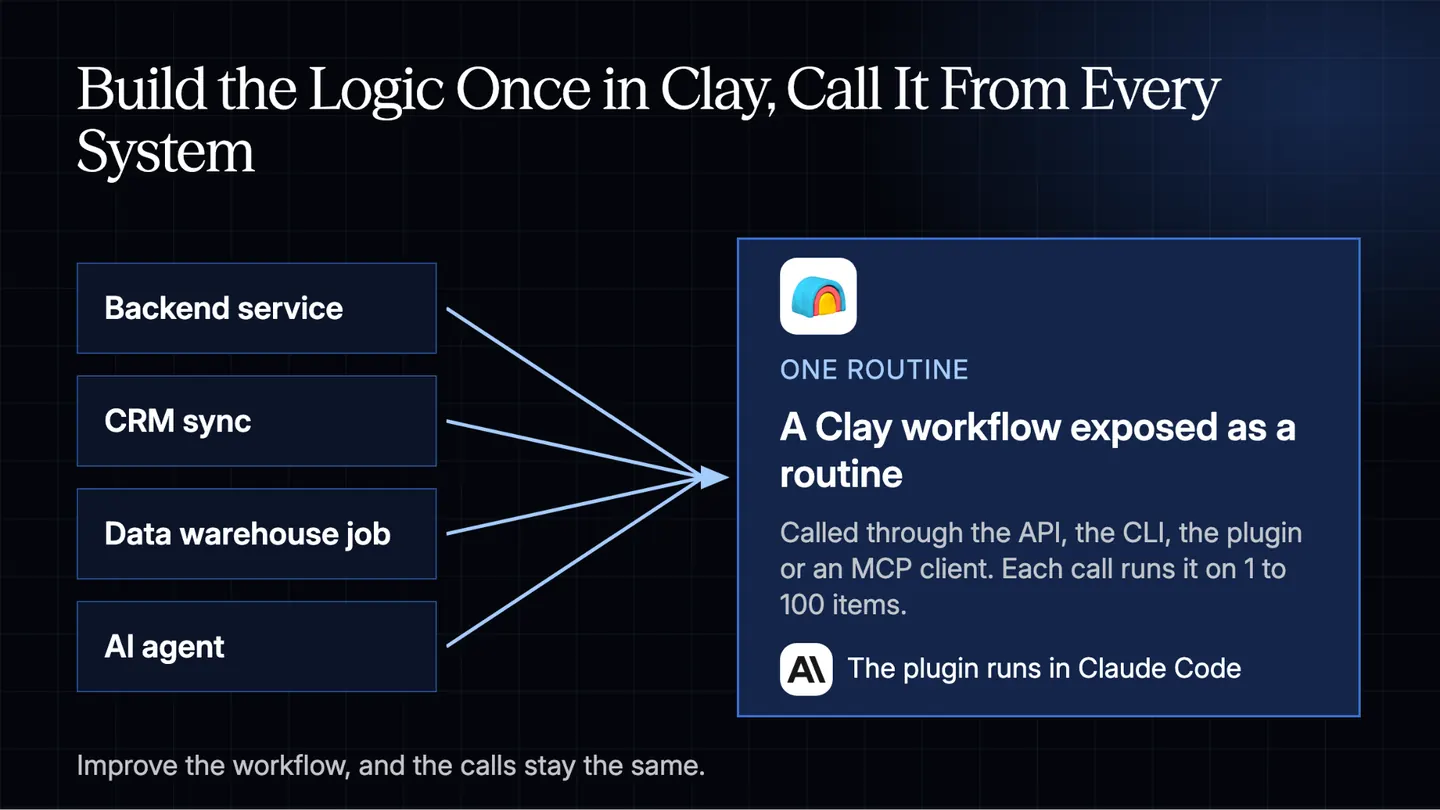
Idea 9 keeps the logic in Clay and lets every system call it.
8. Enriched Fields Written Back to the CRM
Enrichment helps nobody while it sits in a Clay table. A CRM action with auto-run writes it to the records your reps open.
Best for: RevOps teams whose reps work from HubSpot or Salesforce, not from Clay.
The chore: Copying enriched titles, headcounts and industries from Clay into CRM fields, row by row or by CSV.
What takes it over: A CRM update action. In HubSpot it’s Update object, which takes the object type and the HubSpot object ID. Auto-run then fires it whenever rows are added or edited.
Trigger and cadence: Each new or edited row that meets your condition.
Plan: Growth. Clay’s Growth plan adds “Auto-sync & enrich CRM”, and Free and Launch don’t include CRM integrations.
Setup detail: Use Only run if on the action, so it writes only rows that pass a check you set, such as a filled title field. Map each Clay column to one CRM property, leaving out fields your reps edit by hand, then test the action on 10 rows before auto-run goes on.
If the properties need redesigning first, that’s work for a RevOps team or one of the HubSpot agencies that set up CRMs.
9. One Routine Your Other Systems Call
Once a second tool needs the enrichment you built in Clay, you can rebuild it there or call it. A Clay routine keeps the logic in one place, and each system calls that one copy.
Best for: Teams with an engineer who wants product, data and AI tools to share one enrichment and scoring setup.
The chore: Re-running a Clay table for another team, or rebuilding its logic in a backend job.
What takes it over: A workflow exposed as a routine, under Integrations in its settings. Clay’s developer docs say routines “package GTM logic once” and run from a backend service, a CRM sync, a data warehouse job or an AI agent. One API call runs a routine against 1 to 100 items.
Trigger and cadence: Each call from the Clay API, the CLI, the plugin or an MCP client.
Plan: Every plan, including Free. Calls cost the same credits and actions as the same work inside Clay, and the plugin adds no cost.
Setup detail: Clay calls its managed and custom functions the more stable option for production, so test a workflow routine before a live system depends on it. Once it’s live, you can keep improving the workflow without touching its callers. In Clay’s words, “The API calls stay stable while the workflow improves.”
The plugin works in Claude Code, Codex and Cursor, so teams already using Claude Code for GTM work can call routines from there.
The Chore of Checking It All
Every automation on this list can fail without telling you. A provider throttles you, an input goes missing, or a source stops sending. The last idea makes Clay report a failing table instead of waiting for someone to notice.
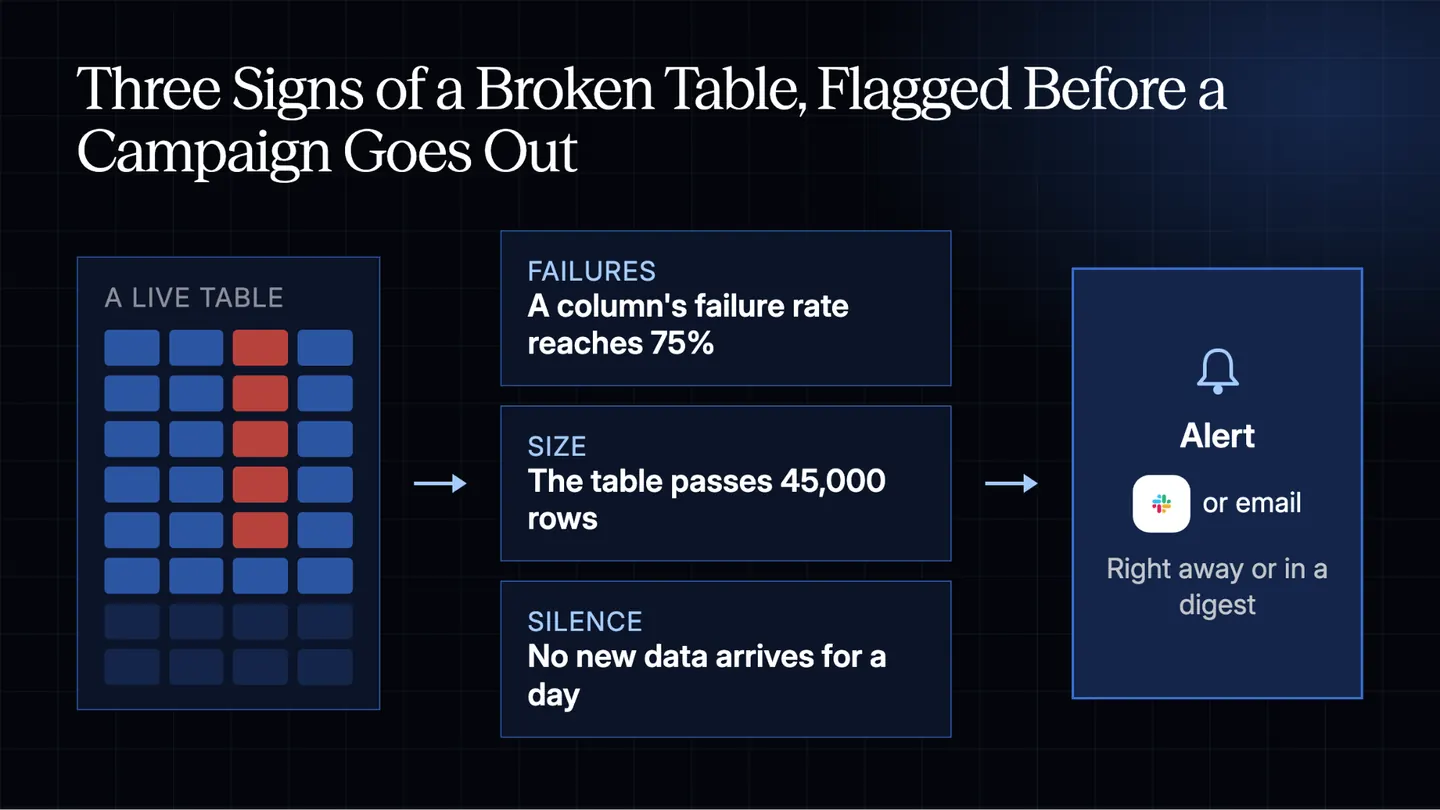
Alerts reach Slack or email when a column fails, a table grows too big or the data stops.
10. Broken Tables Flagged Without a Manual Check
Without an alert, the first sign of a broken table can be a campaign that goes out half empty. Table alerts, sent immediately by default, can warn you first.
Best for: Enterprise teams that run many scheduled tables, signals or webhooks.
The chore: Opening each live table every Monday to look for errored cells and empty columns.
What takes it over: Table alerts. By default they flag a column failure rate of 75% and a table past 45,000 rows. They also flag a table with a signal, scheduled source, scheduled run or webhook that gets no new data for a day.
Trigger and cadence: Immediately by default, or as a daily or weekly digest, by email or Slack. Alerts of one type fire at most once every 24 hours per table.
Plan: Enterprise. Alerts use no actions or data credits.
Setup detail: Alerts stay off until you enable them on each table, so switch them on as you build it. Slack delivery needs workspace admin access. Below Enterprise there are no table alerts, so check by hand that scheduled tables, signals and webhooks still add rows. For workflows, open each one’s runs: Clay records every run as Pending, Running, Waiting, Paused, Done or Failed.
Before You Leave a Clay Automation Running
A Clay automation spends credits while nobody watches. Four checks keep it under control before you walk away.
Test on a few records first. Clay shows cost estimates as you set up each step, but it advises against relying on them alone. Run a small batch, read the actual credit usage on those runs, then scale up.
Publish only when the test passes. A trigger you haven’t published sits in Draft and won’t fire. When you publish a segment workflow, Run on all members now shows how many records the backfill covers, with a credit estimate.
Know how to stop it. To stop a whole workflow from starting runs on its own, pause each of its triggers. A failed run stops at the step that failed and keeps what it produced, and you can re-run it with the same inputs.
Cap the spend where you can. On Enterprise, admins can set credit spend limits on workbooks, tables and workflows. A new workflow doesn’t take the default, so it runs without a limit until an admin sets one. At the limit, credit-consuming processes stop and recurring spends are canceled.
Clay’s controls cover only the part of your GTM automation that runs inside Clay. Steps that run in your CRM or an outside sequencer need their own tests and stop switches, as any sales workflow automation does.
What Clay Automation Costs to Keep Running
$185 a month is where Clay’s Launch plan starts on monthly billing, or $167 a month billed annually. Growth starts at $495 a month, or $446 billed annually, and Enterprise is custom-priced with an annual commitment. Of the ten ideas, only the routine in idea 9 runs on Free, so the other nine need Launch or above.
The table shows which of the 10 ideas each plan adds over the cheaper plans.
| Plan | Price on monthly billing | Ideas it adds |
|---|---|---|
| Free | Free | 9, plus scheduled workflows capped at 100 runs each |
| Launch | From $185 a month | 2, 3, 5 without CRM write-back, 6 and 7 |
| Growth | From $495 a month | 1, 4, 5 with CRM write-back, and 8 |
| Enterprise | Custom, annual commitment | 10, plus hourly schedules, webhook auto-delete and credit spend limits |
Each plan also runs every idea listed for the cheaper plans. The plan fee isn’t the whole bill, because enrichments, signals and agent runs spend credits on top. Clay charges nothing when an enrichment returns no result, and actions reset each billing cycle without rolling over. Credits and actions, not the plan fee, are what a daily automation adds to your Clay pricing bill.
How Hemlane Took Time Out of Outbound
Hemlane sells property management software to landlords and property managers, an audience the case study calls “notoriously hard to reach.” Before working with Frontal, Hemlane had tried internal outreach and outside providers. In the case study’s words, both “ate time and returned little.”
Frontal built the outbound on Clay and Smartlead. Clay sourced and enriched the contacts, and Smartlead ran the campaigns across channels. Careful list building, validation and technical setup sat underneath. The work ran from November 2023 to April 2024, and Hemlane came back for a second round in August 2024.
The Hemlane case study records 70% time saved versus manual outbound. It doesn’t say which automations saved that time, so don’t read the figure as the result of any one idea on this list.
Get Your Clay Automations Running Without You
Pick the chore your team repeats most often and automate that one first. Run it on 10 records, publish it, and read its runs after the first week before you add the next one.
Some teams would rather hand the build to someone else. Our GTM engineering team builds and runs Clay automations inside your own workspace, wired to the CRM and Slack you already use. Most clients start with one service. Our usual fit is companies past product-market fit with a real sales team, and we agree scope and pricing on a call.
Frequently Asked Questions
What are the best Clay automation ideas in 2026?
Three run on a schedule: CRM records pulled into Clay, stale enrichment refreshed and a Monday account coverage review. Four react to something that happens: a webhook instead of a weekly CSV, new leads routed, account news sent to owners, and unsubscribes pulled from sequences. Two connect systems: enriched fields written back to the CRM and one routine other tools call. The tenth is table alerts for broken tables.
What is Clay automation?
Clay automation means the runs Clay starts on its own, with nobody pressing a button. Each one starts on a timer or when something happens, like a webhook POST arriving or a record joining a segment. Enterprise adds table alerts for failing columns and tables that stop getting data.
The main mechanisms include scheduled sources and columns, workflow triggers, webhook sources, signals, campaign events, agent tasks, CRM actions, routines and table alerts. Together they keep a table or a CRM current between campaigns.
Can Clay run on a schedule?
Yes. Scheduled sources and scheduled columns run daily, weekly or monthly, with hourly runs on Enterprise only. A workflow trigger set to Scheduled runs a standalone job or re-runs a whole segment on a cadence. Signals check from daily to quarterly. Free includes scheduled workflows, capped at 100 runs each, but no scheduled sources.
Which Clay plan do you need to automate tasks?
Launch is the first plan with scheduled sources and recurring enrichment runs, at $185 a month on monthly billing. It also covers company news signals and email campaigns. For Clay sales automation that writes to HubSpot or Salesforce, you need Growth, from $495 a month, which adds CRM integrations and webhook automation. Table alerts and credit spend limits are Enterprise only.
What happens when a Clay automation fails?
A failed workflow run halts at the failing step, and whatever it produced before that point stays. Clay’s FAQ puts the cost of a failed run at little or nothing in most cases, because only the lookups and AI steps completed before the failure are billed.
Every run is recorded, so you can run a failed one again with identical inputs. On Enterprise, table alerts tell you by email or Slack when a column’s failure rate passes its threshold.
Does Clay automation work with HubSpot and Salesforce?
Yes, from the Growth plan. Scheduled sources pull HubSpot or Salesforce records into Clay on a cadence, and the HubSpot integration can import, create and update objects. Auto-run and Only run if decide which rows get written back.
Does Frontal build Clay automations?
Yes, as part of Frontal’s GTM engineering work. The automations live in the client’s own Clay account and write to the CRM and Slack the team already uses. Most clients start with one service. Other firms do this work too, and our roundup of Clay automation agencies compares them. Ask any of them who maintains each automation once it’s live.