Play 25Inbound · ABM
Review-Site Intent Scoring
Review-Site Intent Scoring is a six-step inbound and ABM play for email, calls and your CRM, from “Ingest the intent alerts” to “Route by temperature”. It uses G2, Slack, Clay, HubSpot, Salesforce and two more tools.

Kenny Damian, Co-founder & Head of GTM
- Motion
- Inbound, ABM
- Channel
- Email, Call, CRM
- Steps
- 6
- Tools
- 7
The workflow
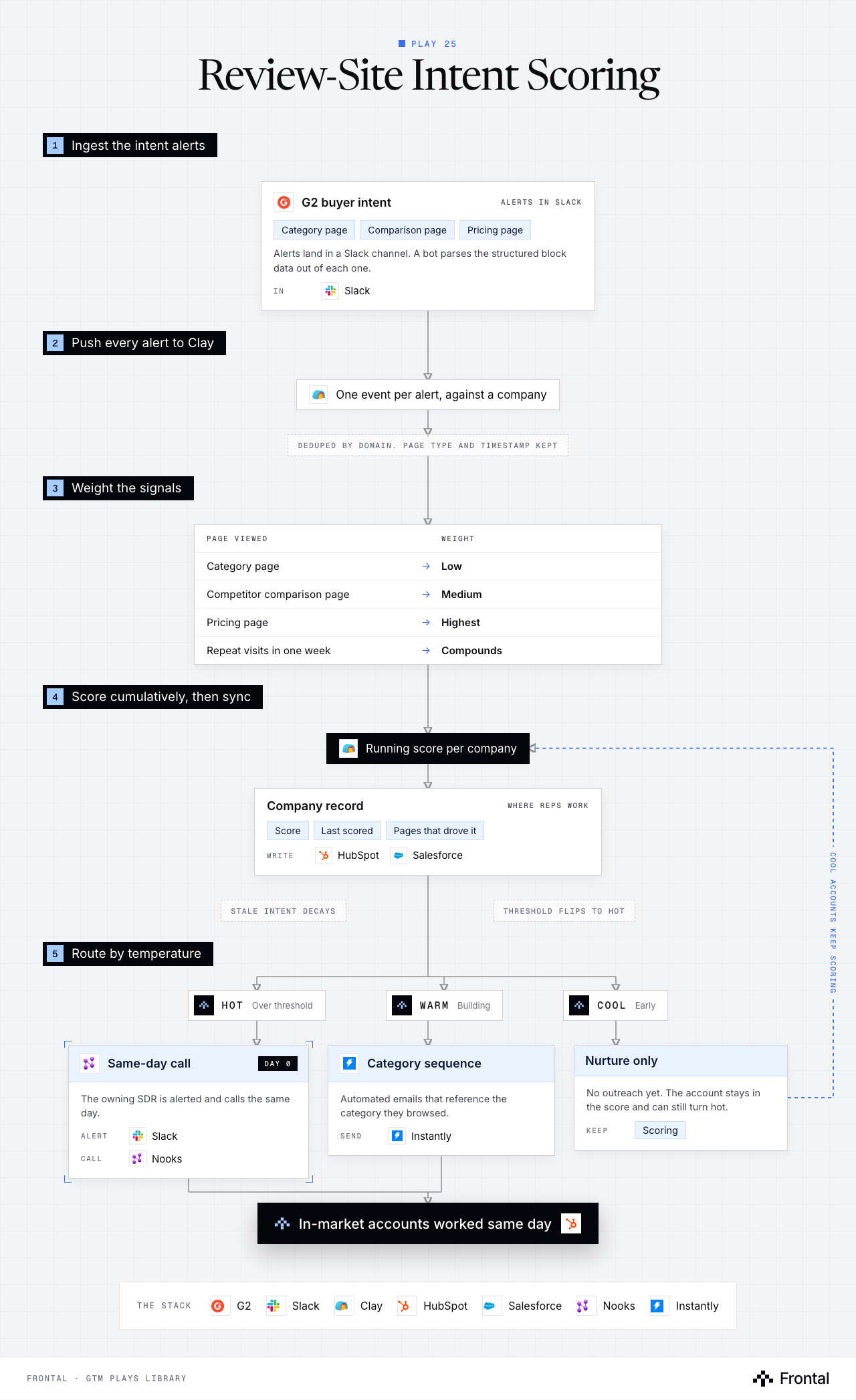
The diagram as text
1Ingest the intent alerts
- G2 buyer intent (alerts in Slack): Category page, Comparison page and Pricing page. Alerts land in a Slack channel. A bot parses the structured block data out of each one. In: Slack. Tool: G2.
2Push every alert to Clay
- One event per alert, against a company. Tool: Clay.
- Deduped by domain. Page type and timestamp kept
3Weight the signals
- Page viewed → Weight
- Category page → Low
- Competitor comparison page → Medium
- Pricing page → Highest
- Repeat visits in one week → Compounds
- Page viewed → Weight
4Score cumulatively, then sync
- Running score per company. Tool: Clay.
- Company record (where reps work): Score, Last scored and Pages that drove it. Write: HubSpot and Salesforce.
- Stale intent decays
- Threshold flips to HOT
5Route by temperature
- Hot: Over threshold.
- Warm: Building.
- Cool: Early.
- Same-day call (day 0): The owning SDR is alerted and calls the same day. Alert: Slack. Call: Nooks.
- Category sequence: Automated emails that reference the category they browsed. Send: Instantly.
- Nurture only: No outreach yet. The account stays in the score and can still turn hot. Keep: Scoring.
- Outcome: In-market accounts worked same day. Tool: HubSpot.
Feedback loop: Cool accounts keep scoring (from Nurture only back to Running score per company).
The stack: G2, Slack, Clay, HubSpot, Salesforce, Nooks, Instantly.
The play in six steps
Step 1: Ingest the intent alerts
Review sites tell you who is actively comparing you. Most teams let those alerts die in a channel.
- G2 buyer-intent alerts land in a Slack channel.
- A bot parses the structured block data out of each alert.
- Category page, comparison page and pricing views are all captured separately.
Step 2: Push to Clay
Every alert becomes a scored event against a company, not a one-off notification.
- Deduplicate against alerts already seen for that domain.
- Keep the page type and the timestamp.
Step 3: Weight the signals
Not every view means the same thing. The weights are the play.
- Category page view: low weight.
- Competitor comparison page: medium weight.
- Pricing page view: highest weight.
- Repeat visits within a week compound.
Step 4: Score cumulatively
A single visit is noise. A pattern is a buying signal.
- Scores accumulate per company across all alerts.
- Scores decay over time so stale intent stops firing.
- Crossing the threshold flips the account to HOT.
Step 5: Sync to CRM
The score has to live where the reps already work.
- Write the score and last-scored date onto the company record.
- Attach a note summarising which pages drove the score.
Step 6: Route by temperature
Same-day action on HOT is the entire value of the play.
- HOT: Slack alert to the owning SDR plus a cold call the same day.
- WARM: automated email sequence referencing the category.
- COOL: nurture only, keep scoring.
Tools used
The seven tools this play names. Each links to the other plays that use it.
Related plays
Signal Activation
11 steps · Website, LinkedIn, Email
HubSpot Account Tiering & Scoring
7 steps · CRM
Target-Account Exec Posts
6 steps · LinkedIn, Email, CRM

Have us run this play
Tell us what you're trying to hit this quarter, and we'll suggest where to start.