Play 20Outbound · ABM · Inbound
Signal Activation
Signal Activation is an eleven-step outbound, ABM and inbound play for your website, LinkedIn and email, from “Capture signals from all sources” to “Activate signals”. It uses LinkedIn, Clay, BetterContact, Findymail, HubSpot and 18 more tools.

Kenny Damian, Co-founder & Head of GTM
- Motion
- Outbound, ABM, Inbound
- Channel
- Website, LinkedIn, Email
- Steps
- 11
- Tools
- 23
The workflow
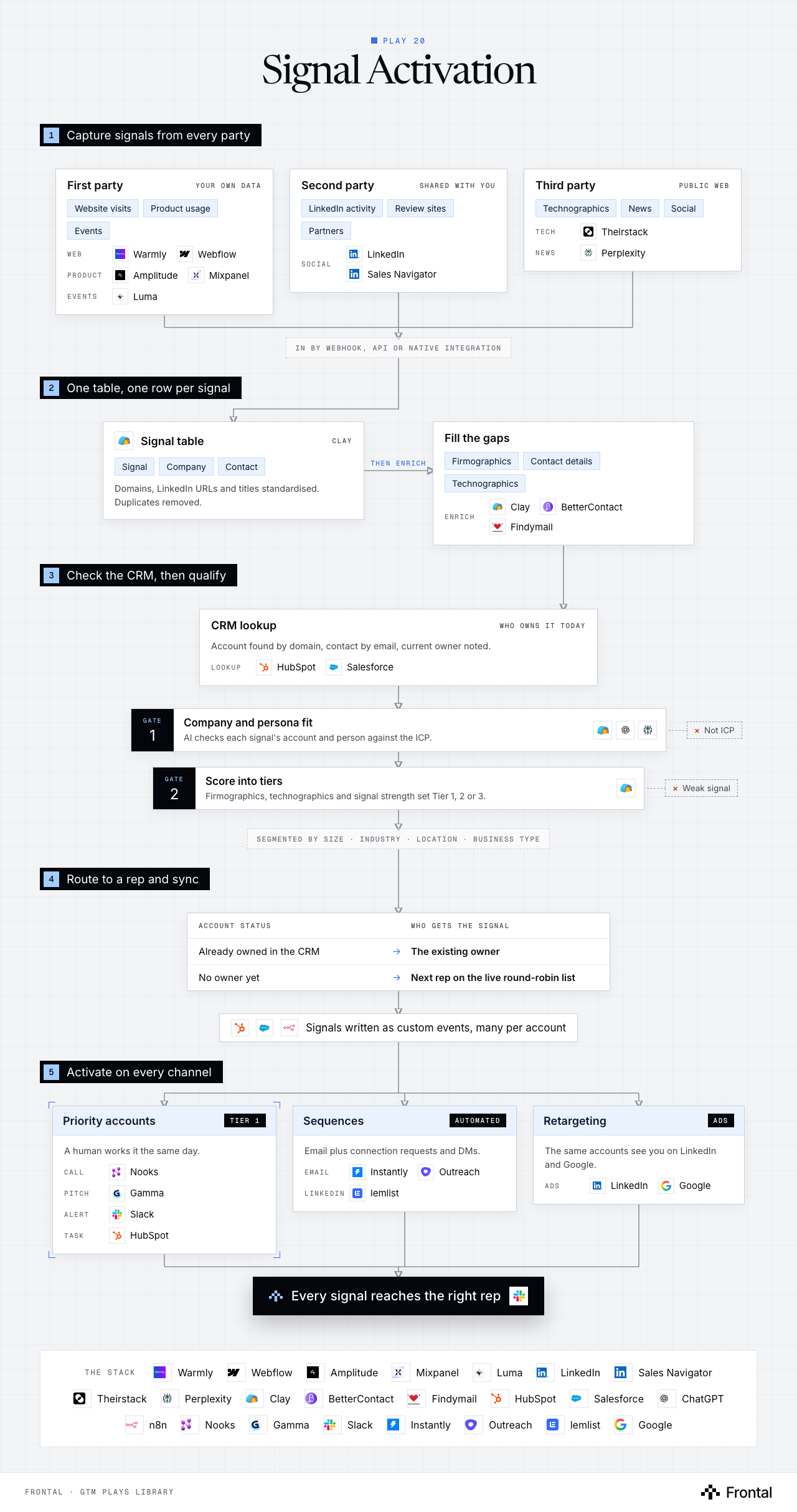
The diagram as text
1Capture signals from every party
- First party (your own data): Website visits, Product usage and Events. Web: Warmly and Webflow. Product: Amplitude and Mixpanel. Events: Luma.
- Second party (shared with you): LinkedIn activity, Review sites and Partners. Social: LinkedIn and Sales Navigator.
- Third party (public web): Technographics, News and Social. Tech: TheirStack. News: Perplexity.
- In by webhook, API or native integration
2One table, one row per signal
- Signal table (clay): Signal, Company and Contact. Domains, LinkedIn URLs and titles standardised. Duplicates removed. Tool: Clay.
- Fill the gaps: Firmographics, Contact details and Technographics. Enrich: Clay, BetterContact and Findymail.
3Check the CRM, then qualify
- CRM lookup (who owns it today): Account found by domain, contact by email, current owner noted. Lookup: HubSpot and Salesforce.
- Gate 1: Company and persona fit: AI checks each signal's account and person against the ICP. Dropped: Not ICP. Tools: Clay, ChatGPT and Perplexity.
- Gate 2: Score into tiers: Firmographics, technographics and signal strength set Tier 1, 2 or 3. Dropped: Weak signal. Tool: Clay.
- Segmented by size · industry · location · business type
4Route to a rep and sync
- Account status → Who gets the signal
- Already owned in the CRM → The existing owner
- No owner yet → Next rep on the live round-robin list
- Signals written as custom events, many per account. Tools: HubSpot, Salesforce and n8n.
- Account status → Who gets the signal
5Activate on every channel
- Priority accounts (tier 1): A human works it the same day. Call: Nooks. Pitch: Gamma. Alert: Slack. Task: HubSpot.
- Sequences (automated): Email plus connection requests and DMs. Email: Instantly and Outreach. LinkedIn: lemlist.
- Retargeting (ads): The same accounts see you on LinkedIn and Google. Ads: LinkedIn and Google.
- Outcome: Every signal reaches the right rep. Tool: Slack.
Labelled connections: Then enrich: Signal table to Fill the gaps.
The stack: Warmly, Webflow, Amplitude, Mixpanel, Luma, LinkedIn, Sales Navigator, TheirStack, Perplexity, Clay, BetterContact, Findymail, HubSpot, Salesforce, ChatGPT, n8n, Nooks, Gamma, Slack, Instantly, Outreach, lemlist, Google.
The play in eleven steps
Step 1: Capture signals from all sources
Aggregates data from first, second, and third-party channels including CRM systems, website analytics, marketing engagement metrics, review platforms, partner networks, LinkedIn activity, technographics, news mentions, and social signals via webhooks, APIs, and native integrations.
Step 2: Aggregate signals into one system
Centralizes all captured signals in a single unified table using Clay or Cargo, with each row representing one signal and associated company or contact.
Step 3: Normalize and deduplicate data
Standardizes key fields like company domain, LinkedIn URLs, and job titles; applies formulas for data cleaning, format standardization, and duplicate removal.
Step 4: Enrich company and contact data
Supplements missing information using Clay, BetterContact, and Findymail to add firmographics, contact details, and technographic data.
Step 5: Lookup records in CRM
Searches HubSpot or Salesforce for existing accounts by domain and contact by email, identifying current account ownership.
Step 6: Qualify accounts using AI
Filters signals against ideal customer profile using Clay, Claude, ChatGPT, or Perplexity to evaluate company and persona fit.
Step 7: Score accounts into tiers
Assigns tier rankings (Tier 1: strong fit, Tier 2: good fit, Tier 3: okay fit) based on firmographics, technographics, and signal strength.
Step 8: Segment accounts
Groups accounts by company size, industry, location, and business type for targeted routing and messaging strategies.
Step 9: Route signals to reps
Assigns each signal to appropriate sales representatives using round-robin distribution, maintaining live rep lists while preserving existing account ownership.
Step 10: Sync data to CRM
Pushes structured signal data into CRM platforms, updating companies, contacts, and custom events while tracking multiple signals per account.
Step 11: Activate signals
Executes multi-channel campaigns including retargeting via Google Ads and LinkedIn Ads; automated sequences through Instantly and lemlist; connection requests and LinkedIn DMs; manual outreach for priority accounts via Nooks; Slack alerts; and CRM task creation.
Tools used
The 23 tools this play names. Each links to the other plays that use it.
Related plays
HubSpot Account Tiering & Scoring
7 steps · CRM
Brand Mentions Monitoring
6 steps · LinkedIn, Email
Multi-Thread Inbound Leads
9 steps · Email, LinkedIn

Have us run this play
Tell us what you're trying to hit this quarter, and we'll suggest where to start.