Play 22Inbound · Outbound
Webinar & Event Attendee Capture
Webinar & Event Attendee Capture is a six-step inbound and outbound play for email and LinkedIn, from “Capture registrations” to “Log to CRM”. It uses Luma, Zoom, Clay, Apollo, Findymail and three more tools.

Kenny Damian, Co-founder & Head of GTM
- Motion
- Inbound, Outbound
- Channel
- Email, LinkedIn
- Steps
- 6
- Tools
- 8
The workflow
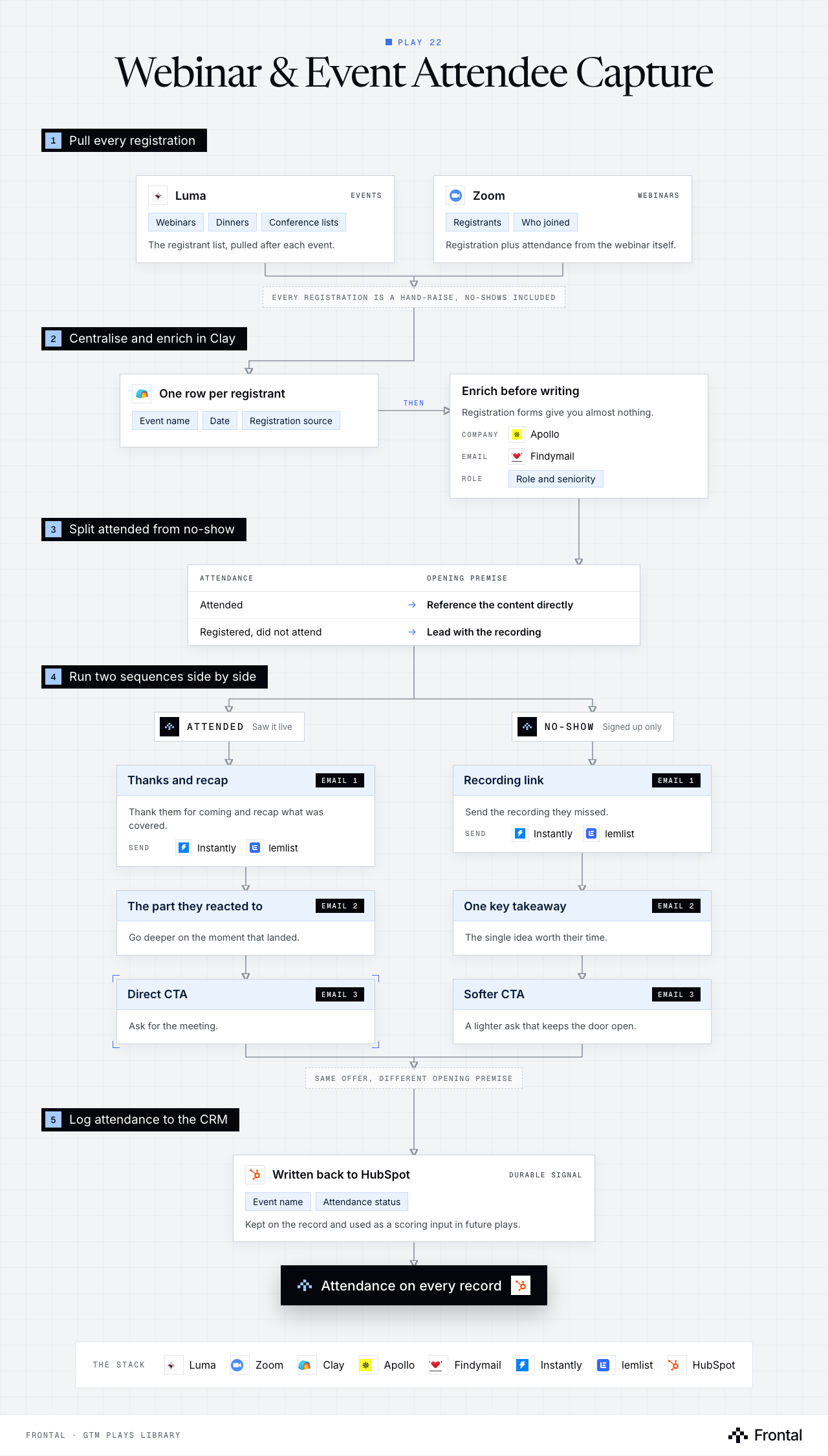
The diagram as text
1Pull every registration
- Luma (events): Webinars, Dinners and Conference lists. The registrant list, pulled after each event. Tool: Luma.
- Zoom (webinars): Registrants and Who joined. Registration plus attendance from the webinar itself. Tool: Zoom.
- Every registration is a hand-raise, no-shows included
2Centralise and enrich in Clay
- One row per registrant: Event name, Date and Registration source. Tool: Clay.
- Enrich before writing: Registration forms give you almost nothing. Company: Apollo. Email: Findymail. Role: Role and seniority.
3Split attended from no-show
- Attendance → Opening premise
- Attended → Reference the content directly
- Registered, did not attend → Lead with the recording
- Attendance → Opening premise
4Run two sequences side by side
- Attended: Saw it live.
- No-show: Signed up only.
- Thanks and recap (email 1): Thank them for coming and recap what was covered. Send: Instantly and lemlist.
- Recording link (email 1): Send the recording they missed. Send: Instantly and lemlist.
- The part they reacted to (email 2): Go deeper on the moment that landed.
- One key takeaway (email 2): The single idea worth their time.
- Direct CTA (email 3): Ask for the meeting.
- Softer CTA (email 3): A lighter ask that keeps the door open.
- Same offer, different opening premise
5Log attendance to the CRM
- Written back to HubSpot (durable signal): Event name and Attendance status. Kept on the record and used as a scoring input in future plays. Tool: HubSpot.
- Outcome: Attendance on every record. Tool: HubSpot.
Labelled connections: Then: One row per registrant to Enrich before writing.
The stack: Luma, Zoom, Clay, Apollo, Findymail, Instantly, lemlist, HubSpot.
The play in six steps
Step 1: Capture registrations
Every registration is a hand-raise, including the ones who never showed up.
- Pull the registrant list from Luma or Zoom after each event.
- Works for your own webinars, dinners and conference attendee lists.
Step 2: Route into Clay
Centralise registrants so attendance can drive the sequence.
- One record per registrant.
- Keep event name, date and registration source.
Step 3: Enrich attendees
Registration forms give you almost nothing: enrich before you write.
- Company firmographics via Apollo.
- Verified email via Findymail.
- Role and seniority.
Step 4: Split attended vs no-show
The single most important branch in this play. The two groups need different emails.
- Attended: they have seen the content, reference it directly.
- Registered but did not attend: they were interested enough to sign up, so lead with the recording.
Step 5: Run the two sequences
Same offer, different opening premise.
- Attended sequence: thanks and recap → the part they reacted to → direct CTA.
- No-show sequence: recording link → one key takeaway → softer CTA.
Step 6: Log to CRM
Attendance is a durable signal worth keeping on the record.
- Write event name and attendance status back to HubSpot.
- Use it as a scoring input in future plays.
Tools used
The eight tools this play names. Each links to the other plays that use it.
Related plays
Product Sign-Up Outreach
7 steps · Email, LinkedIn
Multi-Thread Inbound Leads
9 steps · Email, LinkedIn
Brand Mentions Monitoring
6 steps · LinkedIn, Email

Have us run this play
Tell us what you're trying to hit this quarter, and we'll suggest where to start.