Play 27Outbound
Hiring Signal Monitoring
Hiring Signal Monitoring is a seven-step outbound play for email and LinkedIn, from “Monitor job posts” to “Run the sequence”. It uses TheirStack, PredictLeads, Clay, Apollo, Findymail and four more tools.

Kenny Damian, Co-founder & Head of GTM
- Motion
- Outbound
- Channel
- Email, LinkedIn
- Steps
- 7
- Tools
- 9
The workflow
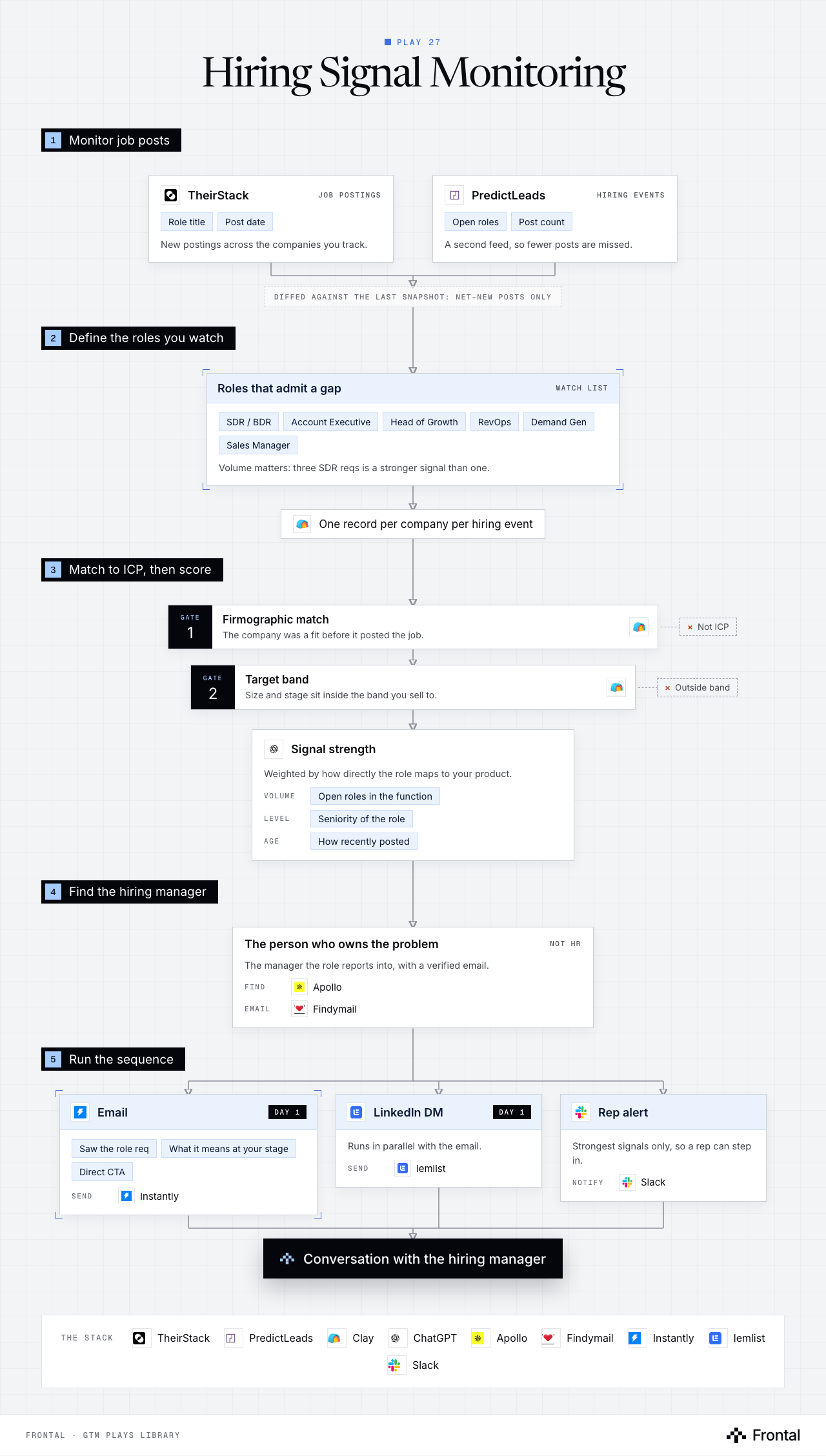
The diagram as text
1Monitor job posts
- TheirStack (job postings): Role title and Post date. New postings across the companies you track. Tool: TheirStack.
- PredictLeads (hiring events): Open roles and Post count. A second feed, so fewer posts are missed. Tool: PredictLeads.
- Diffed against the last snapshot: net-new posts only
2Define the roles you watch
- Roles that admit a gap (watch list): SDR / BDR, Account Executive, Head of Growth, RevOps, Demand Gen and Sales Manager. Volume matters: three SDR reqs is a stronger signal than one.
- One record per company per hiring event. Tool: Clay.
3Match to ICP, then score
- Gate 1: Firmographic match: The company was a fit before it posted the job. Dropped: Not ICP. Tool: Clay.
- Gate 2: Target band: Size and stage sit inside the band you sell to. Dropped: Outside band. Tool: Clay.
- Signal strength: Weighted by how directly the role maps to your product. Volume: Open roles in the function. Level: Seniority of the role. Age: How recently posted. Tool: ChatGPT.
4Find the hiring manager
- The person who owns the problem (not HR): The manager the role reports into, with a verified email. Find: Apollo. Email: Findymail.
5Run the sequence
- Email (day 1): Saw the role req, What it means at your stage and Direct CTA. Send: Instantly.
- LinkedIn DM (day 1): Runs in parallel with the email. Send: lemlist.
- Rep alert: Strongest signals only, so a rep can step in. Notify: Slack.
- Outcome: Conversation with the hiring manager
The stack: TheirStack, PredictLeads, Clay, ChatGPT, Apollo, Findymail, Instantly, lemlist, Slack.
The play in seven steps
Step 1: Monitor job posts
A company hiring for a function is a company admitting it has a gap and a budget.
- Track new postings via TheirStack and PredictLeads.
- Refresh against the previous snapshot so you only act on net-new posts.
Step 2: Define the roles you watch
The role being hired tells you what they are about to struggle with.
- SDR / BDR, Account Executive, Head of Growth, RevOps, Demand Gen, Sales Manager.
- Volume matters: three SDR reqs is a stronger signal than one.
Step 3: Route into Clay
One record per company per hiring event.
- Keep the role title, post date and post count.
Step 4: Match to ICP
A job post is only a signal if the company was a fit anyway.
- Firmographic match against the ICP model.
- Discard companies outside the target band.
Step 5: Score signal strength
Weight by how directly the role maps to your product.
- Number of open roles in the function.
- Seniority of the role.
- How recently it was posted.
Step 6: Find the hiring manager
Write to the person who owns the problem, not to HR.
- Identify the manager the role reports into via Apollo.
- Verified email via Findymail.
Step 7: Run the sequence
The opener references the requisition directly.
- Saw the [role] req → what that usually means at your stage → direct CTA.
- LinkedIn DM in parallel.
- Slack notification for the strongest signals.
Tools used
The nine tools this play names. Each links to the other plays that use it.
Related plays
Funding Signal Scraping
6 steps · Email, LinkedIn
Tech Stack Signal Detection
5 steps · Email, LinkedIn
Multi-Thread Inbound Leads
9 steps · Email, LinkedIn

Have us run this play
Tell us what you're trying to hit this quarter, and we'll suggest where to start.